SonarQube GitLab CI Integration: Configuration Guide
Configure SonarQube in GitLab CI with .gitlab-ci.yml examples for MR decoration, quality gates, Docker scanning, caching, and monorepo support.
Published:
Every merge request that reaches your default branch without static analysis is a gamble - a potential bug, vulnerability, or code smell that compounds into technical debt over time. Integrating SonarQube with GitLab CI/CD eliminates that gamble by running automated code quality checks on every push and merge request. Unlike GitHub Actions where SonarSource provides an official action, GitLab CI integration relies on the SonarScanner CLI run inside a Docker container, giving you more control over the pipeline configuration but requiring a bit more setup work.
This guide covers every aspect of setting up SonarQube in GitLab CI. You will learn how to write the .gitlab-ci.yml configuration, configure CI/CD variables, enable merge request decoration, enforce quality gates, cache scanner data, handle monorepo setups, choose between SonarQube Cloud and self-hosted for GitLab, and troubleshoot the most common issues. Every configuration example shown here is production-ready and can be adapted directly for your projects.
If you have not installed SonarQube yet, start with our SonarQube Docker installation guide or the complete SonarQube setup guide first, then come back here for the GitLab CI integration.

Prerequisites
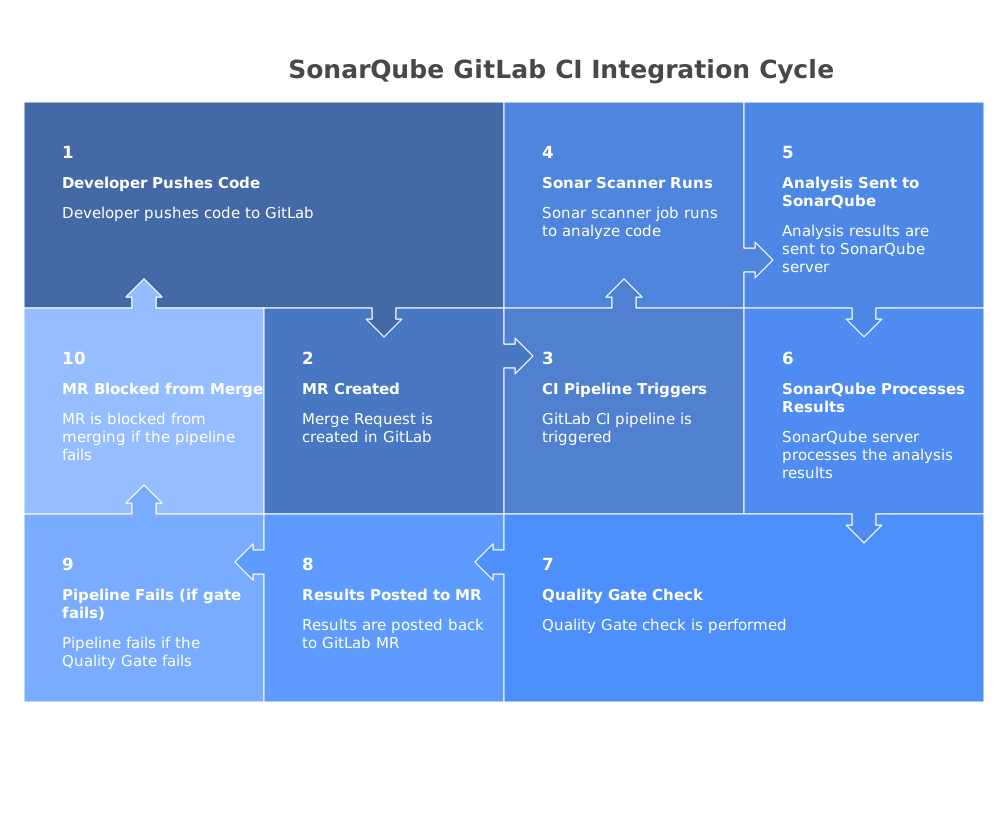
Before configuring SonarQube in your GitLab CI pipeline, ensure you have the following in place:
- A running SonarQube instance - either self-hosted (Community, Developer, or Enterprise Edition) or a SonarQube Cloud account. See our SonarQube Docker guide for the fastest way to get a self-hosted instance running.
- A GitLab project - hosted on GitLab.com or a self-managed GitLab instance with CI/CD pipelines enabled.
- GitLab Runner - a runner registered to your project or group. GitLab.com provides shared runners by default. Self-managed GitLab instances need at least one registered runner with Docker executor support.
- Network connectivity - the GitLab Runner must be able to reach your SonarQube server over the network. For self-hosted SonarQube behind a corporate firewall, the runner must be on the same network or have VPN access.
- SonarQube authentication token - generate one in SonarQube under My Account, then Security, then Tokens. A “project analysis” token is sufficient for scanning a single project, while a “global analysis” token works across all projects.
For MR decoration and branch analysis, you will need SonarQube Developer Edition ($490/year) or higher. Community Edition only supports default branch analysis. See our SonarQube pricing breakdown for a detailed comparison of editions.
Setting up GitLab CI/CD variables
Before writing the pipeline configuration, store your SonarQube credentials as GitLab CI/CD variables. This keeps sensitive values out of your repository and makes them available to all pipeline jobs.
Project-level variables
Navigate to your GitLab project, then Settings, then CI/CD, then expand Variables. Add two variables:
- SONAR_HOST_URL - the URL of your SonarQube server (for example,
https://sonarqube.yourcompany.com). For SonarQube Cloud, usehttps://sonarcloud.io. - SONAR_TOKEN - the authentication token you generated in SonarQube. Check the Mask variable option so the token does not appear in pipeline logs. You can also check Protect variable if you only want it available on protected branches.
Group-level variables
If you have multiple projects that all connect to the same SonarQube instance, add the variables at the GitLab group level instead. Navigate to your group, then Settings, then CI/CD, then Variables. All projects within the group inherit these variables automatically, so you only need to configure them once.
Additional variables for SonarQube Cloud
If you are using SonarQube Cloud instead of self-hosted, you also need to add:
- SONAR_ORGANIZATION - your SonarQube Cloud organization key, found in your organization settings on sonarcloud.io.
Basic .gitlab-ci.yml configuration
The foundation of the SonarQube GitLab CI integration is a job in your .gitlab-ci.yml that runs the SonarScanner CLI using the official Docker image from SonarSource.
Here is a minimal working configuration for default branch analysis:
stages:
  - test
  - analysis

sonarqube-analysis:
  stage: analysis
  image:
    name: sonarsource/sonar-scanner-cli:11
    entrypoint: [""]
  variables:
    SONAR_USER_HOME: "${CI_PROJECT_DIR}/.sonar"
    GIT_DEPTH: "0"
  script:
    - sonar-scanner
  allow_failure: true
  rules:
    - if: $CI_COMMIT_BRANCH == $CI_DEFAULT_BRANCH
Create a sonar-project.properties file in your repository root:
sonar.projectKey=my-org_my-project
sonar.projectName=My Project

sonar.sources=src
sonar.sourceEncoding=UTF-8

sonar.exclusions=**/node_modules/**,**/dist/**,**/coverage/**
Several details in this configuration are important to understand:
entrypoint: [""]- overrides the Docker image’s default entrypoint so GitLab CI can run thescriptcommands directly.GIT_DEPTH: "0"- performs a full Git clone instead of a shallow one. SonarQube needs the full Git history for accurate blame information and new code detection.SONAR_USER_HOME- sets the SonarQube user home directory to a path inside the project directory, which is necessary for caching to work correctly.allow_failure: true- prevents the SonarQube scan from blocking the entire pipeline if it fails. Remove this once you have confirmed the integration works reliably.
The scanner automatically reads SONAR_HOST_URL and SONAR_TOKEN from the environment variables you configured in the previous section. It also reads project configuration from sonar-project.properties.
Merge request analysis and decoration
MR-level analysis is where SonarQube provides the most value in a GitLab CI workflow. Instead of waiting until code reaches the default branch to discover issues, you catch them during code review on the merge request itself. This requires SonarQube Developer Edition or higher for self-hosted, or any SonarQube Cloud plan.
Configure GitLab integration in SonarQube
Before MR decoration works, you need to connect SonarQube to your GitLab instance:
- In GitLab, create a personal access token with the api scope. Navigate to your user settings, then Access Tokens, and create a token.
- In SonarQube, navigate to Administration, then DevOps Platform Integrations, then GitLab.
- Click Create configuration and enter your GitLab URL (for example,
https://gitlab.comor your self-managed GitLab URL) and the personal access token you created. - Save the configuration and verify the connection status shows as successful.
Pipeline configuration for MR analysis
Update your .gitlab-ci.yml to handle both default branch analysis and merge request analysis:
stages:
  - test
  - analysis

sonarqube-analysis:
  stage: analysis
  image:
    name: sonarsource/sonar-scanner-cli:11
    entrypoint: [""]
  variables:
    SONAR_USER_HOME: "${CI_PROJECT_DIR}/.sonar"
    GIT_DEPTH: "0"
  cache:
    key: "${CI_JOB_NAME}"
    paths:
      - .sonar/cache
  script:
    - sonar-scanner
  rules:
    - if: $CI_PIPELINE_SOURCE == 'merge_request_event'
    - if: $CI_COMMIT_BRANCH == $CI_DEFAULT_BRANCH

sonarqube-vulnerability-report:
  stage: analysis
  image:
    name: sonarsource/sonar-scanner-cli:11
    entrypoint: [""]
  script:
    - sonar-scanner -Dsonar.qualitygate.wait=true
  allow_failure: true
  rules:
    - if: $CI_COMMIT_BRANCH == $CI_DEFAULT_BRANCH
When the pipeline runs on a merge request event, the SonarScanner CLI automatically detects the merge request context from GitLab CI predefined variables and passes the appropriate parameters to SonarQube. Specifically, it reads CI_MERGE_REQUEST_IID, CI_MERGE_REQUEST_SOURCE_BRANCH_NAME, and CI_MERGE_REQUEST_TARGET_BRANCH_NAME to configure the merge request analysis.
If the automatic detection does not work - for example, if you are using an older SonarScanner version - you can pass the parameters explicitly:
sonarqube-mr-analysis:
  stage: analysis
  image:
    name: sonarsource/sonar-scanner-cli:11
    entrypoint: [""]
  variables:
    SONAR_USER_HOME: "${CI_PROJECT_DIR}/.sonar"
    GIT_DEPTH: "0"
  script:
    - >
      sonar-scanner
      -Dsonar.pullrequest.key=$CI_MERGE_REQUEST_IID
      -Dsonar.pullrequest.branch=$CI_MERGE_REQUEST_SOURCE_BRANCH_NAME
      -Dsonar.pullrequest.base=$CI_MERGE_REQUEST_TARGET_BRANCH_NAME
  rules:
    - if: $CI_PIPELINE_SOURCE == 'merge_request_event'
Once configured, SonarQube posts analysis results directly on the GitLab merge request. This includes an overall quality gate status, a summary of new issues by severity, and inline comments on specific lines that introduced bugs, vulnerabilities, or code smells.
Quality gate enforcement
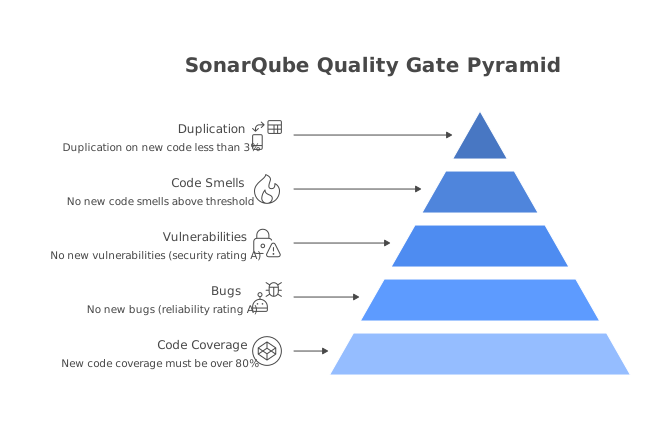
A SonarQube quality gate defines the minimum quality standards your code must meet before it should be merged. The default “Sonar Way” quality gate requires zero new bugs, zero new vulnerabilities, at least 80% coverage on new code, and less than 3% duplication on new code.
Using the scanner’s built-in quality gate wait
The simplest way to enforce quality gates in GitLab CI is to use the sonar.qualitygate.wait scanner property:
sonarqube-analysis:
  stage: analysis
  image:
    name: sonarsource/sonar-scanner-cli:11
    entrypoint: [""]
  variables:
    SONAR_USER_HOME: "${CI_PROJECT_DIR}/.sonar"
    GIT_DEPTH: "0"
  script:
    - sonar-scanner -Dsonar.qualitygate.wait=true -Dsonar.qualitygate.timeout=300
  rules:
    - if: $CI_PIPELINE_SOURCE == 'merge_request_event'
    - if: $CI_COMMIT_BRANCH == $CI_DEFAULT_BRANCH
When sonar.qualitygate.wait=true is set, the scanner does not exit immediately after uploading the analysis. Instead, it polls the SonarQube server until the quality gate result is available and then exits with a non-zero code if the gate fails. The sonar.qualitygate.timeout property (in seconds) controls how long the scanner waits before giving up - the default is 300 seconds (5 minutes).
This approach is simpler than using a separate API call because everything happens in a single step. The tradeoff is that the scanner process stays running while waiting for the server to process the report, which keeps the GitLab Runner occupied.
Using the SonarQube API for quality gate checks
For more control over the quality gate check, you can use the SonarQube API in a separate job:
sonarqube-check:
  stage: analysis
  image: curlimages/curl:latest
  needs:
    - job: sonarqube-analysis
  script:
    - |
      GATE_STATUS=$(curl -s -u "${SONAR_TOKEN}:" \
        "${SONAR_HOST_URL}/api/qualitygates/project_status?projectKey=my-org_my-project" \
        | grep -o '"status":"[^"]*"' | head -1 | cut -d'"' -f4)
      echo "Quality Gate Status: ${GATE_STATUS}"
      if [ "${GATE_STATUS}" != "OK" ]; then
        echo "Quality Gate failed"
        exit 1
      fi
  rules:
    - if: $CI_COMMIT_BRANCH == $CI_DEFAULT_BRANCH
This approach separates the scan from the quality gate check, letting the scanner finish quickly while a lightweight job handles the polling. The needs keyword ensures the check only runs after the scan completes.
Custom quality gate configuration
If the default Sonar Way quality gate does not match your team’s standards, create a custom gate in SonarQube. Navigate to Quality Gates in the web interface, click Create, and add your conditions. Common customizations include lowering the coverage threshold from 80% to 60% for legacy projects, adding maximum code complexity conditions, requiring zero new security hotspots, or setting a maximum technical debt ratio. Assign the custom gate to your project under Project Settings, then Quality Gate.
Docker-based scanning with build steps
Many projects require build steps before SonarQube can perform accurate analysis. Java projects need compiled class files, and JavaScript/TypeScript projects benefit from running tests with coverage before scanning. Here is how to handle these scenarios in GitLab CI.
Node.js project with test coverage
stages:
  - test
  - analysis

test:
  stage: test
  image: node:20
  script:
    - npm ci
    - npm run test -- --coverage --coverageReporters=lcov
  artifacts:
    paths:
      - coverage/
    expire_in: 1 hour

sonarqube-analysis:
  stage: analysis
  image:
    name: sonarsource/sonar-scanner-cli:11
    entrypoint: [""]
  variables:
    SONAR_USER_HOME: "${CI_PROJECT_DIR}/.sonar"
    GIT_DEPTH: "0"
  cache:
    key: "${CI_JOB_NAME}"
    paths:
      - .sonar/cache
  script:
    - sonar-scanner -Dsonar.qualitygate.wait=true
  needs:
    - job: test
      artifacts: true
  rules:
    - if: $CI_PIPELINE_SOURCE == 'merge_request_event'
    - if: $CI_COMMIT_BRANCH == $CI_DEFAULT_BRANCH
The corresponding sonar-project.properties:
sonar.projectKey=my-org_my-node-app
sonar.projectName=My Node App

sonar.sources=src
sonar.tests=src
sonar.test.inclusions=**/*.test.ts,**/*.spec.ts
sonar.exclusions=**/node_modules/**,**/dist/**,**/coverage/**
sonar.javascript.lcov.reportPaths=coverage/lcov.info
sonar.sourceEncoding=UTF-8
The test job runs first and saves the coverage directory as a GitLab CI artifact. The SonarQube job then downloads that artifact and the scanner reads the LCOV report from the coverage directory.
Java project with Maven
For Java projects, you need a build step that compiles the code and generates test coverage reports before SonarQube can analyze the compiled classes:
stages:
  - build
  - analysis

build-and-test:
  stage: build
  image: maven:3.9-eclipse-temurin-17
  script:
    - mvn clean verify
  artifacts:
    paths:
      - target/
    expire_in: 1 hour

sonarqube-analysis:
  stage: analysis
  image: maven:3.9-eclipse-temurin-17
  variables:
    GIT_DEPTH: "0"
  script:
    - >
      mvn sonar:sonar
      -Dsonar.host.url=$SONAR_HOST_URL
      -Dsonar.token=$SONAR_TOKEN
      -Dsonar.qualitygate.wait=true
  needs:
    - job: build-and-test
      artifacts: true
  rules:
    - if: $CI_PIPELINE_SOURCE == 'merge_request_event'
    - if: $CI_COMMIT_BRANCH == $CI_DEFAULT_BRANCH
For Maven projects, you can use the SonarQube Maven plugin (mvn sonar:sonar) instead of the standalone SonarScanner CLI. The Maven plugin automatically detects project structure, source directories, compiled classes, and JaCoCo coverage reports from your pom.xml. This eliminates the need for a separate sonar-project.properties file in many cases.
Custom Docker image for multi-tool analysis
When your project needs both build tools and the SonarScanner in the same job, create a custom Docker image. Here is a Dockerfile that combines Node.js and SonarScanner:
FROM node:20-slim

RUN apt-get update && apt-get install -y openjdk-17-jre-headless curl unzip \
    && curl -o /tmp/sonar-scanner.zip \
       https://binaries.sonarsource.com/Distribution/sonar-scanner-cli/sonar-scanner-cli-6.2.1.4610-linux-x64.zip \
    && unzip /tmp/sonar-scanner.zip -d /opt \
    && ln -s /opt/sonar-scanner-6.2.1.4610-linux-x64/bin/sonar-scanner /usr/local/bin/sonar-scanner \
    && rm /tmp/sonar-scanner.zip \
    && apt-get clean

ENV PATH="/opt/sonar-scanner-6.2.1.4610-linux-x64/bin:${PATH}"
Then use it in your .gitlab-ci.yml to run tests and scan in a single job:
sonarqube-analysis:
  stage: analysis
  image: registry.gitlab.com/my-org/sonar-node:latest
  variables:
    SONAR_USER_HOME: "${CI_PROJECT_DIR}/.sonar"
    GIT_DEPTH: "0"
  script:
    - npm ci
    - npm run test -- --coverage
    - sonar-scanner -Dsonar.qualitygate.wait=true
  rules:
    - if: $CI_PIPELINE_SOURCE == 'merge_request_event'
    - if: $CI_COMMIT_BRANCH == $CI_DEFAULT_BRANCH
This approach reduces pipeline complexity by combining the build, test, and scan steps into a single job. The tradeoff is that you need to maintain a custom Docker image.
Caching for faster pipelines
SonarScanner downloads plugin data and builds a local cache on the first run. Without caching, this adds 30 to 60 seconds to each pipeline execution. GitLab CI’s built-in caching eliminates this overhead on subsequent runs.
sonarqube-analysis:
  stage: analysis
  image:
    name: sonarsource/sonar-scanner-cli:11
    entrypoint: [""]
  variables:
    SONAR_USER_HOME: "${CI_PROJECT_DIR}/.sonar"
    GIT_DEPTH: "0"
  cache:
    key: sonar-cache-${CI_DEFAULT_BRANCH}
    paths:
      - .sonar/cache
  script:
    - sonar-scanner -Dsonar.qualitygate.wait=true
  rules:
    - if: $CI_PIPELINE_SOURCE == 'merge_request_event'
    - if: $CI_COMMIT_BRANCH == $CI_DEFAULT_BRANCH
The SONAR_USER_HOME variable is critical here. By setting it to ${CI_PROJECT_DIR}/.sonar, the scanner stores its cache inside the project directory where GitLab CI can access it for caching. Without this variable, the scanner stores its cache in the container’s home directory, which gets discarded after the job finishes.
The cache key uses the default branch name to share the cache across all pipeline runs. If you want branch-specific caches, use ${CI_COMMIT_REF_SLUG} instead, but this increases storage usage since each branch gets its own cache copy.
For projects with large dependency sets, also cache build tool directories. For Node.js projects, cache the node_modules directory. For Maven projects, cache ~/.m2/repository. For Gradle projects, cache ~/.gradle/caches. These are separate from the SonarQube cache and should be defined in their respective build jobs.
Monorepo support
Monorepos require special handling because scanning the entire repository on every commit wastes time when only one service changed. The recommended approach creates separate SonarQube projects per service and uses GitLab CI rules to trigger scans selectively.
stages:
  - test
  - analysis

.sonar-base:
  stage: analysis
  image:
    name: sonarsource/sonar-scanner-cli:11
    entrypoint: [""]
  variables:
    SONAR_USER_HOME: "${CI_PROJECT_DIR}/.sonar"
    GIT_DEPTH: "0"
  cache:
    key: sonar-cache-${CI_JOB_NAME}
    paths:
      - .sonar/cache

scan-api:
  extends: .sonar-base
  script:
    - >
      sonar-scanner
      -Dsonar.projectKey=my-org_monorepo-api
      -Dsonar.projectName="Monorepo - API Service"
      -Dsonar.sources=services/api/src
      -Dsonar.tests=services/api/tests
      -Dsonar.qualitygate.wait=true
  rules:
    - if: $CI_PIPELINE_SOURCE == 'merge_request_event'
      changes:
        - services/api/**/*
    - if: $CI_COMMIT_BRANCH == $CI_DEFAULT_BRANCH
      changes:
        - services/api/**/*

scan-web:
  extends: .sonar-base
  script:
    - >
      sonar-scanner
      -Dsonar.projectKey=my-org_monorepo-web
      -Dsonar.projectName="Monorepo - Web Service"
      -Dsonar.sources=services/web/src
      -Dsonar.tests=services/web/src/__tests__
      -Dsonar.javascript.lcov.reportPaths=services/web/coverage/lcov.info
      -Dsonar.qualitygate.wait=true
  rules:
    - if: $CI_PIPELINE_SOURCE == 'merge_request_event'
      changes:
        - services/web/**/*
    - if: $CI_COMMIT_BRANCH == $CI_DEFAULT_BRANCH
      changes:
        - services/web/**/*

scan-shared:
  extends: .sonar-base
  script:
    - >
      sonar-scanner
      -Dsonar.projectKey=my-org_monorepo-shared
      -Dsonar.projectName="Monorepo - Shared Library"
      -Dsonar.sources=packages/shared/src
      -Dsonar.qualitygate.wait=true
  rules:
    - if: $CI_PIPELINE_SOURCE == 'merge_request_event'
      changes:
        - packages/shared/**/*
    - if: $CI_COMMIT_BRANCH == $CI_DEFAULT_BRANCH
      changes:
        - packages/shared/**/*
The .sonar-base hidden job defines the common configuration that each service-specific job extends. The changes directive under rules ensures each scan job only runs when files in the relevant directory have been modified. This keeps CI pipeline times fast in large monorepos because unchanged services are skipped entirely.
Each service uses its own sonar.projectKey so the results appear as separate projects in SonarQube. This gives each team a focused dashboard for their service without noise from other parts of the monorepo.
If a shared library change should trigger scans in all dependent services, you can add the shared path to each service’s changes list or use GitLab CI trigger jobs to cascade pipeline runs.
SonarQube Cloud vs self-hosted with GitLab
Choosing between SonarQube Cloud and self-hosted SonarQube for your GitLab CI integration involves tradeoffs in setup complexity, cost, and control.
SonarQube Cloud (SonarCloud) with GitLab
SonarQube Cloud offers the simplest path to GitLab integration. It requires no infrastructure management - no servers, no databases, no networking configuration. The setup takes minutes:
sonarcloud-analysis:
  stage: analysis
  image:
    name: sonarsource/sonar-scanner-cli:11
    entrypoint: [""]
  variables:
    SONAR_USER_HOME: "${CI_PROJECT_DIR}/.sonar"
    GIT_DEPTH: "0"
  script:
    - >
      sonar-scanner
      -Dsonar.organization=$SONAR_ORGANIZATION
      -Dsonar.host.url=https://sonarcloud.io
  cache:
    key: "${CI_JOB_NAME}"
    paths:
      - .sonar/cache
  rules:
    - if: $CI_PIPELINE_SOURCE == 'merge_request_event'
    - if: $CI_COMMIT_BRANCH == $CI_DEFAULT_BRANCH
SonarQube Cloud includes MR decoration on all plans - including the free tier for public projects. You do not need Developer Edition for MR comments like you do with self-hosted SonarQube. This makes it particularly attractive for open source projects and small teams that want full MR analysis without the cost of Developer Edition.
The tradeoff is that your code is sent to SonarSource’s infrastructure for analysis. For teams with strict data residency requirements or air-gapped environments, self-hosted is the only option.
Self-hosted SonarQube with GitLab
Self-hosted SonarQube gives you full control over your data and infrastructure. The Community Edition is free with no line-of-code limits, but it only supports default branch analysis. For MR decoration and branch analysis, you need Developer Edition starting at $490/year.
The .gitlab-ci.yml configuration for self-hosted is identical to the examples shown earlier in this guide. The key difference is operational - you are responsible for maintaining the SonarQube server, keeping it updated, managing the database, and ensuring it is accessible from your GitLab Runners.
For teams already running other self-hosted infrastructure, adding SonarQube to the stack is straightforward. For teams that prefer a fully managed approach, SonarQube Cloud or a managed alternative like Codacy eliminates the operational burden.
For a deeper comparison of Cloud vs self-hosted, see our SonarQube vs SonarCloud comparison.
Troubleshooting common issues
Even with a correct configuration, SonarQube in GitLab CI can encounter several common problems. Here are the most frequent issues and their solutions.
”Not authorized” or 401 errors
The SONAR_TOKEN variable is invalid, expired, or does not have permissions for the project. Navigate to your GitLab project’s CI/CD settings and verify the variable exists and is not a protected variable being used on an unprotected branch. In SonarQube, regenerate the token under My Account, then Security if needed, and update the GitLab CI variable.
Scanner cannot find sonar-project.properties
The scanner looks for the properties file in the working directory. In GitLab CI, the working directory is the repository root by default. If your properties file is in a subdirectory, use the -Dsonar.projectBaseDir parameter to point to the correct location, or move the file to the repository root.
MR decoration not appearing
Verify that the GitLab integration is configured correctly in SonarQube under Administration, then DevOps Platform Integrations. Check that the personal access token has the api scope and has not expired. Ensure the pipeline is triggered by a merge request event (check the rules in your .gitlab-ci.yml). Also confirm you are using SonarQube Developer Edition or higher - Community Edition does not support MR decoration.
Quality gate wait timeout
If the scanner times out waiting for the quality gate result, increase the timeout with -Dsonar.qualitygate.timeout=600 (10 minutes). Check that the SonarQube Compute Engine is not overloaded by looking at Administration, then Compute Engine in the SonarQube web interface. If reports are queuing up, the server may need more resources.
Missing coverage data
SonarQube does not generate coverage reports - it only reads them. Ensure your test stage runs before the scan and generates reports in the correct format (LCOV for JavaScript/TypeScript, JaCoCo XML for Java, coverage.xml for Python). Verify the sonar.*.reportPaths property points to the correct file path. When using GitLab CI artifacts to pass coverage data between jobs, confirm the artifact paths include the coverage files.
”Shallow clone detected” warning
SonarQube needs the full Git history for accurate blame information. Set GIT_DEPTH: "0" in your job variables to perform a full clone. Without this, SonarQube falls back to limited analysis and cannot accurately determine which code is new.
Scanner runs out of memory
For large projects, the default JVM heap size may not be sufficient. Increase the scanner’s memory allocation by adding a SONAR_SCANNER_OPTS variable:
variables:
  SONAR_SCANNER_OPTS: "-Xmx2048m"
Also review your exclusion patterns to make sure generated code, vendored dependencies, and build artifacts are excluded from analysis.
For a comprehensive SonarQube review covering more troubleshooting scenarios and an honest assessment of the platform’s strengths and weaknesses, see our SonarQube review.
Alternatives to SonarQube for GitLab CI
SonarQube is a strong choice for static analysis in GitLab CI, but it is not the only option. Depending on your team’s needs, these alternatives may be a better fit.
CodeRabbit
CodeRabbit combines static analysis with AI-powered code review in a single managed platform. It has a free tier for public and private repos, with paid plans from $12 per user per month, and provides automated merge request reviews, PR summaries, and suggested fixes with no infrastructure to manage. CodeRabbit integrates natively with GitLab - connecting directly to your repositories and posting analysis results on merge requests without requiring a separate server or complex CI configuration. It also runs 40+ open-source linters behind the AI review, so rule-based findings and contextual feedback arrive together.
For teams that want code review enforcement in GitLab without the overhead of running and maintaining a SonarQube instance, CodeRabbit removes the self-hosting burden entirely while adding contextual, AI-powered review capabilities.
SonarQube Cloud
If you want SonarQube’s analysis engine without self-hosting, SonarQube Cloud is the SaaS version managed by SonarSource. It includes MR decoration on all plans and is free for public projects. The setup is simpler than self-hosted because there is no server to maintain. See our SonarQube pricing guide for a detailed cost comparison.
Other options
Several other tools integrate with GitLab CI for code analysis:
- Semgrep - lightweight, fast SAST scanner with a generous free tier and excellent security focus.
- Codacy - code quality platform that connects to GitLab as an integration with minimal pipeline configuration.
- DeepSource - automated code review with a low false positive rate and auto-fix capabilities.
- GitLab SAST - GitLab’s built-in SAST feature, included in GitLab Ultimate or available as a standalone analyzer.
For a broader comparison, see our SonarQube alternatives guide.
Conclusion
Integrating SonarQube with GitLab CI creates an automated quality gate that catches bugs, vulnerabilities, and code smells on every pipeline run. The setup involves storing credentials as CI/CD variables, writing a .gitlab-ci.yml job that runs the SonarScanner CLI, and optionally configuring MR decoration and quality gate enforcement.
For most teams, the recommended configuration includes MR analysis with quality gate wait enabled, caching to keep pipeline times fast, and GitLab CI rules that trigger scans on both merge request events and default branch pushes. If you are working with a monorepo, use the changes directive to scan only the services that were modified.
Start with the basic configuration from this guide, verify it runs successfully on a few merge requests, and then layer on quality gate enforcement and caching. Once the foundation is stable, customize the quality gate thresholds and exclusion patterns to match your team’s standards.
For the complete guide to getting SonarQube running from scratch, including Docker installation and server configuration, see our SonarQube Docker guide. If you are setting up SonarQube with other CI platforms, we also have guides for SonarQube with GitHub Actions and SonarQube with Jenkins. For an honest assessment of whether SonarQube is the right tool for your team, read our SonarQube review.
Further Reading
- SonarQube Docker Compose: Production-Ready Configuration
- SonarQube Maven Plugin: How to Analyze Java Projects (2026 Guide)
- Best AI Code Review Tools in 2026 - Expert Picks
- 13 Best Code Quality Tools in 2026 - Platforms, Linters, and Metrics
- 12 Best Free Code Review Tools in 2026 - Open Source and Free Tiers
 Gitar
GitarComments are not enough
Gitar applies the fix, validates it in CI, and clears the queue.
See it on your repo Read our independent Gitar reviewFrequently Asked Questions
How do I integrate SonarQube with GitLab CI?
Add a sonarqube-analysis job to your .gitlab-ci.yml file that runs the SonarScanner CLI using the official sonar-scanner-cli Docker image. Store your SonarQube token as a GitLab CI/CD variable named SONAR_TOKEN and your server URL as SONAR_HOST_URL. Create a sonar-project.properties file in your repository root with your project key and source directories. The scanner sends analysis results to your SonarQube instance on every pipeline run.
How do I configure SonarQube merge request decoration in GitLab?
MR decoration requires SonarQube Developer Edition or higher. In SonarQube, navigate to Administration, then DevOps Platform Integrations, and add a GitLab configuration with your GitLab URL and a personal access token with the api scope. In your .gitlab-ci.yml, pass the MR parameters using sonar.pullrequest.key set to CI_MERGE_REQUEST_IID, sonar.pullrequest.branch set to CI_MERGE_REQUEST_SOURCE_BRANCH_NAME, and sonar.pullrequest.base set to CI_MERGE_REQUEST_TARGET_BRANCH_NAME. SonarQube then posts analysis results directly on the merge request.
What is the difference between SonarQube Cloud and self-hosted SonarQube for GitLab CI?
SonarQube Cloud (formerly SonarCloud) is a SaaS service hosted by SonarSource that requires no infrastructure management. It offers native GitLab integration with automatic MR decoration on all plans and is free for public projects. Self-hosted SonarQube gives you full control over your data and infrastructure but requires you to maintain the server, database, and networking. MR decoration on self-hosted requires Developer Edition or higher.
How do I enforce SonarQube quality gates in GitLab CI?
After the SonarQube scan completes, use the SonarQube API to check the quality gate status. Add a script step that calls curl against the /api/qualitygates/project_status endpoint with your project key. Parse the JSON response to check whether the status is OK or ERROR. If the quality gate fails, exit the script with a non-zero code to fail the GitLab CI job. Alternatively, use the sonar.qualitygate.wait=true scanner property to make the scanner itself wait for and report the quality gate result.
How do I cache SonarQube scanner data in GitLab CI?
Add a cache block to your SonarQube job in .gitlab-ci.yml that caches the .sonar/cache directory. Set the cache key to include a prefix like sonar-cache and optionally the CI_COMMIT_REF_SLUG variable for branch-specific caching. This avoids re-downloading plugin data and analyzer resources on every pipeline run, reducing scan times by 30 to 60 seconds depending on project size and network speed.
How do I set up SonarQube variables in GitLab CI?
Navigate to your GitLab project or group settings, then CI/CD, then Variables. Add SONAR_HOST_URL with the URL of your SonarQube server and SONAR_TOKEN with a SonarQube authentication token generated under My Account, then Security in SonarQube. Mark SONAR_TOKEN as masked so it does not appear in pipeline logs. For group-level sharing, add the variables at the group level so all projects inherit them automatically.
How do I use the SonarScanner Docker image in GitLab CI?
Set the image directive in your .gitlab-ci.yml job to sonarsource/sonar-scanner-cli:latest or a specific version tag. The image includes the SonarScanner CLI pre-installed. Run sonar-scanner in the script section with your project parameters. GitLab CI pulls the Docker image automatically. For projects that need additional tools like Node.js or Java, use a custom Docker image that includes both the build tools and sonar-scanner-cli.
How do I configure SonarQube for a monorepo in GitLab CI?
Create a separate SonarQube project for each service or module in the monorepo. Use GitLab CI rules with changes directives to trigger scans only when files in a specific module change. Each module needs its own sonar-project.properties file with a unique sonar.projectKey and sonar.sources path. Use the parallel or needs keywords in .gitlab-ci.yml to scan multiple modules concurrently for faster pipeline execution.
Why is my SonarQube GitLab CI scan failing with a timeout?
Timeout failures typically occur when the scanner cannot reach your SonarQube server or when the quality gate wait exceeds the job timeout. Increase the GitLab CI job timeout under CI/CD settings or in the .gitlab-ci.yml with the timeout keyword. For self-hosted SonarQube behind a firewall, ensure the GitLab Runner can reach the server URL. Also check that the SONAR_TOKEN variable has not expired and that the SonarQube Compute Engine has resources to process reports promptly.
How do I fix the SonarQube error 'Project not found' in GitLab CI?
This error means the sonar.projectKey in your sonar-project.properties does not match any project in your SonarQube instance. Log in to SonarQube, verify the project exists, and copy the exact project key from Project Information into your properties file. For SonarQube Cloud, the project key format is typically organization_project-name. Also verify that the SONAR_TOKEN has sufficient permissions to access the project.
Can I run SonarQube and other analysis tools together in GitLab CI?
Yes, and many teams do. Add separate jobs in your .gitlab-ci.yml for each tool - SonarQube for rule-based static analysis, Semgrep for security scanning, and an AI code review tool like CodeRabbit for logic-aware feedback. Run them in parallel using the same pipeline stage. Each tool catches different categories of issues, so combining them provides broader coverage than any single tool alone.
Is SonarQube free for GitLab CI?
SonarQube Community Edition is free and open source for self-hosted use, but it only supports default branch analysis without MR decoration. SonarQube Cloud is free for public projects. For private projects with MR analysis and quality gate enforcement in GitLab CI, you need SonarQube Developer Edition starting at $490 per year or a paid SonarQube Cloud plan. The GitLab CI integration itself does not add any cost beyond the SonarQube license.
Explore More
Tool Reviews
 SonarQube Review
 CodeRabbit Review
Free Newsletter
Stay ahead with AI dev tools
Weekly insights on AI code review, static analysis, and developer productivity. No spam, unsubscribe anytime.
Join developers getting weekly AI tool insights.
Related Articles
CodeRabbit Azure DevOps: Setting Up AI Code Review
Set up CodeRabbit on Azure DevOps step by step. Covers Marketplace install, pipeline config, branch policies, and PR review setup.
February 18, 2026
how-toCodeRabbit GitLab Integration: Configuration Guide
Set up CodeRabbit GitLab integration for AI code review on merge requests. Covers OAuth, project config, MR analysis, and CI/CD pipeline setup.
February 18, 2026
how-toHow to Automate Code Reviews - Complete Setup Guide
Automate code reviews with AI tools, linters, and CI/CD pipelines. Covers GitHub Actions, GitLab CI, and tool configuration for every team size.
February 27, 2026