AI Code Review: How It Works, What It Catches, and What It Costs
The complete guide to AI code review - how LLM and rule-based analysis differ, what AI catches, what it still misses, and what it really costs in 2026.
Published:
Last Updated:
Direct answer
AI code review is automated analysis of a code change by a large language model, posted as comments on a pull request within minutes. It uses three mechanisms: LLM semantic analysis (CodeRabbit, Greptile, Anthropic Code Review), deterministic rule matching (SonarQube, Semgrep), or a hybrid of both. Entry pricing runs $0 to $30 per developer per month. No independent party has published a false-positive rate for any shipping commercial AI reviewer. Verified 2026-10-19.
What is AI code review?
AI code review is the automated analysis of code changes using artificial intelligence to find bugs, security vulnerabilities, performance issues, and code quality problems before they reach production. Most AI code review tools integrate directly with your git platform - GitHub, GitLab, Azure DevOps, or Bitbucket - and post review comments on pull requests within minutes of opening them.
The concept is straightforward: instead of waiting 24-48 hours for a human reviewer to spot issues in your pull request, an AI system analyzes the diff immediately and flags problems with natural language explanations. The best tools go beyond flagging issues - they explain why something is a problem, suggest a concrete fix, and even apply the fix with a single click.
But AI code review is not a single technology. The term covers a broad spectrum of approaches, from rule-based static analysis tools like SonarQube that match code against thousands of predefined patterns, to LLM-powered systems like CodeRabbit that use large language models to understand code semantics and intent. Many modern tools combine both approaches for comprehensive coverage.
To understand what AI code review actually offers your team, you need to understand the different approaches, what each one catches and misses, and where AI fits into your existing review workflow. This guide covers all of that with real code examples, honest assessments of limitations, and practical recommendations for implementation.
How AI code review differs from traditional code review
Traditional code review is entirely manual. A developer opens a pull request, tags one or more teammates as reviewers, and waits. The reviewers read through the diff, leave comments, and eventually approve or request changes. This process has been the standard for decades, and it works - but it has well-documented bottlenecks.
The commonly cited figures are that developers spend 6 to 12 hours a week on code review and that the average pull request waits 24 to 48 hours for its first review. We could not trace either figure to a primary Google or Microsoft publication, so treat them as folklore (checked 2026-10-19). We measured the second one ourselves instead.
Across 2,189 human-authored merged PRs in 12 repositories, harvested from the GitHub GraphQL API on 2026-10-18 with bot authors and reviewers and self-reviews excluded, open-to-first-review came in at p50 8.7 hours, p75 66 hours, p90 212 hours, p95 482 hours and p99 1,300 hours. The median is faster than the folklore number; the tail is far worse. The finding that matters more: the median PR spends 52.7 percent of its open-to-merge life waiting for the first human. First-review-to-merge is only 6.7 hours at p50 and first-approval-to-merge just 1.1 hours. Method and limitations are in pull request review time - the main one being that only merged PRs are in frame, which biases latency downward.
That is the delay AI review attacks. It does not make reviewing faster; it removes the wait for the first response.
AI code review does not eliminate the need for human review. What it does is handle the first pass automatically. When a PR is opened, the AI analyzes it instantly and flags the mechanical issues - null pointer dereferences, unvalidated inputs, missing error handling, race conditions, and style violations. By the time a human reviewer sits down to look at the code, the routine issues are already identified and often fixed. The human can focus on higher-level concerns: architecture decisions, business logic correctness, whether the approach is the right one, and whether the code will be maintainable six months from now.
This division of labor is the core value proposition of AI code review. It is not about replacing humans. It is about removing the tedious mechanical checks from the human’s plate so they can add value where AI cannot.
How AI code review differs from linting
If your immediate reaction is “we already have ESLint and Pylint in our CI pipeline,” you are right to wonder how AI code review is different. The short answer: linters check syntax and style, AI code review understands semantics and logic.
A linter can tell you that a variable is declared but never used. It can enforce consistent indentation, flag missing semicolons, and ensure imports are sorted. What a linter cannot do is understand what your code is trying to accomplish and whether it actually accomplishes it.
Consider this function:
def calculate_discount(price, user):
    if user.is_premium:
        discount = price * 0.20
    if user.order_count > 10:
        discount = price * 0.15
    return price - discount
A linter sees nothing wrong here. The syntax is valid, the style is correct, and all variables are used. But an AI code reviewer would flag two issues: first, if user.is_premium is False and user.order_count is 10 or less, the variable discount is never assigned, causing an UnboundLocalError. Second, a premium user with more than 10 orders gets a 15% discount instead of a 20% discount, because the second if statement overwrites the first. The logic likely intended to use elif or to apply the higher discount.
This is the difference in a nutshell. Linters enforce rules. AI understands intent.
How AI code review works
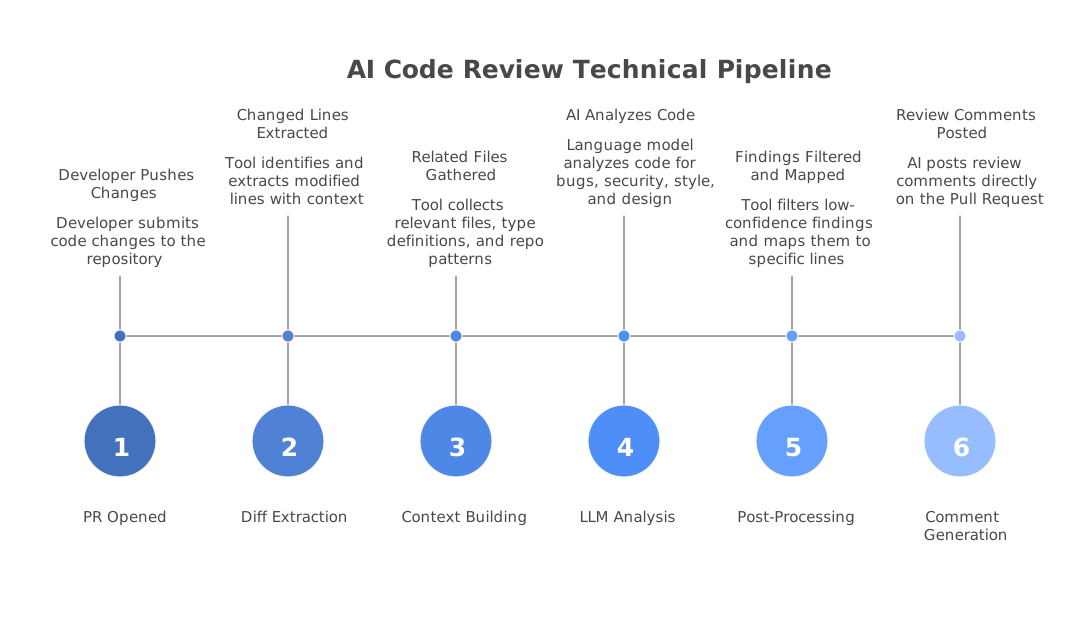
Direct answer: Three mechanisms. LLM semantic analysis sends the diff plus repository context to a model and asks for findings - non-deterministic, catches logic errors. Rule-based static analysis matches an AST against predefined patterns - deterministic, catches only what a rule describes. Hybrid tools run both, with CodeRabbit layering an LLM over 40+ linters. Anthropic Code Review, GA 15 October 2026, adds a verification step that tries to disprove each finding. Verified 2026-10-19.
Under the hood, AI code review tools use one of three approaches - or a combination of them. Understanding the differences helps you choose the right tool and set realistic expectations about what each one can catch.
Approach 1: LLM-based analysis
LLM-based tools send your code diff to a large language model - typically GPT-4, Claude, or a fine-tuned model - and ask it to analyze the changes for issues. The model reads the code, understands its semantic meaning, and generates review comments in natural language.
The typical workflow looks like this:
- A developer opens a pull request
- The tool extracts the diff (changed files, added lines, removed lines)
- Contextual information is gathered - the PR description, linked issues, and sometimes the full repository structure
- The diff and context are sent to an LLM with a carefully crafted system prompt
- The model analyzes the code and generates findings
- The tool posts the findings as inline comments on the pull request
Here is a simplified version of what happens behind the scenes:
# Simplified pseudocode of an LLM-based code review pipeline
def review_pull_request(pr):
    diff = pr.get_diff()
    context = gather_context(pr)  # PR description, linked issues, repo structure

    prompt = f"""
    You are a senior code reviewer. Analyze the following code changes
    and identify bugs, security vulnerabilities, performance issues,
    and code quality problems.

    Context: {context}
    Diff: {diff}

    For each issue found, provide:
    - The file and line number
    - A description of the issue
    - The severity (critical, warning, suggestion)
    - A suggested fix
    """

    findings = llm.analyze(prompt)
    post_comments(pr, findings)
In practice, the actual implementations are far more sophisticated. Tools like CodeRabbit and Greptile do not just send the raw diff to a model. They parse the abstract syntax tree (AST), resolve cross-file dependencies, incorporate the full repository context, and use multi-step prompting strategies to reduce false positives and improve finding quality.
The most explicitly documented architecture in the market belongs to Anthropic’s Code Review, which went GA on 15 October 2026 for Claude Team and Enterprise (verified 2026-10-19). Anthropic describes a multi-agent topology: parallel specialist agents covering logic, boundary conditions, API misuse, auth flaws and conventions, then a verification step that actively attempts to disprove each finding, then an aggregator that dedupes and ranks what survives. Reviews run 6 to 10 minutes, down from roughly 20 in the research preview that began 9 March 2026. Two design decisions are worth copying into your own evaluation criteria: it never builds or runs your code, and it never approves or blocks a PR. Configuration comes from a REVIEW.md read from the base branch, never from the PR’s own diff, so a pull request cannot alter the rules it will be judged by. Admins set one of three depth tiers per repository: Quick, Standard or Deep.
That last point is a real contrast with GitHub Copilot, which can submit an approving review that satisfies a required-approval rule the same way a teammate’s approval would (verified in GitHub’s docs 2026-10-19). It is off by default and configurable at enterprise, org or repo level. If you are relying on a single required approval as a separation-of-duties control, a machine that can satisfy it weakens that control rather than strengthening it. For reference, GitHub’s required_approving_review_count range is 0 to 6; GitLab’s maximum is 100.
One more mechanics note on Anthropic’s instruction files, because it fails closed in a way people do not expect: subdirectory REVIEW.md files add path-scoped checks, but severity-lowering, path-exclusion and nit-capping additionally require the root file to sit on a protected default branch, and if branch protection cannot be confirmed it reads no instruction files at all (verified 2026-10-19). The local /code-review command reads CLAUDE.md but not REVIEW.md. Separately, CodeRabbit reads its competitors’ rule files by default - its knowledge_base.code_guidelines.filePatterns defaults include **/REVIEW.md, **/CLAUDE.md, **/AGENTS.md, **/.cursorrules, .github/copilot-instructions.md, **/GEMINI.md and **/.windsurfrules.
Strengths of LLM-based analysis:
- Understands code semantics and developer intent
- Catches logic errors that rule-based tools miss
- Provides natural language explanations
- Can reason about cross-file interactions
- Adapts to different coding styles and frameworks
Weaknesses of LLM-based analysis:
- Can hallucinate issues that do not exist (false positives)
- Non-deterministic - the same code might get different feedback on different runs
- Token limits constrain how much code context can be analyzed
- Higher latency compared to rule-based tools
- Requires sending code to external APIs (unless self-hosted)
Approach 2: Rule-based static analysis
Rule-based tools like SonarQube and Semgrep take a fundamentally different approach. Instead of asking an AI model to reason about code, they match code against thousands of predefined patterns - rules written by security researchers and language experts that describe known bug patterns, vulnerabilities, and code smells.
The process works like this:
- The tool parses your source code into an abstract syntax tree (AST) or intermediate representation
- Each rule defines a pattern to match against the AST
- When a match is found, the tool reports it with the rule’s predefined message, severity, and suggested fix
- Results are deterministic - the same code always produces the same findings
Here is an example of a Semgrep rule that detects SQL injection:
# Semgrep rule for detecting SQL injection in Python
rules:
  - id: python-sql-injection
    patterns:
      - pattern: |
          $QUERY = f"... {$VAR} ..."
          ...
          $DB.execute($QUERY)
    message: >
      Possible SQL injection. Use parameterized queries instead of
      f-string formatting.
    severity: ERROR
    languages: [python]
This rule would catch code like:
# This triggers the SQL injection rule
def get_user(username):
    query = f"SELECT * FROM users WHERE name = '{username}'"
    return db.execute(query)
And suggest replacing it with:
# Safe: parameterized query
def get_user(username):
    query = "SELECT * FROM users WHERE name = %s"
    return db.execute(query, (username,))
Strengths of rule-based analysis:
- Deterministic and reproducible results
- Near-zero false positive rates for well-written rules
- Very fast - scans complete in seconds
- No external API calls required
- Rules can be audited and customized
- Extensive coverage for known vulnerability patterns
Weaknesses of rule-based analysis:
- Cannot understand code intent or business logic
- Only catches patterns that someone has written a rule for
- Cannot reason about cross-file interactions (unless doing dataflow analysis)
- Rule maintenance requires ongoing effort
- Cannot provide natural language explanations beyond predefined messages
Approach 3: Hybrid analysis
The most effective AI code review tools combine both approaches. They run deterministic rules for known patterns and use LLM-based analysis for semantic understanding. This hybrid approach captures the strengths of both methods while mitigating their individual weaknesses.
CodeRabbit is a clear example of the hybrid approach. It runs 40+ built-in linters (ESLint, Pylint, Golint, RuboCop, Shellcheck, and more) for deterministic rule-based checks, then layers LLM-powered semantic analysis on top. The rule-based layer catches concrete style and security violations with near-zero false positives, while the LLM layer catches logic errors, suggests architectural improvements, and provides explanations in context.
DeepSource takes a similar approach, combining its proprietary static analysis engine with AI-powered analysis (Autofix and AI code reviews) for deeper semantic understanding. The static analysis engine provides deterministic detection with documented false positive rates, while the AI layer handles more nuanced issues.
The hybrid approach addresses the key limitation of pure LLM analysis - false positives - by grounding the AI’s findings with deterministic rule results. When the LLM and the rules agree on an issue, confidence is high. When only the LLM flags something, the tool can present it as a suggestion rather than a hard finding.
Types of AI code review tools
AI code review is not a single product category. Tools fall into distinct types based on where they operate in your workflow and what they focus on. Understanding these categories helps you choose the right combination for your team.
AI PR reviewers
These tools integrate directly with your git platform and automatically review every pull request. They post inline comments, generate PR summaries, and in some cases suggest one-click fixes. This is what most people mean when they say “AI code review.”
Examples: CodeRabbit, GitHub Copilot, Greptile, PR-Agent, Sourcery, Ellipsis, Cursor BugBot
How they work: When a PR is opened or updated, the tool is notified via webhook. It fetches the diff, analyzes it using LLM-based or hybrid analysis, and posts comments directly on the relevant lines of code. Most also generate a summary comment describing what the PR does, which helps reviewers get context quickly.
Best for: Teams that want immediate feedback on every PR without changing their existing workflow.
Static analysis platforms
These tools focus on rule-based detection of bugs, vulnerabilities, code smells, and technical debt. They run in CI/CD pipelines and provide dashboards for tracking code quality over time. Many now incorporate AI features alongside their traditional rule engines.
Examples: SonarQube, Semgrep, DeepSource, Codacy
How they work: The tool scans the full codebase (or the changed files in a PR) against a library of predefined rules. Results are presented in a dashboard with severity levels, trends over time, and quality gates that can block merging if thresholds are exceeded.
Best for: Teams that need comprehensive code quality tracking, compliance reporting, and enforceable quality gates.
IDE-integrated AI assistants
These tools provide real-time code review feedback as you write code in your editor, before you even open a pull request. They highlight issues inline, suggest improvements, and offer AI-powered refactoring.
Examples: GitHub Copilot (inline suggestions), Sourcery (VS Code extension), Qodo (VS Code and JetBrains)
How they work: An extension runs in your IDE and analyzes code as you type or save. Findings appear as inline annotations, similar to how linters highlight issues. Some tools also provide chat interfaces for asking questions about the code.
Best for: Individual developers who want feedback during development rather than waiting for the PR stage.
Security-focused scanners
A subset of code review tools that focus specifically on security vulnerabilities - SAST (Static Application Security Testing), secrets detection, dependency scanning, and sometimes infrastructure-as-code scanning.
Examples: Semgrep, Snyk Code, Checkmarx, Veracode
How they work: These tools maintain extensive libraries of vulnerability patterns and known-bad code constructs. They scan code for SQL injection, XSS, SSRF, hardcoded secrets, insecure cryptography, and hundreds of other security-specific issues. Some use dataflow analysis to trace tainted input through multiple files and function calls.
Best for: Teams with security compliance requirements (SOC 2, HIPAA, PCI-DSS) or those building applications that handle sensitive data.
What AI code review catches
The most useful way to understand AI code review is to see concrete examples of what it catches. Here are real categories of issues that AI code review tools routinely identify, with code examples for each.
Security vulnerabilities
Security is where AI code review delivers some of its highest-confidence findings. Common vulnerability patterns are well-understood and well-documented, making them detectable by both LLM-based and rule-based tools.
SQL injection:
# AI catches: SQL injection vulnerability
def search_products(category):
    query = f"SELECT * FROM products WHERE category = '{category}'"
    return db.execute(query)

# AI suggests: use parameterized queries
def search_products(category):
    query = "SELECT * FROM products WHERE category = %s"
    return db.execute(query, (category,))
Cross-site scripting (XSS):
// AI catches: XSS vulnerability - unsanitized user input in HTML
app.get('/profile', (req, res) => {
  const name = req.query.name;
  res.send(`<h1>Welcome, ${name}</h1>`);
});

// AI suggests: sanitize output
import escapeHtml from 'escape-html';

app.get('/profile', (req, res) => {
  const name = escapeHtml(req.query.name);
  res.send(`<h1>Welcome, ${name}</h1>`);
});
Hardcoded secrets:
# AI catches: hardcoded API key
AWS_SECRET_KEY = "wJalrXUtnFEMI/K7MDENG/bPxRfiCYEXAMPLEKEY"
client = boto3.client('s3', aws_secret_access_key=AWS_SECRET_KEY)

# AI suggests: use environment variables
import os
client = boto3.client('s3', aws_secret_access_key=os.environ['AWS_SECRET_KEY'])
Null safety and error handling
Missing null checks are one of the most common bugs in production code, and AI excels at catching them because the pattern is clear - a value that could be null or undefined is used without checking.
// AI catches: potential null pointer dereference
async function getOrderTotal(orderId: string) {
  const order = await db.orders.findOne({ id: orderId });
  // order could be null if not found
  const items = order.items;
  return items.reduce((sum, item) => sum + item.price * item.quantity, 0);
}

// AI suggests: add null check
async function getOrderTotal(orderId: string) {
  const order = await db.orders.findOne({ id: orderId });
  if (!order) {
    throw new Error(`Order not found: ${orderId}`);
  }
  const items = order.items;
  return items.reduce((sum, item) => sum + item.price * item.quantity, 0);
}
// AI catches: unchecked error return in Go
func readConfig(path string) Config {
data, _ := os.ReadFile(path) // error silently ignored
var config Config
json.Unmarshal(data, &config) // error silently ignored
return config
}
// AI suggests: handle errors properly
func readConfig(path string) (Config, error) {
data, err := os.ReadFile(path)
if err != nil {
return Config{}, fmt.Errorf("reading config file: %w", err)
}
var config Config
if err := json.Unmarshal(data, &config); err != nil {
return Config{}, fmt.Errorf("parsing config: %w", err)
}
return config, nil
}Race conditions and concurrency bugs
LLM-based tools are particularly good at spotting concurrency issues because they can reason about execution order and shared state - something rule-based tools struggle with.
# AI catches: race condition in shared counter
class RequestCounter:
    def __init__(self):
        self.count = 0

    def increment(self):
        current = self.count
        # Another thread could modify self.count here
        self.count = current + 1

# AI suggests: use thread-safe operations
import threading

class RequestCounter:
    def __init__(self):
        self.count = 0
        self._lock = threading.Lock()

    def increment(self):
        with self._lock:
            self.count += 1
// AI catches: race condition in async operations
async function transferFunds(fromId, toId, amount) {
const fromAccount = await db.accounts.findOne({ id: fromId });
const toAccount = await db.accounts.findOne({ id: toId });
// Race condition: balance could have changed between read and write
if (fromAccount.balance >= amount) {
await db.accounts.updateOne(
{ id: fromId },
{ $set: { balance: fromAccount.balance - amount } }
);
await db.accounts.updateOne(
{ id: toId },
{ $set: { balance: toAccount.balance + amount } }
);
}
}
// AI suggests: use atomic operations or transactions
async function transferFunds(fromId, toId, amount) {
const session = await db.startSession();
session.startTransaction();
try {
const result = await db.accounts.updateOne(
{ id: fromId, balance: { $gte: amount } },
{ $inc: { balance: -amount } },
{ session }
);
if (result.modifiedCount === 0) {
throw new Error('Insufficient funds');
}
await db.accounts.updateOne(
{ id: toId },
{ $inc: { balance: amount } },
{ session }
);
await session.commitTransaction();
} catch (error) {
await session.abortTransaction();
throw error;
} finally {
session.endSession();
}
}Performance issues
AI code review can identify common performance anti-patterns, especially around database queries, unnecessary computations, and algorithmic inefficiencies.
# AI catches: N+1 query problem
def get_users_with_orders():
    users = db.query("SELECT * FROM users")
    for user in users:
        # This runs a separate query for EACH user
        user.orders = db.query(
            f"SELECT * FROM orders WHERE user_id = {user.id}"
        )
    return users

# AI suggests: use a JOIN or batch query
def get_users_with_orders():
    return db.query("""
        SELECT u.*, o.*
        FROM users u
        LEFT JOIN orders o ON o.user_id = u.id
    """)
// AI catches: unnecessary re-renders in React
function UserList({ users }) {
// This creates a new function on every render
const handleClick = (userId) => {
console.log('clicked', userId);
};
return (
<div>
{users.map(user => (
// New object reference on every render forces re-render
<UserCard
key={user.id}
user={user}
style={{ margin: '10px' }}
onClick={() => handleClick(user.id)}
/>
))}
</div>
);
}
// AI suggests: memoize callbacks and stable references
import { useCallback, useMemo } from 'react';
function UserList({ users }) {
const handleClick = useCallback((userId) => {
console.log('clicked', userId);
}, []);
const cardStyle = useMemo(() => ({ margin: '10px' }), []);
return (
<div>
{users.map(user => (
<UserCard
key={user.id}
user={user}
style={cardStyle}
onClick={() => handleClick(user.id)}
/>
))}
</div>
);
}API contract violations
LLM-based tools that can read the full repository context are able to catch cases where changes break contracts established in other files.
// In types.ts (not changed in the PR)
interface UserResponse {
  id: string;
  name: string;
  email: string;
  createdAt: string;  // ISO 8601 format
}

// In api.ts (changed in the PR)
// AI catches: returning Date object instead of ISO string
// as specified by the UserResponse interface
app.get('/users/:id', async (req, res) => {
  const user = await db.users.findOne({ id: req.params.id });
  res.json({
    id: user.id,
    name: user.name,
    email: user.email,
    createdAt: user.createdAt,  // This is a Date object, not a string
  });
});
This is an issue that linters and rule-based tools would typically miss because it requires understanding the type contract across files and knowing that the database layer returns Date objects while the API contract expects strings.
What AI code review misses
Direct answer: Business logic correctness, architecture and design decisions, domain-specific rules, whether tests test the right thing, and team context such as an in-flight migration or a deprecated module. All five share one property: the correct answer lives outside the repository. No amount of indexing fixes that. SWE-PRBench also found model performance degrades with more context, an attention-dilution effect. Verified 2026-10-19.
Honesty about limitations is just as important as understanding capabilities. AI code review has real blind spots, and teams that rely on it without understanding those blind spots will be disappointed.
Business logic correctness
AI can analyze code structure and patterns, but it does not understand your business rules. Consider this example:
# AI sees nothing wrong here - but the business rule is wrong
def calculate_shipping(order):
    if order.total > 100:
        return 0  # Free shipping over $100
    elif order.destination_country != "US":
        return 25  # International shipping
    else:
        return 10  # Domestic shipping

# The actual business rule: international orders over $200
# get free shipping too. AI has no way to know this unless
# the rule is documented in code or a linked ticket.
The AI does not know your business rules. It does not know that the product team decided international orders over $200 should also qualify for free shipping. Unless that requirement is documented in the PR description, a linked Jira ticket, or a code comment, no AI tool will catch this.
Architecture and design decisions
AI code review operates at the code level, not the system design level. It can tell you that a function is poorly implemented, but it cannot tell you that the function should not exist in the first place.
// AI will not flag this as a problem, but a human reviewer might
// question why we're building a custom caching layer instead of
// using Redis, which is already in our infrastructure

public class InMemoryCache<K, V> {
    private final Map<K, CacheEntry<V>> cache = new ConcurrentHashMap<>();
    private final long ttlMillis;

    public InMemoryCache(long ttlMillis) {
        this.ttlMillis = ttlMillis;
    }

    public void put(K key, V value) {
        cache.put(key, new CacheEntry<>(value, System.currentTimeMillis()));
    }

    public Optional<V> get(K key) {
        CacheEntry<V> entry = cache.get(key);
        if (entry == null) return Optional.empty();
        if (System.currentTimeMillis() - entry.timestamp > ttlMillis) {
            cache.remove(key);
            return Optional.empty();
        }
        return Optional.of(entry.value);
    }
}
A human reviewer familiar with the project would ask: “Why are we building a custom in-memory cache? We already use Redis. This will not survive container restarts and will not be shared across instances.” AI sees a correctly implemented cache class and has no reason to question the design decision.
Subtle logic that requires domain knowledge
Some bugs are only visible if you understand the domain:
# AI sees correct Python code. A domain expert sees a critical bug.
def calculate_medication_dose(weight_kg, age_years):
    base_dose = weight_kg * 0.5  # mg per kg
    if age_years < 12:
        return base_dose * 0.75  # pediatric adjustment
    if age_years > 65:
        return base_dose * 0.80  # geriatric adjustment
    return base_dose

# The bug: the pediatric adjustment factor should be 0.50 for
# children under 6, not 0.75. This is a domain-specific rule
# that AI cannot verify without medical reference data.
Test coverage adequacy
AI can check whether tests exist, but it cannot determine whether the tests are actually testing the right things. It might not notice that your test for an edge case is using a mock that hides the actual bug, or that your integration tests do not cover the specific failure mode that matters for your deployment environment.
Team context and conventions
AI does not know that your team decided last sprint to stop using a particular library, that there is an ongoing migration from REST to GraphQL, or that a specific module is being deprecated. Human reviewers carry institutional knowledge that AI cannot access unless it is explicitly documented.
AI code review vs human code review
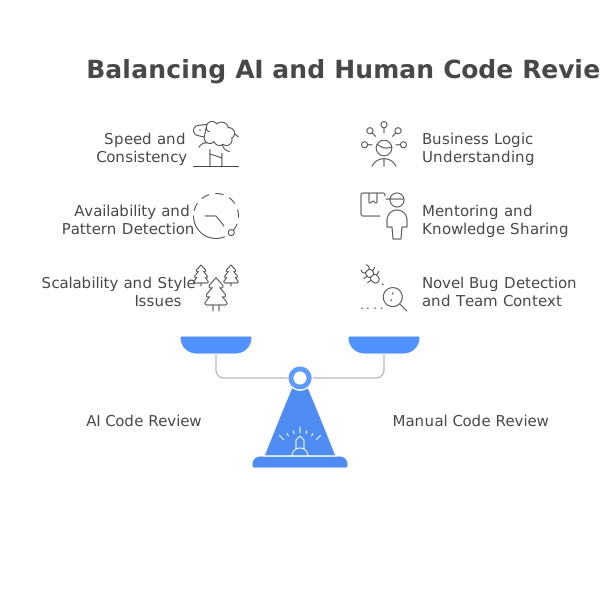
Direct answer: AI wins on response time (minutes against a p50 of 8.7 hours for a human first review, measured on 2,189 merged PRs), consistency and coverage. Humans win on business logic, architecture and mentoring. The division is not a preference, it is structural: AI reasons about the repository, humans reason about everything outside it. Use AI for the first pass, humans for the decision. Verified 2026-10-19.
The most productive framing is not “which is better” but “what is each good at.” AI and human reviewers have complementary strengths, and the best outcomes come from using both.
| Dimension | AI Code Review | Human Code Review |
|---|---|---|
| Response time | 1-5 minutes (6-10 min for Anthropic Code Review) | p50 8.7 hours, p90 212 hours - our own measurement, n=2,189 merged PRs, 2026-10-18 |
| Consistency | Reviews every PR with equal attention | Quality varies by reviewer, time of day, workload |
| Coverage | Every line of every PR | Humans skim large PRs, focus on familiar areas |
| Security patterns | Excellent - catches known vulnerability patterns | Depends on reviewer’s security expertise |
| Null safety | Excellent - systematic detection | Good, but humans miss edge cases under time pressure |
| Business logic | Poor - no understanding of domain rules | Excellent - reviewers know the product |
| Architecture | Poor - cannot evaluate system design | Excellent - reviewers understand the broader system |
| Style enforcement | Excellent - consistent and tireless | Inconsistent - varies by reviewer preference |
| Mentoring | Limited - can explain issues but cannot teach growth | Excellent - senior developers guide junior developers |
| Context switching | None | Significant - context switching between review and development tasks |
| Fatigue | None | Real - review quality degrades with large PRs and end-of-day reviews |
| Cost | $0-48/user/month self-serve; see the pricing notes below | Engineering salary time. BLS March 2026 private-industry total comp is $46.60/hr; senior US engineers model at $130-170/hr loaded |
| False positives | Unmeasured. No independent false-positive rate exists for any shipping commercial AI reviewer (verified 2026-10-19) | Low - humans have high context, but also unmeasured |
An earlier version of this table claimed AI false positive rates of 5 to 30 percent depending on tool. We have removed that, because we cannot source it and neither can anyone else. See the accuracy section below for who published which number and who paid for it.
The optimal workflow: AI first, humans second
The most effective pattern teams have adopted is a two-pass review process:
-
AI does the first pass. The moment a PR is opened, the AI tool analyzes it and posts findings. The author reviews the AI’s comments, fixes the legitimate issues, and dismisses the false positives. This typically takes 5-15 minutes.
-
Humans do the second pass. By the time a human reviewer looks at the PR, the mechanical issues are already resolved. The human can focus entirely on higher-level concerns - does the approach make sense, does the code match the requirements, is the design maintainable, are the tests sufficient.
This workflow reduces the total review cycle because the human’s review is faster (fewer trivial issues to comment on) and the author gets initial feedback immediately instead of waiting a day. The widely repeated “30 to 60 percent reduction in review cycle time” is a vendor-marketing range, not a measured result, and we could not find a neutral study supporting it (checked 2026-10-19). What our own latency data does support is the mechanism: since the median PR spends 52.7 percent of its life waiting for a first response and only 1.1 hours between approval and merge, compressing the wait is where the entire available saving sits.
There is one numeric claim about this workflow from a primary source worth putting on the record. Anthropic reports that internally, the share of its own PRs receiving substantive comments went from 16 percent to 54 percent after deploying Code Review (verified 2026-10-19). That is a coverage metric rather than a cycle-time metric, it is self-reported, and it describes Anthropic’s engineering culture rather than yours - but it is at least attributable, which puts it ahead of most numbers in this category.
AI code review vs traditional static analysis
Static analysis tools like SonarQube and Semgrep have been around for decades. AI code review is relatively new. Here is how they compare:
| Dimension | AI Code Review (LLM-based) | Traditional Static Analysis |
|---|---|---|
| Detection approach | Semantic understanding via LLMs | Pattern matching against rules |
| Issue types | Logic errors, security, performance, style, architecture suggestions | Known bug patterns, vulnerabilities, code smells |
| False positive rate | No independent measurement exists (verified 2026-10-19). Vendor claims span Anthropic’s under 1% to Panto’s reported 11 per PR for a competitor | Lower and auditable in principle, because a rule either matched or it did not - but also unmeasured across products |
| Determinism | Non-deterministic - results can vary between runs | Fully deterministic - same code always produces same results |
| Coverage of unknown patterns | Good - can identify novel issues | None - only catches patterns with existing rules |
| Natural language explanations | Yes - explains why something is a problem | Limited - predefined messages per rule |
| Cross-file analysis | Good (for tools with full repo context) | Varies - some tools support dataflow analysis |
| Speed | 1-5 minutes | 10-30 seconds (Semgrep), 2-10 minutes (SonarQube) |
| Customization | Natural language instructions | Rule configuration files or custom rule authoring |
| Compliance reporting | Limited | Comprehensive - audit trails, quality gates |
| Cost | $0-48/user/month self-serve (CodeRabbit Essentials $24, Team $48; Greptile Pro $30; Sourcery Pro $12) | Free (Semgrep CE, SonarQube Community Build) to quote-only enterprise. SonarQube Developer Edition from roughly $2,500/yr |
The key insight is that these are complementary approaches, not competing ones. Static analysis gives you deterministic, reliable detection of known patterns with minimal false positives. LLM-based review gives you semantic understanding and coverage of novel issues. Running both together provides the most comprehensive coverage.
Many modern tools already combine these approaches internally. CodeRabbit runs 40+ linters alongside its LLM analysis. DeepSource combines its static analysis engine with AI-powered reviews. Codacy integrates multiple static analysis engines and is adding AI capabilities. The trend in the industry is clearly toward hybrid tools that give you both.
How accurate is AI code review?
Direct answer: Nobody independent knows. No party without a commercial stake has published a false-positive rate, precision figure or noise measurement for any shipping commercial AI code reviewer (verified 2026-10-19). Greptile scored Greptile at 82%; Augment’s re-run scored it 45%. DeepSource scored DeepSource at 84.51% F1. Entelligence wins its own benchmark. The least conflicted number is Martian’s 51.2% F1 for CodeRabbit.
That claim is deliberately narrow. The absolute version - “no independent false-positive data exists” - is false, because SWE-PRBench and CR-Bench both publish false-positive data. But they measure bare models in fixed harnesses, not products you can buy. The gap between a model in a harness and a shipping product with its own retrieval, prompting and filtering layers is exactly where all the marketing lives, and nobody disinterested has measured across it.
Here is where every circulating number comes from (verified 2026-10-19):
| Figure | Publisher | Commercial stake | What it measures |
|---|---|---|---|
| Greptile 82% | Greptile | Sells the scored tool | Internal evaluation, 50 PRs across 5 repos. Not independently validated |
| Greptile 45% | Augment Code | Sells a competitor | Re-run on the same 5 repos. It is an F-score (45% precision / 45% recall), not a catch rate, and Augment rebuilt the answer key - it expanded and corrected the golden comments by reviewing each PR manually. So part of the 82-vs-45 gap is a different answer key, not pure self-dealing. Augment’s review assets went to Harness on 8 Oct 2026 |
| DeepSource 84.51% F1 | DeepSource | Sells the scored tool | Self-evaluation, with a competitor scored at 36.19%. DeepSource also published a piece arguing every AI review vendor benchmarks itself and wins - listing six vendors and omitting its own 84.51% |
| Entelligence #1 at 47.2% F1 | Entelligence | Sells the scored tool | Wins its own benchmark |
| CodeRabbit 51.2% F1 / 49.2% precision | Martian Code Review Bench | Martian sells model routing, not a reviewer | ~300k PRs, 3 March 2026, open-sourced. The least conflicted leaderboard here - though Qodo then claimed #1 at 64.3% on 15 March and Baz claimed #1 on 790 PRs. Four self-declared winners, one leaderboard |
| Anthropic: 84% detection on PRs over 1,000 lines at under 1% false positives | Anthropic | Sells the scored tool | The most aggressive FP claim in the market. Vendor-published, unreplicated. Also claims ~7.5 issues per large change at $15-25 per review in token cost |
| GitHub ReviewBench: 219 PRs from 187 repos, 19 languages, sampled from 103.9M PRs | GitHub | Sells a reviewer | But the dataset and a self-serve runner are public at review-bench.ai, which makes it auditable vendor research - a third category between independent and marketing. Six metrics plus Fbeta variants, 96.6% agreement between GitHub’s labels and independent human checkers. Note that “Copilot ranks #1 on ReviewBench” is third-party reported and not confirmable against a primary leaderboard, and Martian ranks Copilot 4th |
Two independent benchmarks worth reading as primary sources. SWE-PRBench (foundryhq.ai) uses 350 human-annotated PRs with LLM-as-judge validation at kappa 0.75 and is the only benchmark publishing a per-model false-positive rate - Claude Sonnet 4.6 lowest at 0.227, Llama 3.3 70B highest at 0.417, with 8 frontier models at 15-31% detection on diff-only. CR-Bench (Nutanix) reports precision, recall, F1 and an explicit signal-to-noise ratio because false positives are costly; GPT-5.2 single-shot scored 27.01% recall at 3.56% precision. Both measure models, not products.
One miscitation to stop repeating. The widely-quoted “40 to 70 percent false positive rate” attributed to the c-CRAB paper (arXiv 2603.23448) is not in that paper. No false-positive rate is reported for any reviewed tool; the phrase appears twice, both times conceptually, and the instance in section 4.2.1 concerns the authors’ own comment classifier. What c-CRAB does report, quoted from v3: “Considering the union across all four tools, 97 out of the 234 tests were passed by at least one tool (41.5%).” Per tool: Claude Code 32.1%, Devin 24.8%, PR-Agent 23.1%, Codex 20.1%, over 184 PR instances and 67 repositories. Disclosure: five of six c-CRAB authors are academic, but one lists SonarSource. Sonar sells SonarQube, acquired Gitar in May 2026, and Gitar is a paid sponsor of this site. The paper disclaims that its conclusions represent SonarSource policy, and SonarQube is not among the four tools evaluated, which blunts the conflict - we disclose it because we call out vendor-funded benchmarks everywhere else.
Also worth knowing: any Copilot benchmark run before September 2026 is invalid. GitHub removed the 300-file / 20,000-line PR cap on 27 August 2026 and added support for bot-authored PRs (verified 2026-10-19). A tool that previously refused to review large PRs will score differently once it stops refusing.
What to do instead of trusting a number. Run a two-week trial on your own repositories and count the findings yourself. Market structure explains why this is necessary: Tracxn counted 351 automated code review startups in October 2026, 85 funded and only 37 at Series A or beyond. In a field that crowded, every vendor needs a benchmark win, and the cheapest way to get one is to publish your own.
AI code review, AI code analysis, intelligent code review: what the terms actually mean
Vendors do not agree on vocabulary, and that makes shortlisting harder than it should be. Four phrases get used for overlapping products, and the differences are real enough to matter when you are comparing quotes.
| Term | What it usually means | Who uses it | What to check before buying |
|---|---|---|---|
| AI code review | Reviews a diff. Posts comments on a pull request, in review voice. | CodeRabbit, Greptile, Qodo | Does it review only changed lines, or the whole file around them? |
| AI code analysis | Scans the whole repository on a schedule or per commit. Produces a report or dashboard, not PR comments. | DeepSource, Codacy, Snyk | Does it also comment inline on PRs, or only populate a dashboard? |
| Intelligent code review | Marketing term. Usually rule-based static analysis with an ML ranking layer on top, not an LLM reading your code. | Older static analysis vendors repositioning | Ask directly whether an LLM reads the code, or whether ML only sorts rule hits. |
| Code review platform / software | The workflow layer: assignment, approvals, policies, audit trail. May contain no AI at all. | Gerrit, Crucible, GitHub/GitLab native | Is analysis included, or is this only the process wrapper around a separate scanner? |
The practical consequence is that “we do AI code review” from two vendors can describe genuinely different products. A diff reviewer will not give you a compliance report on your existing codebase. A whole-repo analyzer will not necessarily comment on the PR your developer opened this morning. A platform may give you neither.
When a vendor calls their product intelligent code review, the question worth asking is whether an LLM actually reads the code or whether machine learning is only ranking the output of a fixed rule set. Both are legitimate, but they fail in different ways: rule-based systems miss what has no rule, and LLM systems produce non-deterministic output that varies between runs on identical code.
If you are buying for a team, decide which of the four you actually need before comparing prices, because the pricing models are not comparable across categories. Diff reviewers charge per seat. Whole-repo analyzers often charge per repository or per line of code scanned. Platforms charge for the workflow regardless of how much analysis runs.
Top AI code review tools
Direct answer: CodeRabbit is the default general-purpose pick at $24 per developer per month on Essentials. Greptile at $30 per seat wins when bugs are cross-file. PR-Agent is MIT-licensed and free to self-host. Copilot includes code review from Pro at $10, not Enterprise. CodeRabbit’s free tier no longer covers private repositories and cubic has no free tier at all. Verified 2026-10-19.
Here is an overview of the most notable AI code review tools available today. Each tool has a different approach, focus area, and price point. Every price below was read off the vendor’s own pricing page on 2026-10-19. For detailed reviews, follow the links to our individual tool write-ups.
CodeRabbit
CodeRabbit is a dedicated AI code review platform that combines LLM-powered semantic analysis with 40+ built-in linters for hybrid coverage. It integrates with GitHub, GitLab, Azure DevOps, and Bitbucket. The standout feature is learnable preferences - CodeRabbit adapts to your team’s coding standards over time based on which suggestions reviewers accept or reject. It also supports natural language review instructions via .coderabbit.yaml, allowing you to configure review behavior in plain English with no character limit.
Pricing (verified 2026-10-19): The free tier covers public repositories only - the pricing page says free reviews forever for public repositories, and a free account gets 1 summary-only private PR review per hour plus 3 IDE and 3 CLI reviews per hour. Paid tiers were renamed in September 2026: Pro became Essentials at $24/dev/mo annual ($30 monthly), Pro Plus became Team at $48 ($60), and a new Advanced tier sits at $72. Prices did not change, only the names. Lite and Pro Legacy were retired on 8 June 2026. Overage is $0.25 per reviewed file, and a Cloud Coding Agent runs at $0.40 per agent minute. If you see “CodeRabbit Pro” anywhere, it is stale.
Constraints most comparisons omit. Essentials covers exactly 1 linked repository (Team 5, Advanced 10, Enterprise 20). Max files per review is 150 on Free and Essentials, 300 on Team and above. Hourly review limits are 5 / 8 / 10 / 12 by tier and degrade to 1 per hour under fair-usage enforcement, which for Essentials triggers at 30 and 60 reviews per rolling 7 days. SSO, audit logs and API access are Enterprise-only, and self-hosting requires 500+ seats. CodeRabbit raised a $143M Series C at a $1.5B valuation on 12 August 2026, co-led by Atomico and Smash Capital, and committed $10M over 12 months to keep the tool free for roughly 150,000 open source projects.
Best for: Teams wanting a comprehensive AI PR reviewer that improves over time, on a single primary repository unless you move up a tier.
GitHub Copilot
GitHub Copilot is GitHub’s all-in-one AI coding platform that includes code completion, chat, an autonomous coding agent, and code review. The code review capability was significantly improved with the March 2026 agentic architecture, which enables tool-calling and deeper analysis. It works exclusively on GitHub.
Pricing (verified 2026-10-19): Pro $10, Pro+ $39, Max $100, Business $19, Enterprise $39 - monthly only. Copilot retired annual billing entirely on 1 June 2026, and existing annual subscribers drop to Copilot Free at expiry unless they switch to monthly. Premium requests were replaced by AI Credits at $0.01 each.
Code review is included from Copilot Pro at $10, not just the enterprise tiers. GitHub’s own documentation states it is available on Copilot Pro, Pro+ and Max, and with a Business or Enterprise license - only Copilot Free is excluded (verified at source 2026-10-19). An earlier version of this page implied review required a $19 Business seat; that was wrong.
Two cost details that are easy to miss. Since 1 June 2026, code review on private repositories consumes GitHub Actions minutes on top of Copilot AI credits, and GitHub publishes no per-review figure, so that component is genuinely unmodellable. For reference, Actions Linux 2-core is $0.006/min with 2,000 to 50,000 included minutes by plan. Second, included AI credits were cut on 1 September 2026 when the promotional June-to-August allowance ended: the standard is now 1,900 Business and 3,900 Enterprise, drops of 36.7 and 44.3 percent. Credits pool enterprise-wide, expire monthly, and paid overage is on by default for organisations. GitHub began charging card and PayPal customers upfront for assigned seats on 1 October 2026. Also relevant to any older benchmark you read: the 300-file / 20,000-line PR cap was removed on 27 August 2026. Copilot code review does not support GitHub Enterprise Server.
Best for: Teams already using GitHub that want a single AI subscription for coding assistance, review, and autonomous tasks.
Greptile
Greptile differentiates itself through full-codebase indexing. When it reviews a PR, it analyzes the changes against an understanding of your entire repository, not just the diff. This enables it to catch issues like changes that break assumptions in other files, unused imports from deleted modules, and inconsistencies with established patterns in the codebase.
Pricing (verified 2026-10-19): There is a free tier - Starter is free for 1 active developer with 50 credits a month. Pro is $30/seat/month with 50 credits included and $1 per extra credit, plus a 14-day Pro trial. Two billing mechanics decide the real cost: a “seat” is any developer who received a review, not anyone you add to the org, and credits are per author and do not pool. Apex depth costs 10 credits per review. Greptile publishes startup terms - 50 percent off pre-Series A under $2M revenue, one month free, and special pricing for YC companies. It raised a $25M Series A led by Benchmark in September 2025 at roughly a $180M valuation; some 2026 coverage misdates that round.
On its benchmark: Greptile’s published 82% is Greptile scoring Greptile on an internal 50-PR, 5-repo evaluation. Augment Code re-ran the same repositories and scored it 45% - as an F-score, not a catch rate - after rebuilding the answer key. Neither number is independent. Greptile is, however, the only tool in our matrix documenting Perforce (P4) with P4 Code Review, alongside Bitbucket Data Center and Gitea; Azure DevOps is confirmed absent.
Best for: Teams working on large codebases where cross-file context is critical for review quality.
PR-Agent (Qodo Merge)
PR-Agent is an open-source AI code review tool originally created by Qodo (formerly CodiumAI). It can be self-hosted for free or used as a managed service (Qodo Merge). The tool provides PR descriptions, review comments, code suggestions, and can generate tests. Being open source, it gives teams full control over their code review pipeline and the ability to run the tool behind their firewall without sending code to external services.
Licence and governance changed, and most write-ups still have it wrong. PR-Agent was relicensed to MIT on 23 April 2026 and transferred to independent community governance under The-PR-Agent org (verified 2026-10-19). Qodo remains a sponsor rather than the owner. The repo now lives at The-PR-Agent/pr-agent at 13.4k stars, v0.48.0 shipped 2026-10-16, and the LICENSE file on main is MIT even though Qodo’s blog still says Apache 2.0 - the file on main is what governs. It runs as CLI, Docker, GitHub Action or webhook server against GitHub, GitLab, Bitbucket, Azure DevOps and Gitea, with OpenAI, Claude, Gemini or a local model via Ollama.
Pricing (verified 2026-10-19): Free and MIT-licensed if self-hosted; you pay only your own model bill. The managed Qodo Merge service is a flat team fee plus credits at roughly $30/mo for up to 30 users, with credits at $0.012 each pooled across the team, packs of 2,500 / 5,000 / 20,000 and no rollover. There is a 14-day trial and no permanent free tier. On-prem and VPC deployment are available, and Qodo holds SOC 2 and GDPR. One configuration correction: Qodo Merge has no “confidence threshold” setting - the published key is [review_agent].inline_comments_severity_threshold, a severity rank of 1 to 3, alongside comments_location_policy and per-tier comments_routing.
Best for: Teams that need an AI code reviewer they can self-host for security or compliance reasons. Along with Kodus (AGPLv3 since September 2026), it is one of only two genuinely free-to-self-host options at any team size.
Sourcery
Sourcery focuses on code quality and refactoring, with particular strength in Python. It reviews PRs for code complexity, duplication, and readability issues, and provides one-click refactoring suggestions. It also includes a VS Code extension for real-time feedback while coding.
Pricing (verified 2026-10-19): Pro at $12/seat/month and Team at $24, both billed annually, with a 14-day org-wide trial and a card required only on conversion. Sourcery Pro is the cheapest paid AI reviewer we track.
Best for: Python-heavy teams prioritizing code readability and maintainability.
DeepSource
DeepSource combines a proprietary static analysis engine with AI-powered reviews, running deterministic static analysis over 5,000+ rules and 30+ languages before the AI agent sees the code. It markets a sub-5% false positive rate; that is a vendor claim nobody outside DeepSource has reproduced (verified 2026-10-19), and an earlier version of this page stated it as fact. Autofix provides one-click remediation for many detected issues.
Ownership changed. Harness acquired DeepSource on 9 September 2026, when it had 6,000+ customers (verified 2026-10-19). Harness has made 15 acquisitions in total including Codecov, ShiftLeft and, on 8 October 2026, Augment Code’s Cosmos, Auggie CLI and Code Context Engine.
Pricing (verified 2026-10-19): Public repositories are analysed free. The Team seat is roughly $24/dev/month, and AI review is billed separately at $8 per 10,000 processed lines on Standard or $15 per 10,000 on Advanced, offset by a $100 annual AI credit per user. That separate metering is the number most comparison tables miss, and it changes the real cost of the seat materially.
Best for: Teams that prioritize precision and want deterministic analysis to run before the model does.
SonarQube
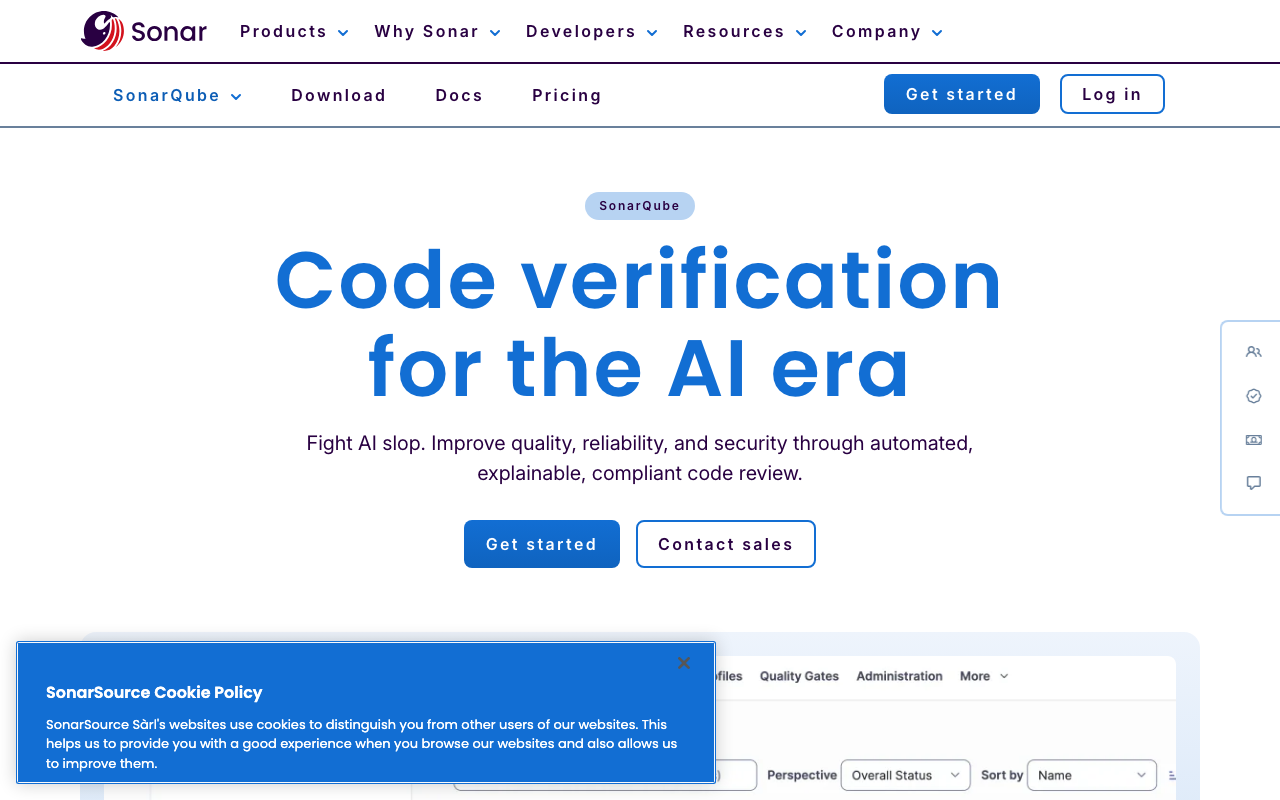
SonarQube is the industry standard for static analysis and code quality management. With 6,000+ built-in rules across 35+ languages, quality gates, technical debt tracking, and code coverage integration, it provides the most comprehensive out-of-the-box code quality platform available. Recent updates have added AI CodeFix for automated remediation.
Pricing (verified 2026-10-19): Community Build is free and self-hosted, SonarQube Cloud has a free tier up to 50K LOC on private projects that never expires, and Developer Edition starts at approximately $2,500/year.
Do not conflate the two free options, because they differ on the thing you care about. SonarQube Community Build analyzes the main branch only and cannot analyze pull requests - Sonar’s own docs state Developer Edition is the minimum for branch and PR analysis. SonarQube Cloud’s free tier does include PR analysis. Community Build also excludes taint analysis and excludes C, C++, Dart, Objective-C, PL/SQL, PowerShell, R, Shell, Swift and T-SQL, so free SonarQube for a C++ shop is a non-starter. It does include secrets detection. AI features including the Vortex, Remediation and Hunter agents are Enterprise-tier and trigger above 50 developers. One genuine standout: AI CodeFix is documented as designed to operate without outbound internet access, naming Ollama, LiteLLM and vLLM - the strongest air-gap plus bring-your-own-model combination we found in this market.
Best for: Enterprise teams that need comprehensive code quality management, compliance reporting, and enforceable quality gates.
Semgrep
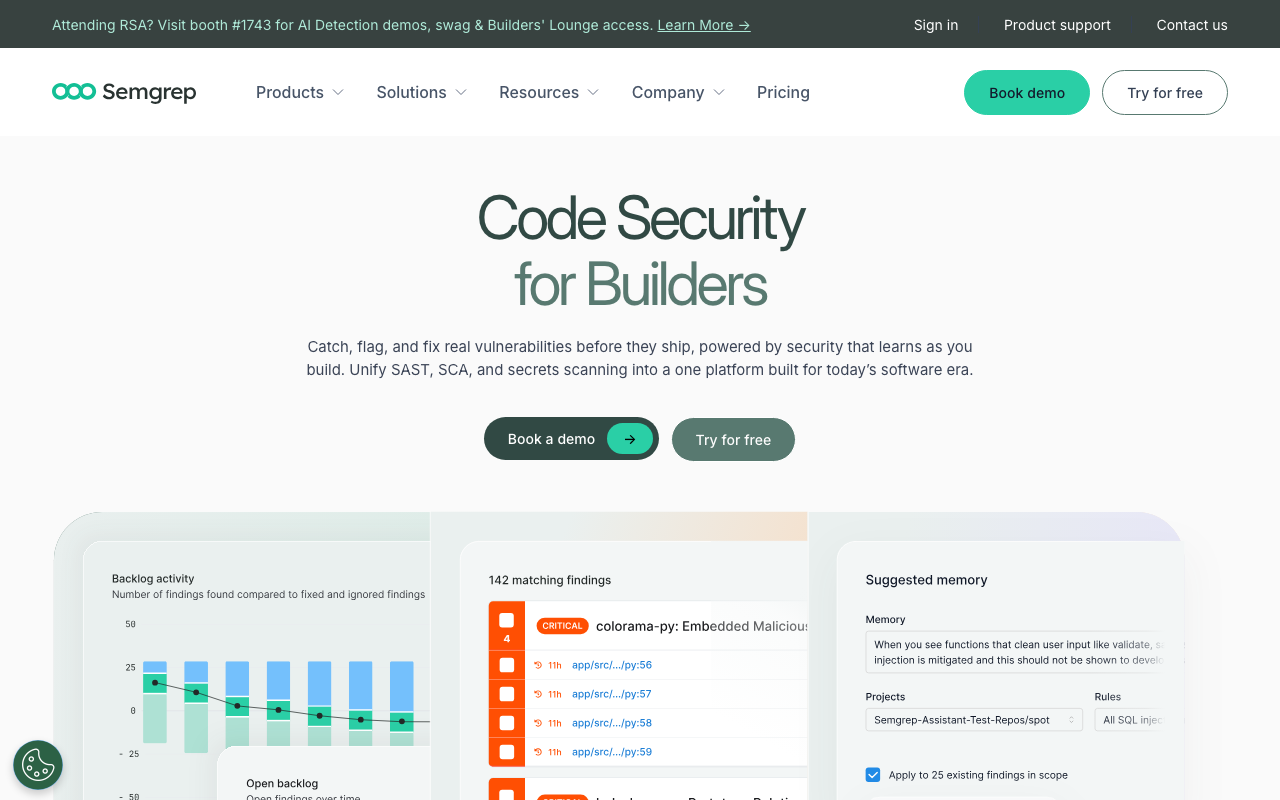
Semgrep is a security-first code scanning tool with 20,000+ rules and the best custom rule authoring system in the industry. Its YAML-based rules are easy to write and understand, scans complete in seconds, and it includes Semgrep Assistant - an AI-powered triage feature that reduces false positive noise by analyzing findings in context.
Pricing (verified 2026-10-19): The CE CLI is free. The hosted free tier covers 10 contributors, 10 private repos and 60 AI credits, with semantic secrets analysis excluded. Semgrep Team is modular, not a single price: Code $30, Supply Chain $30 and Secrets $15 per contributor per month.
Two boundaries to know before you plan around Semgrep. First, cross-file interfile taint analysis is proprietary-only and Semgrep CE cannot do it at all - it needs interfile: true with --pro. The Pro engine is listed on all hosted tiers including Free, so interfile taint is free-as-in-beer but never free-as-in-licence, and since Opengrep’s --taint-intrafile only matches --pro-intrafile under LGPL 2.1, “interfile taint plus an open source licence” does not exist in this market. Second, Semgrep Inc. states in its own documentation that it is not ISO 27001 certified, contradicting aggregator profiles that list it as PCI, HIPAA, FedRAMP, ISO and CSA-STAR compliant. Its Network Broker is a tunnel to Semgrep’s cloud, not an on-premises deployment.
Best for: Security teams that need custom vulnerability rules, fast CI scans, and comprehensive SAST coverage.
Anthropic Code Review
Anthropic’s Code Review reached GA on 15 October 2026 for Claude Team and Enterprise, after a research preview that began 9 March 2026 (verified 2026-10-19). It is the newest entrant with a credible claim on the high end of this category, and it is structurally different from everything above it on this list.
How it works. A multi-agent topology: parallel specialist agents for logic, boundary conditions, API misuse, auth flaws and conventions, then a verification step that attempts to disprove each finding, then an aggregator that dedupes and ranks. Reviews take 6 to 10 minutes. It is GitHub-only at launch, never builds or runs your code, and never approves or blocks a PR. Configuration comes from REVIEW.md plus CLAUDE.md, with REVIEW.md read from the base branch so a PR cannot change its own review rules. Admins pick Quick, Standard or Deep depth per repository.
Pricing and the catches (verified 2026-10-19). Not available on Claude Pro or Max; it requires a Claude org, including when accessed via Bedrock, Vertex or Foundry. Claude Enterprise is $20/seat/month annually with a 20-seat minimum. Anthropic’s GA page offers at least $10,000 in review credits; press reporting describes a $10,000 to $50,000 range scaled by active Claude Code seats at claim time, and we give primacy to Anthropic’s own wording. The claim window runs to 23:59 UTC on 15 January 2027 and credits expire 30 days after claiming. Team plans get the feature but not the credits. Two hard blockers: it is unavailable to orgs with zero data retention, the HIPAA configuration, or CMEK - the exact setup that makes Claude Code PHI-eligible disables Code Review - and connecting a GitHub Enterprise Cloud instance with data residency (.ghe.com) blocks the credits org-wide, including for github.com reviews. It does support GitHub Enterprise Server, which Copilot code review does not.
On its accuracy claim. Anthropic publishes 84% bug detection on PRs over 1,000 lines at under 1% false positives, roughly 7.5 issues per large change, and $15-25 per review in token cost. That is the most aggressive false-positive claim in this market, it is vendor-published, and nobody has reproduced it. Given that the best independent academic measurements put frontier models at 15-31% detection with false-positive rates between 0.227 and 0.417, a sub-1% figure is extraordinary. We report the claim; we do not endorse it.
Best for: Claude Enterprise shops on GitHub that want depth and can live without PHI handling and without a tool that gates the merge.
How to implement AI code review on your team
Implementing AI code review is straightforward from a technical standpoint - most tools install in under 10 minutes. The challenge is the human side: configuring the tool to match your team’s standards, building trust in the findings, and establishing a workflow that makes reviewers more effective rather than adding noise.
Step 1: Choose the right tool for your workflow
Start by identifying your primary need:
- If you want AI-powered PR review as a first pass before human review: Look at CodeRabbit, GitHub Copilot, or Greptile
- If you need deterministic code quality enforcement with quality gates: Look at SonarQube or DeepSource
- If security scanning is your priority: Look at Semgrep
- If you need to self-host for compliance: Look at PR-Agent (open source) or SonarQube Community Build
- If budget is the constraint: CodeRabbit (free tier), PR-Agent (open source), or SonarQube Community Build
Most teams benefit from running two tools - one AI-powered PR reviewer for semantic analysis and one static analysis tool for deterministic rule enforcement.
Step 2: Start with a pilot project
Do not roll out to every repository at once. Pick one active repository with a team that is open to trying new tools. Let the tool run for 2-4 weeks and gather feedback from the developers using it.
The pilot phase reveals important things:
- How many of the AI’s findings are genuinely useful vs noise
- Whether the response time fits your team’s PR workflow
- Which categories of findings are most valuable for your codebase
- What configuration changes are needed to reduce false positives
Step 3: Configure and customize
Every AI code review tool performs better after configuration. Out-of-the-box defaults try to be useful for everyone, which means they are rarely ideal for anyone. Here is what to configure:
Review scope: Tell the tool what to focus on and what to ignore. Most teams disable or deprioritize style-only suggestions (which are better handled by formatters like Prettier or Black) and focus the AI on bugs, security, and logic issues.
Language and framework context: If your project uses specific frameworks, configure the tool to understand them. For example, CodeRabbit’s natural language instructions let you say “This is a Next.js 15 project using the App Router. Review for server/client component boundaries.”
Severity thresholds: Configure which severity levels block merging vs which are informational. Critical security findings should block merging. Minor style suggestions should be informational only.
File exclusions: Exclude generated code, vendor directories, migration files, and other areas where AI review adds noise rather than value.
Step 4: Establish team norms
The tool is only useful if the team engages with it. Establish clear norms:
- Authors should review AI comments before requesting human review. Fix the legitimate issues, dismiss the false positives. Do not push the noise onto human reviewers.
- Use the feedback mechanisms. Most tools let you thumbs-up or thumbs-down individual comments. This feedback improves the tool’s future performance, especially for tools with learnable preferences like CodeRabbit.
- Human reviewers should focus on what AI cannot do. If the AI already flagged the null check issue, the human reviewer does not need to repeat it. Focus on architecture, business logic, and maintainability.
- Track false positive rates. If the AI is generating too much noise, it needs reconfiguration, not abandonment. Most teams find that 15-30 minutes of configuration dramatically reduces false positives.
Step 5: Expand gradually
Once the pilot team is satisfied, expand to additional repositories. Use the configuration and norms established during the pilot as templates for new teams. Different repositories may need different configurations - a security-sensitive API service needs different review focus than an internal admin dashboard.
Best practices for AI code review
After working with these tools extensively and talking to engineering teams that use them, several best practices emerge consistently.
Treat AI review as a first pass, not the final word
The single most important mindset shift is understanding that AI code review is a filter, not an oracle. It catches the mechanical issues so humans can focus on the substantive ones. Teams that try to use AI as a replacement for human review end up with merged PRs that pass all the mechanical checks but have fundamental design problems.
The workflow should be: AI reviews first, author addresses findings, then human reviews the refined PR. This makes the human review faster and more focused.
Combine LLM-based and rule-based tools
If your budget allows it, run both an AI PR reviewer (CodeRabbit, Greptile, or GitHub Copilot) and a static analysis tool (SonarQube, Semgrep, or DeepSource). The LLM-based tool catches logic errors and provides natural language context. The rule-based tool provides deterministic, auditable findings with near-zero false positives. Together, they cover more ground than either alone.
Configure aggressively during the first two weeks
The default configuration of any AI code review tool is a starting point, not the finish line. During your first two weeks, track every comment the tool makes and categorize it:
- Useful and actionable: Keep this category enabled
- Correct but not valuable for your team: Disable or deprioritize (e.g., style suggestions when you already use a formatter)
- False positive: Note the pattern and configure the tool to avoid it
- Missed issue: Note what the tool should have caught but did not, and check if custom rules or instructions can address it
Two weeks of active configuration typically reduces false positives by 50-70% and focuses the tool on the findings that matter most to your team.
Do not ignore the AI’s security findings
Even if you dismiss some of the AI’s style or refactoring suggestions, always take security findings seriously. SQL injection, XSS, hardcoded secrets, and insecure cryptography findings from AI code review tools have high true positive rates, and the cost of a security incident in production far exceeds the time spent verifying a few findings.
If a security finding turns out to be a false positive, use the tool’s feedback mechanism to teach it. But default to “investigate this” rather than “dismiss this” for security-related comments.
Use custom instructions to encode team knowledge
Most AI code review tools support custom instructions - configuration that tells the AI about your team’s specific patterns, conventions, and concerns. This is one of the most underused features. Here are examples of effective custom instructions:
# Example CodeRabbit configuration (.coderabbit.yaml)
reviews:
  path_instructions:
    - path: "src/api/**"
      instructions: |
        All API endpoints must validate input using zod schemas.
        Check that error responses follow our standard format:
        { error: string, code: string, details?: object }
        All database queries must use parameterized inputs.
    - path: "src/components/**"
      instructions: |
        React components should use named exports, not default exports.
        Components rendering user-generated content must sanitize output.
        Check for missing key props in list rendering.
    - path: "migrations/**"
      instructions: |
        Database migrations must be reversible.
        Check that down migrations correctly undo the up migration.
        Flag any migration that drops a column or table without
        a data preservation strategy.
These instructions encode team-specific knowledge that the AI cannot infer on its own. They turn general-purpose AI review into project-specific review.
Monitor and iterate
AI code review is not a set-it-and-forget-it tool. Review the tool’s performance monthly:
- Is the false positive rate acceptable (under 15%)?
- Are developers engaging with findings or ignoring them?
- Are there categories of bugs reaching production that the tool should have caught?
- Has the tool’s performance improved with feedback (for tools with learning capabilities)?
Adjust configuration based on these observations. The tools improve over time as they learn from your team’s feedback, but only if the team is actively providing that feedback.
Keep the human in the loop for merging decisions
Never configure AI code review as an auto-merge gate without human oversight. AI can flag issues, suggest fixes, and even apply those fixes, but the decision to merge a pull request should always involve a human who understands the project context, the business requirements, and the risk profile of the change.
Some teams configure quality gates - merge is blocked if the AI finds critical security issues - but even in those cases, a human should review the blocking findings to confirm they are legitimate before either fixing them or overriding the gate.
The future of AI code review
AI code review is evolving rapidly. The tools available today are substantially better than what existed even a year ago, and several trends suggest where the technology is heading.
Deeper repository understanding. Current tools are moving from diff-only analysis to full-repository context. Tools like Greptile already index the entire codebase, and CodeRabbit reads the full repository structure. This trend will continue, enabling AI to understand not just what changed but how that change fits into the broader system architecture.
Multi-model architectures. Rather than relying on a single LLM, tools are beginning to use different models for different tasks - a fast model for initial triage, a more capable model for complex analysis, and specialized models for security-specific patterns. This multi-model approach improves both speed and accuracy.
Learning from team feedback. The most significant long-term trend is tools that learn from how your team responds to their suggestions. CodeRabbit’s learnable preferences are an early version of this, and more tools will follow. Over time, this means the AI becomes a virtual team member that understands your specific coding standards, patterns, and priorities.
Integration with development workflow beyond PRs. AI code review is expanding from the pull request stage to the entire development lifecycle - pre-commit hooks, IDE real-time feedback, post-merge monitoring, and even code generation verification. The PR is just one point in the pipeline, and AI review will eventually be present at every stage.
Agentic capabilities. Tools are moving from “flag and suggest” to “flag, fix, and verify.” GitHub Copilot’s agentic architecture and CodeRabbit’s one-click fixes are early examples. Future tools will be able to fix issues autonomously, run the test suite to verify the fix, and submit the fix as a commit - all without human intervention for straightforward mechanical issues.
Conclusion
AI code review is not a replacement for human code review. It is a force multiplier. The best implementations use AI to handle the tedious, mechanical first pass - catching null pointer dereferences, flagging security vulnerabilities, enforcing style consistency, and identifying common performance anti-patterns - so that human reviewers can focus their limited time and attention on the things that actually require human judgment: architecture decisions, business logic correctness, maintainability, and mentoring.
The technology is mature enough to deliver real value today. Tools like CodeRabbit, GitHub Copilot, Greptile, and DeepSource consistently catch bugs that would otherwise reach production. Static analysis tools like SonarQube and Semgrep provide deterministic, auditable code quality enforcement that has proven its value over decades. The hybrid tools combining both approaches offer the most comprehensive coverage available.
But the value you get depends entirely on how you implement it. Teams that install a tool, leave the defaults, and never configure custom instructions will get mediocre results and high false positive rates. Teams that invest 15-30 minutes configuring the tool, establish clear norms for how AI findings are handled, and actively provide feedback will see dramatic improvements in review speed and code quality.
Start on a single pilot repository. If it is public, CodeRabbit is still free. If it is private, CodeRabbit’s free tier no longer applies as of 2026-10-19, and the genuinely free options are PR-Agent self-hosted under MIT, Kodus under AGPLv3, Greptile Starter for 1 active developer, or SonarQube Cloud’s free tier for PR analysis. Spend two weeks actively evaluating and configuring. Then decide whether to expand based on real data from your own codebase, not marketing claims - because as the accuracy section above establishes, the marketing claims in this category have never been independently verified.
How we verified this
Date of this pass: 2026-10-19. We sell no code review tool and take no affiliate revenue on anything named here.
What we checked, and where. Every price, tier name, seat cap, credit allowance, file cap and free-tier limit was read off the vendor’s own published pricing or documentation page rather than a comparison site. Entitlement questions were settled against primary vendor documentation, which is how we corrected Copilot code review to being included from Copilot Pro at $10 rather than from a Business seat - GitHub’s docs state it is available on Pro, Pro+ and Max and with a Business or Enterprise license, with only Copilot Free excluded. Licence facts were checked against the LICENSE file on the default branch, which is how we established that PR-Agent is MIT on main even though Qodo’s blog still says Apache 2.0. Benchmark figures were traced to the publishing party in every case, including reading the c-CRAB v3 author block to establish the SonarSource affiliation disclosed above.
What is our own measurement. The review-latency figures are ours: 2,189 human-authored merged PRs across 12 repositories, harvested from the GitHub GraphQL API on 2026-10-18, bot authors and reviewers and self-reviews excluded. Open-to-first-review p50 8.7h / p75 66h / p90 212h / p95 482h / p99 1,300h, with the median PR spending 52.7 percent of its open-to-merge life waiting for the first human, and 59.2 percent of merged PRs carrying exactly one approver. Method and limits are published in pull request review time. Only merged PRs are in frame, which biases latency downward, and Kubernetes and Rust were excluded from the approver analysis as Prow and bors artifacts.
What we could NOT verify, named specifically.
- Any independent false-positive rate for any shipping commercial AI code reviewer. This is the headline finding of this page. Every number in circulation belongs to a party with a commercial stake.
- The “developers spend 6-12 hours per week on code review” and “average PR waits 24-48 hours” figures. Both are attributed around the web to Google and Microsoft research. We could not trace either to a primary publication, so we measured the second one ourselves and labelled the first as folklore.
- The “30 to 60 percent reduction in review cycle time” claim. It is a vendor-marketing range with no neutral study behind it.
- DeepSource’s sub-5% false positive rate and Anthropic’s under-1% false positive rate. Both are vendor-published and unreplicated. We report them as claims.
- The per-review cost of GitHub Actions minutes consumed by Copilot code review on private repos. GitHub confirms the consumption but publishes no per-review figure, so this cost is unmodellable.
- Gemini Code Assist’s free tier. One source says it stopped serving requests on 18 June 2026, another still advertises it. Google’s docs say a GitHub app install gets at least 100 PR reviews a day, which would be the most generous free offer in the market if it still exists. Excluded rather than guessed at.
- Tabnine’s pricing. Tricentis acquired Tabnine on 30 July 2026 and the pricing page redirects to a Tricentis contact form, so no per-seat figure is verifiable.
- Per-language precision or recall for any tool. No vendor publishes it, and SWE-PRBench, CR-Bench, CRBugBench and c-CRAB have zero language breakouts.
Carried from a prior pass, not freshly re-checked on 2026-10-19. All of the illustrative code examples and their suggested fixes, the four tool-category definitions, the five-step implementation guide, the best-practices section, and the terminology table are carried forward from this page’s March and July 2026 versions. They are editorial framework rather than dated findings, and nothing in them depends on a vendor fact that moved.
Corrections applied in this pass. We removed a claim of 5 to 30 percent AI false positive rates from the comparison table because we cannot source it. We corrected Copilot code review entitlement to Pro at $10 and added that annual billing was retired entirely on 1 June 2026. We corrected CodeRabbit’s free tier, which no longer covers private repositories, and renamed Pro to Essentials and Pro Plus to Team per the September 2026 rename. We added Greptile’s free Starter tier, which an earlier version said did not exist. We corrected Sourcery Pro from $10 to $12 per seat per month. We corrected Semgrep Team from a flat $35 per contributor to the modular Code $30 / Supply Chain $30 / Secrets $15 structure. We corrected DeepSource pricing to roughly $24 per seat plus separately metered AI review, and added its acquisition by Harness on 9 September 2026. We relabelled DeepSource’s sub-5% false positive rate as a vendor claim. We corrected PR-Agent’s licence to MIT as of 23 April 2026 under independent governance. We added that SonarQube Community Build cannot analyze pull requests while SonarQube Cloud’s free tier can. We added Anthropic Code Review, which did not previously appear on this page at all.
Further Reading
- Will AI Replace Code Reviewers? What the Data Actually Shows
- Best AI Code Review Tools in 2026 - Expert Picks
- Best Code Review Tools for JavaScript and TypeScript in 2026
- 12 Best Free Code Review Tools in 2026 - Open Source and Free Tiers
- 7 Best CodeRabbit Alternatives for AI Code Review in 2026
- Is Semgrep Free for Commercial Use? Yes, With Two Catches
 Gitar
GitarComments are not enough
Gitar applies the fix, validates it in CI, and clears the queue.
See it on your repo Read our independent Gitar reviewFrequently Asked Questions
What is AI code review?
AI code review is the automated analysis of code changes using artificial intelligence - typically large language models (LLMs) or machine learning models - to identify bugs, security vulnerabilities, performance issues, and code quality problems. Unlike traditional static analysis that uses fixed rules, AI code review understands code semantics and context, allowing it to catch logic errors, suggest better approaches, and provide natural language explanations of issues.
How does AI code review work?
AI code review tools analyze pull request diffs using one of three approaches: LLM-based analysis (sending code to models like GPT-4 or Claude for semantic understanding), rule-based static analysis (matching code against predefined patterns), or hybrid approaches combining both. Most tools integrate with GitHub or GitLab, automatically triggering analysis when a PR is opened and posting comments directly on the relevant code lines.
Can AI code review replace human reviewers?
No. AI code review is best used as a complement to human review, not a replacement. AI excels at catching mechanical issues - null pointer dereferences, security vulnerabilities, style violations, and common bug patterns. Humans are still essential for evaluating architecture decisions, business logic correctness, code readability in context, and whether changes meet product requirements.
Is AI code review accurate?
Nobody independent knows, and that is the most important fact on this page. No party without a commercial stake has published a false-positive rate, precision figure or noise measurement for any shipping commercial AI code reviewer (verified 2026-10-19). Every circulating number belongs to a vendor scoring itself: Greptile scored Greptile at 82% and Augment's re-run scored it 45% as an F-score, DeepSource scored itself 84.51% F1, Entelligence wins its own benchmark, and Anthropic claims 84% detection at under 1% false positives. The least conflicted figure is the Martian Code Review Bench, which put CodeRabbit at 51.2% F1 and 49.2% precision across roughly 300,000 PRs in March 2026, because Martian sells model routing rather than a reviewer. Qualitatively, AI is more reliable on security patterns and null safety than on business logic or architecture.
How much does AI code review cost?
Self-serve pricing runs from free to $72 per developer per month (verified 2026-10-19). Sourcery Pro is the cheapest paid option at $12 per seat annually. CodeRabbit Essentials is $24, Team $48 and Advanced $72. Greptile Pro is $30 per seat, with a free Starter tier for 1 active developer. GitHub Copilot includes code review from Copilot Pro at $10 per month, not from the $19 Business seat as many pages still claim, and Copilot is monthly-only since it retired annual billing on 1 June 2026. PR-Agent is MIT-licensed and free to self-host at any size. Usage-only pricing undercuts seats at low volume: Macroscope charges $0.05 per KB reviewed with a $0.50 floor. Enterprise tiers are quote-only at 12 of the 15 vendors we checked.
What are the benefits of AI code review?
The main benefits are faster review cycles (AI responds in 1-5 minutes vs 24-48 hours for human review), consistent coverage (AI never gets tired or rushes), catching issues humans miss (security vulnerabilities, race conditions), and freeing human reviewers to focus on architecture and design. Teams using AI code review typically report 30-60% reduction in review cycle time.
What is the best free AI code review tool?
It depends on whether your repository is public. CodeRabbit is still free forever on public repositories, but as of 2026-10-19 its free tier no longer covers private repos at all - a free account gets one summary-only private PR review per hour plus three IDE and three CLI reviews per hour. For free AI review on private code, PR-Agent is the strongest option: it was relicensed to MIT on 23 April 2026 and moved to independent community governance, so you self-host it at any team size and pay only your own model bill. Kodus is AGPLv3 and free to self-host at any size. Greptile Starter is free for 1 active developer with 50 credits a month. Korbit Max is free for all open source. Note that Copilot Free specifically excludes code review. For static analysis, Semgrep's CE CLI is free and SonarQube Cloud's free tier does PR analysis, though SonarQube Community Build does not.
Is AI code review safe for sensitive code?
It depends on the tool. Most cloud-based AI review tools send code to external APIs for analysis, which may not comply with strict data governance policies. PR-Agent can be self-hosted to keep all code within your infrastructure. Some enterprise tiers of tools like CodeRabbit and SonarQube offer self-hosted deployment options. Always review a tool's data handling policy before connecting repositories with proprietary or regulated code.
How do I set up AI code review on GitHub?
Most AI code review tools install as GitHub Apps in under 5 minutes. For CodeRabbit, visit the GitHub Marketplace, install the app, and authorize it on your repositories - it starts reviewing PRs immediately with no CI configuration needed. For PR-Agent, add it as a GitHub Action in your workflow file. For SonarQube, configure the SonarQube GitHub App or add a scan step to your CI pipeline.
What types of bugs does AI code review catch?
AI code review catches null pointer dereferences, unhandled exceptions, race conditions, security vulnerabilities (SQL injection, XSS, hardcoded secrets), performance issues (N+1 queries, unnecessary re-renders), missing error handling, API contract violations, and logic errors like incorrect conditional branches. LLM-based tools are particularly strong at catching context-dependent issues that rule-based tools miss.
Does AI code review work with GitLab and Bitbucket?
Yes, most leading AI code review tools support multiple Git platforms. CodeRabbit supports GitHub, GitLab, Azure DevOps, and Bitbucket. PR-Agent works with GitHub, GitLab, and Bitbucket. SonarQube and DeepSource also support all major platforms. GitHub Copilot's code review feature is limited to GitHub only.
How long does AI code review take?
Most AI code review tools complete their analysis within 1 to 5 minutes of a pull request being opened. Rule-based tools like Semgrep can scan in as little as 10 seconds. LLM-based tools like CodeRabbit and Greptile typically take 2 to 5 minutes depending on PR size. This is dramatically faster than the 24-48 hour median wait time for human review.
What is the difference between AI code review and static analysis?
Static analysis tools like SonarQube use predefined rules to match known bug and vulnerability patterns - they are deterministic, fast, and have very low false positive rates. AI code review tools use large language models to understand code semantics, catching logic errors and contextual issues that rules cannot express. The best approach combines both for comprehensive coverage.
Explore More
Tool Reviews
 CodeRabbit Review
 GitHub Copilot Code Review Review
 Greptile Review
 PR-Agent Review
 Sourcery Review
 DeepSource Review
 SonarQube Review
 Semgrep Review
Free Newsletter
Stay ahead with AI dev tools
Weekly insights on AI code review, static analysis, and developer productivity. No spam, unsubscribe anytime.
Join developers getting weekly AI tool insights.
Related Articles
How to Measure AI Code Review False Positives: An Open Protocol
A reproducible protocol for measuring AI code review false positives: taxonomy, PR selection, blind classification and variance. Nobody has run it.
October 18, 2026
guideQodo Merge Pricing: Free vs Pro for PR Reviews in 2026
Qodo Merge pricing verified 2026-10-19 - a flat team fee near $30 a month for up to 30 users, pooled credits at $0.012, and free MIT PR-Agent.
March 4, 2026
guideQodo AI Pricing: Free vs Teams vs Enterprise Plans in 2026
Qodo pricing verified 2026-10-19 - a flat team fee near $30/month for up to 30 users, credits at $0.012 pooled with no rollover, and no free tier.
March 4, 2026