DeepSource Free vs Paid: Plan Differences Explained
DeepSource free vs paid plan comparison - features, limits, pricing, and when to upgrade from the Open Source plan to Team or Enterprise.
Published:
Understanding DeepSource Free vs Paid Plans
DeepSource deprecated its original Free plan in early 2026, replacing it with a more limited Open Source plan that only covers public repositories. If your team was relying on the free tier for private repo analysis, that option no longer exists - the paid Team plan at $24/user/month is now the minimum for private repository support. This pricing restructure shifted the free-versus-paid calculus significantly and caught several teams off guard.
The core question is straightforward: does your team need to analyze private repositories? If yes, the paid Team plan is the only option. But the differences between the DeepSource free plan and paid tiers extend far beyond repository visibility. Features like unlimited Autofix, bundled AI Review credits, monorepo support, audit logs, and API access are all gated behind the $24/user/month Team subscription. Understanding exactly where the free tier ends and the paid features begin helps you avoid surprises and budget appropriately.
This guide provides a complete breakdown of the DeepSource free tier limits, the Team plan’s full feature set, the Enterprise plan’s additional capabilities, a side-by-side feature comparison table, a pricing analysis at different team sizes, ROI calculations for upgrading, and guidance on who should stay on the free plan versus who needs to move to a paid tier.
What the DeepSource Free Plan Includes
DeepSource’s free tier is officially called the Open Source plan. It replaced the former Free plan in February 2026, and the distinction matters because the two plans are not equivalent. The old Free plan supported up to 3 private repositories and 3 team members. The current Open Source plan drops private repository support entirely.
Core Features on the Free Plan
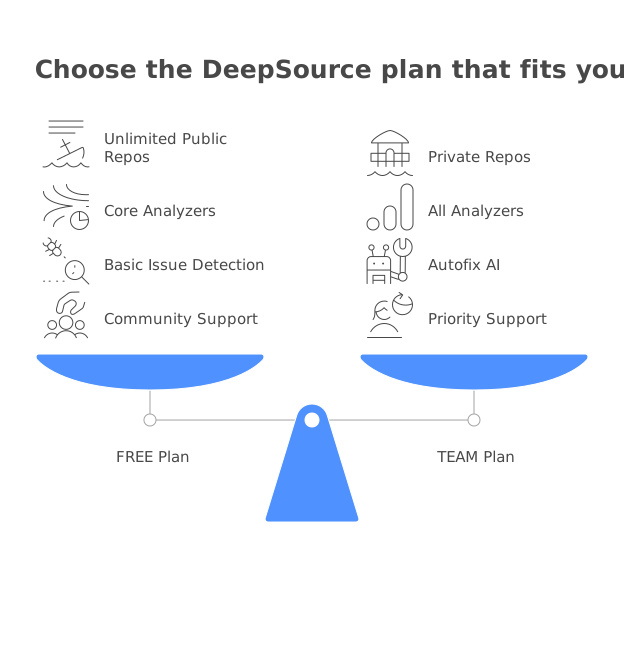
The Open Source plan provides access to DeepSource’s static analysis engine at no cost for public repositories. Here is what you get:
- Unlimited public repositories - connect as many public repos as your organization maintains
- Unlimited team members - no cap on the number of people who can access the dashboard
- 5,000+ static analysis rules - the same rule set available on paid plans, covering bugs, anti-patterns, security issues, and code smells
- 1,000 pull request reviews per month - automated analysis on every PR, up to the monthly limit
- 1,000 automated code formatting runs per month - DeepSource can format code automatically on PRs
- 12+ language support - Python, JavaScript, TypeScript, Go, Ruby, Java, Rust, C#, Kotlin, PHP, Scala, and Swift
- AI Review and Autofix on a pay-as-you-go basis - available but not bundled or unlimited
The static analysis engine on the free plan is not a watered-down version. You get the same 5,000+ rules, the same sub-5% false positive rate, and the same detection quality that paid users receive. DeepSource does not throttle analysis accuracy based on plan tier.
Hard Limits on the Free Plan
While the free plan offers genuine analytical value, several hard limits constrain its usefulness for professional teams:
No private repository support. This is the most consequential limitation. If your codebase is in private repositories - as is the case for virtually every commercial software team - the free plan simply cannot analyze your code. There is no workaround, no exception, and no way to selectively analyze a subset of private repos on the free tier.
1,000 monthly PR review cap. For most open-source projects, 1,000 reviews per month is generous. A project would need to merge more than 33 PRs per day to hit this limit. But very active projects with multiple contributors and frequent pull requests could approach this ceiling.
No bundled AI Review credits. AI Review - DeepSource’s AI-powered pull request analysis that provides structured feedback across bug risk, anti-patterns, performance, security, and documentation - is available only on a pay-as-you-go basis. Each interaction is charged at $8 per 100,000 input tokens and $4 per 1,000 fixed lines. Without bundled credits, regular use of AI Review adds up quickly.
No unlimited Autofix. DeepSource Autofix generates context-aware code fixes for detected issues. On the free plan, Autofix is pay-as-you-go rather than unlimited. For teams that rely on automated remediation as a core part of their workflow, this means unpredictable costs or limited usage.
No monorepo support. Teams using monorepo architectures cannot configure DeepSource’s monorepo features on the free plan. This limits the ability to set up per-project analysis configurations within a single repository.
No audit logs. Compliance-conscious teams that need to track who accessed what and when cannot get audit trail data on the free plan.
No API or webhook access. The free plan does not provide programmatic access to DeepSource’s data. Teams that want to integrate DeepSource into CI/CD pipelines, export findings to other systems, or build custom workflows around analysis results need the paid plan.
Standard support only. Free plan users receive standard support without priority response times. For teams that need timely issue resolution, this can be a bottleneck.
What the DeepSource Team Plan Adds
The Team plan at $24/user/month (annual billing) is DeepSource’s primary commercial offering. It evolved from the former Business plan, and existing Business customers were migrated at no additional cost. This is the plan most engineering teams will subscribe to, and it removes every limitation of the free tier while adding substantial new capabilities.
Complete Feature Set
Private and public repository support. The Team plan analyzes both private and public repositories with no restrictions. Connect your entire codebase regardless of visibility settings.
Unlimited Autofix. Every issue detected by DeepSource’s 5,000+ rules can receive an auto-generated fix at no additional per-fix cost. This is one of the most significant differences from the free plan, where Autofix runs are metered. For a detailed breakdown of how Autofix works and the value it delivers, see our DeepSource Autofix guide.
$120 in bundled AI Review credits per user per year. Each Team plan user receives $10/month equivalent in AI Review credits. For most developers opening 3-5 PRs per week with moderate-sized diffs, the bundled credits cover the full year’s usage. This effectively makes AI Review a no-additional-cost feature for typical development patterns.
Unlimited pull request reviews. The 1,000 monthly cap on the free plan is removed entirely. Your team can process as many PRs as needed without worrying about hitting a ceiling.
OSS dependency scanning. The Team plan includes 3 OSS dependency scanning targets for vulnerability detection and license compliance monitoring. Additional targets cost $8/target/month.
Security scanning. Comprehensive security analysis covering OWASP Top 10 and SANS Top 25 vulnerability patterns, plus secrets detection for 30+ services.
PR report cards. Every pull request receives a structured report card with scores across five dimensions - bug risk, anti-patterns, performance, security, and documentation. This provides developers with immediate, actionable feedback.
Monorepo support. Full monorepo configuration capabilities including per-project analysis settings within a single repository.
Audit logs. Complete audit trail of team activity for compliance and governance requirements.
API and webhook access. Programmatic access to DeepSource’s analysis data for CI/CD integration, custom reporting, and workflow automation.
Priority support. Faster response times compared to the free plan’s standard support.
Pricing Details
The Team plan pricing structure includes several nuances worth understanding:
- $24/user/month with annual billing - the lowest available per-seat rate
- Approximately $30/user/month with monthly billing - 20% more expensive than annual
- Committer-based billing - only users who actively push code to analyzed repositories count toward your bill. Users with the Contributor role are excluded from the committer count
- 14-day free trial - includes up to $50 in AI Review credits, no credit card required
The committer-based billing model is a genuine cost advantage. If your 10-person engineering team includes 2 people who primarily review code without committing (tech leads, engineering managers), you pay for 8 seats instead of 10. For a deeper look at all pricing details, see our DeepSource pricing guide.
DeepSource Enterprise Plan
The Enterprise plan exists for organizations with requirements that go beyond the Team plan’s capabilities. It comes in two variants - Enterprise Cloud and Enterprise Server (self-hosted) - and both require contacting sales for custom pricing.
What Enterprise Adds Over Team
Self-hosted deployment (Enterprise Server). Run DeepSource on your own infrastructure, which is mandatory for organizations in regulated industries where source code cannot leave the corporate network.
Enterprise Cloud. A cloud-hosted variant with advanced security configurations beyond the standard Team plan deployment.
SSO/SCIM authentication. Integration with identity providers like Okta, Azure AD, and other SAML/SCIM-compliant systems for centralized user management.
Airgapped deployment. Support for environments with no internet connectivity - critical for defense, government, and classified project work.
IP restrictions. Network-level access controls that restrict which IP addresses can reach the DeepSource instance.
SLA-backed priority support. Guaranteed response times, unlike the Team plan’s priority support which does not carry contractual SLA commitments.
Dedicated account manager. A named point of contact for strategic guidance and issue escalation.
Migration assistance. Help transitioning from other code quality tools, including configuration mapping and data migration.
Custom contract terms and manual invoicing. Procurement-friendly billing options for organizations that cannot use standard credit card or automatic payment methods.
When Enterprise Is Necessary
The Enterprise plan is not about getting more analysis features - the Team plan includes everything DeepSource offers in terms of analysis, Autofix, and AI Review. Enterprise is about deployment flexibility, security controls, and compliance requirements. If your organization mandates SSO for all vendor tools, requires self-hosted deployment for data sovereignty, or needs SLA-backed support as a procurement prerequisite, Enterprise is your only option.
Estimated Enterprise pricing based on industry patterns for similar platforms: Enterprise Cloud at roughly $36-48/user/month (1.5-2x Team), and Enterprise Server at roughly $48-72/user/month (2-3x Team). Actual pricing depends on team size, contract length, and negotiation.
Feature Comparison Table: Free vs Team vs Enterprise
The following table provides a complete side-by-side comparison of what each DeepSource plan includes.
| Feature | Open Source (Free) | Team ($24/user/mo) | Enterprise (Custom) |
|---|---|---|---|
| Public repositories | Unlimited | Unlimited | Unlimited |
| Private repositories | Not supported | Unlimited | Unlimited |
| Team members | Unlimited | Unlimited | Unlimited |
| Static analysis rules | 5,000+ | 5,000+ | 5,000+ |
| Languages supported | 12+ | 12+ | 12+ |
| Monthly PR reviews | 1,000 | Unlimited | Unlimited |
| Code formatting runs | 1,000/month | Unlimited | Unlimited |
| Autofix AI | Pay-as-you-go | Unlimited | Unlimited |
| AI Review | Pay-as-you-go | $120/user/year bundled | $120/user/year bundled |
| PR report cards | Basic | 5-dimension | 5-dimension |
| Security scanning (OWASP/SANS) | Basic | Full | Full |
| Secrets detection | No | 30+ services | 30+ services |
| OSS dependency scanning | No | 3 targets included | Included |
| Monorepo support | No | Yes | Yes |
| Audit logs | No | Yes | Yes |
| API and webhook access | No | Yes | Yes |
| Priority support | No | Yes | SLA-backed |
| SSO/SCIM | No | No | Yes |
| Self-hosted deployment | No | No | Yes |
| Airgapped deployment | No | No | Yes |
| IP restrictions | No | No | Yes |
| Dedicated account manager | No | No | Yes |
| Custom contract terms | No | No | Yes |
The gap between Free and Team is substantial. The gap between Team and Enterprise is primarily about deployment and governance, not analysis capabilities.
Pricing Breakdown by Team Size
Understanding the actual dollar cost at your team’s scale helps with budgeting and comparison. All calculations below use the Team plan’s annual billing rate of $24/user/month.
Solo Developer
| Plan | Monthly Cost | Annual Cost |
|---|---|---|
| Open Source (public repos) | $0 | $0 |
| Team - monthly billing | $30 | $360 |
| Team - annual billing | $24 | $288 |
For a solo developer, the decision hinges entirely on whether you need private repository analysis. If your work is open source, the free plan provides everything you need. For private repos, $288/year on annual billing is a modest investment that includes unlimited Autofix and AI Review credits.
5-Developer Team
| Plan | Monthly Cost | Annual Cost |
|---|---|---|
| Open Source (public repos) | $0 | $0 |
| Team - monthly billing | $150 | $1,800 |
| Team - annual billing | $120 | $1,440 |
| Annual savings (monthly vs annual) | $30/month | $360/year |
At five developers, the Team plan costs less than a single day of the team’s combined salary in most markets. The $1,440 annual cost is easy to justify given the unlimited Autofix and AI Review capabilities. Committer-based billing may reduce this further if not all five team members actively push code.
10-Developer Team
| Plan | Monthly Cost | Annual Cost |
|---|---|---|
| Team - monthly billing | $300 | $3,600 |
| Team - annual billing | $240 | $2,880 |
| Annual savings | $60/month | $720/year |
Bundled AI Review credits: $1,200/year ($120 per user x 10 users). The $720 annual savings from annual billing justify locking in the commitment if you plan to use DeepSource for more than 6 months.
25-Developer Team
| Plan | Monthly Cost | Annual Cost |
|---|---|---|
| Team - monthly billing | $750 | $9,000 |
| Team - annual billing | $600 | $7,200 |
| Annual savings | $150/month | $1,800/year |
At 25 developers, DeepSource becomes a meaningful budget item. The committer-based billing model becomes increasingly valuable at this scale. If 5 of your 25 team members are non-committing (managers, tech leads who review but rarely push, QA engineers), you effectively pay for 20 seats - reducing the annual cost to $5,760.
50-Developer Team
| Plan | Monthly Cost | Annual Cost |
|---|---|---|
| Team - monthly billing | $1,500 | $18,000 |
| Team - annual billing | $1,200 | $14,400 |
| Annual savings | $300/month | $3,600/year |
At 50 developers, negotiate directly with DeepSource for volume discounts. Organizations at this scale often qualify for custom pricing that reduces per-seat costs by 10-25%. Also evaluate whether Enterprise features (SSO, self-hosted deployment) are requirements - if so, expect higher per-seat pricing.
Who Should Stay on the Free Plan
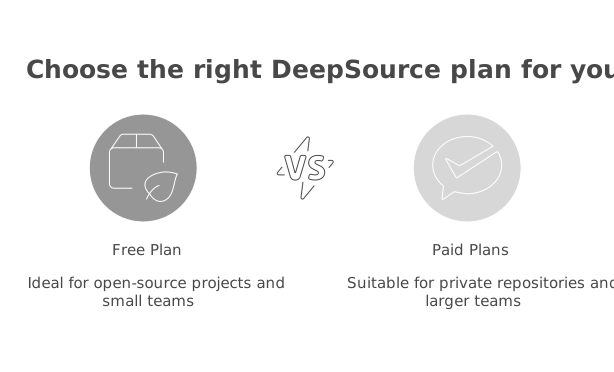
The free Open Source plan is genuinely useful for specific use cases, and there is no reason to pay if the free tier meets your needs.
Open-source maintainers and organizations. If all your repositories are public, the free plan gives you full access to DeepSource’s static analysis engine with 5,000+ rules. The 1,000 monthly PR review limit accommodates even highly active open-source projects. You get unlimited team members, so your entire contributor community can access the dashboard.
Teams evaluating DeepSource before purchasing. Use the Open Source plan on a public repository to experience the analysis quality, interface, and workflow before committing budget for private repos. This approach lets you test DeepSource over weeks or months without cost pressure, unlike the 14-day trial which has a fixed window.
Projects that do not need AI features regularly. If your primary interest is rule-based static analysis on public repos and you only need AI Review or Autofix occasionally, the pay-as-you-go model on the free plan keeps your base cost at zero while giving you access to AI features when needed.
Educational and learning projects. Students, bootcamp participants, and developers building portfolio projects in public repos can use DeepSource’s full analysis capabilities for free. There is no academic verification process required - the plan is open to all public repositories.
Who Should Upgrade to Team
The Team plan is necessary - not optional - in several scenarios.
Any team with private repositories. This is the simplest and most common trigger for upgrading. The free plan offers zero private repository support. Even a solo developer with a single private side project needs the Team plan to analyze it. For a broader perspective on is DeepSource free for your use case, see our dedicated guide.
Teams that rely on automated code fixes. If your team processes many PRs daily and expects automated remediation for detected issues, the unlimited Autofix on the Team plan eliminates usage concerns and cost unpredictability. On the free plan, every Autofix run costs money, which creates friction around using the feature.
Teams that want AI-powered PR feedback. The $120/year per user in bundled AI Review credits makes AI-powered pull request analysis effectively free for most developers’ normal volume. Without bundled credits, a team that uses AI Review regularly will accumulate meaningful pay-as-you-go charges.
Organizations with compliance requirements. Audit logs, API access for integration with security dashboards, and webhook support for automated alerting are all Team plan features. If your organization needs these for SOC 2, ISO 27001, or internal compliance programs, the Team plan is the minimum viable tier.
Monorepo teams. If your organization uses a monorepo architecture with per-project analysis configurations, the Team plan’s monorepo support is essential. The free plan does not offer this capability.
Teams that need integrations beyond basic Git. If you want DeepSource integrated into CI/CD pipelines, connected to project management tools, or feeding data into custom dashboards via API, the Team plan’s API and webhook access is required.
ROI Analysis: Is the Upgrade Worth It?
The financial case for upgrading from the DeepSource free plan to Team centers on two primary value drivers: Autofix time savings and false positive rate reduction.
Autofix Time Savings
When a static analysis tool detects an issue and a developer must fix it manually, the typical workflow consumes 9-37 minutes per fix - reading the finding, navigating to the code, determining the correct fix, implementing it, and verifying nothing broke. The average is roughly 15 minutes per manual fix.
With unlimited Autofix on the Team plan, this process shrinks to 1-3 minutes per fix - reviewing the auto-generated fix and clicking to apply it.
Conservative ROI calculation assuming $75/hour loaded developer cost:
| Team Size | Weekly Fixes | Time Saved/Week | Monthly Value Saved | DeepSource Monthly Cost | Monthly Net Savings |
|---|---|---|---|---|---|
| 5 devs | 50 | 10.8 hours | $3,250 | $120 | $3,130 |
| 10 devs | 100 | 21.7 hours | $6,500 | $240 | $6,260 |
| 25 devs | 250 | 54.2 hours | $16,250 | $600 | $15,650 |
Even cutting these estimates in half - 5 fixes per developer per week instead of 10, and 10 minutes saved per fix instead of 13 - the ROI remains strongly positive. A 10-developer team would still save approximately $2,700/month against $240/month in subscription costs, an 11x return.
False Positive Rate Impact
DeepSource’s sub-5% false positive rate means developers spend almost no time triaging irrelevant findings. Many competing tools operate at 15-25% false positive rates, which compounds wasted time across the team.
For a 25-developer team processing 250 findings per week:
- At 20% false positive rate (typical competitor): 50 false positives x 10 minutes = 8.3 hours wasted weekly
- At 5% false positive rate (DeepSource): 12.5 false positives x 10 minutes = 2.1 hours wasted weekly
- Weekly time savings: 6.2 hours ($465/week or $24,180/year)
This false-positive savings alone nearly covers a 25-developer team’s annual DeepSource cost of $7,200.
Break-Even Analysis
At $24/user/month and a $75/hour loaded developer cost, DeepSource needs to save each developer just 19 minutes per month to break even. That is less than one automated fix per week. For any team that processes PRs regularly, this threshold is trivially easy to exceed.
How DeepSource Compares to Alternatives
When evaluating whether the DeepSource free plan is sufficient or a paid plan makes more sense, it helps to understand how DeepSource’s pricing and features stack up against competitors. For a broader comparison, see our DeepSource alternatives guide.
DeepSource vs Codacy
Codacy is a code quality and security platform that competes directly with DeepSource’s paid tiers, and it undercuts them on price.
| Aspect | DeepSource Free | DeepSource Team | Codacy Pro |
|---|---|---|---|
| Starting price | $0 | $24/user/month | $15/user/month |
| Private repos | No | Yes | Yes |
| AI code review | Pay-as-you-go | Bundled credits | Included |
| Static analysis rules | 5,000+ | 5,000+ | Multi-analyzer |
| Autofix | Pay-as-you-go | Unlimited | Available |
| Languages | 12+ | 12+ | 49 |
| Security scanning | Basic | Comprehensive | SAST, SCA, secrets |
Codacy is the better fit for teams that want broad language coverage and a bundled security suite behind enforceable quality gates. DeepSource is the better fit for teams that value a low false positive rate and deterministic one-click fixes. On price, Codacy Pro sits below DeepSource Team, which matters most for teams sizing up their first paid plan.
DeepSource Free vs SonarQube Community Build
SonarQube’s free Community Build is worth considering for teams that need private repository analysis without paying for DeepSource Team. The Community Build is self-hosted and supports both public and private repositories at zero license cost. However, it lacks PR analysis, branch analysis, and many advanced security rules. Teams that can manage self-hosted infrastructure get more flexibility from SonarQube Community Build, while teams that want a zero-maintenance cloud experience get better value from DeepSource’s free plan on public repos.
The Middle Ground
For teams that find DeepSource’s free plan too limited but the Team plan too expensive, few middle-ground options exist within DeepSource’s own pricing structure. The former Starter plan at $8/seat/month was deprecated for new customers. The best approach is to use the 14-day free trial to validate the Team plan’s value, then commit to annual billing for the 20% savings. For a complete look at pricing across all tiers, see our DeepSource pricing guide.
Feature Deep Dive: What Changes When You Upgrade
Understanding the practical impact of each paid feature helps determine whether the upgrade delivers real value for your specific workflow.
Autofix: From Metered to Unlimited
On the free plan, every Autofix run has a cost. This creates a natural hesitation - developers may skip applying fixes because they know each one consumes credits. On the Team plan, Autofix is unlimited. Developers can apply every suggested fix without thinking about cost, which changes the dynamic from “should I use this fix?” to “is this fix correct?” This behavioral shift is significant because it removes the friction that prevents teams from fully adopting automated remediation.
AI Review: From Pay-As-You-Go to Bundled
AI Review provides five-dimension feedback on every PR - bug risk, anti-patterns, performance, security, and documentation. On the free plan, each AI Review interaction costs money. On the Team plan, the $120/year per user in bundled credits means most developers never see overage charges. The result is that AI Review becomes a default part of the PR workflow rather than an optional extra that requires budget approval.
Audit Logs and API Access: From None to Full
These features may seem like checkboxes, but they matter for operational maturity. Audit logs let you track who changed analysis configurations, who suppressed findings, and who accessed the dashboard. API access lets you build automated workflows - piping DeepSource findings into Jira tickets, triggering Slack notifications for critical issues, or generating custom reports for engineering leadership. Without these capabilities, DeepSource operates as a standalone tool. With them, it integrates into your broader engineering platform.
Security Scanning: From Basic to Comprehensive
The free plan includes basic security analysis through static analysis rules that catch common vulnerability patterns. The Team plan adds comprehensive security scanning with OWASP Top 10 and SANS Top 25 coverage, plus secrets detection for 30+ services. For teams that handle sensitive data, process payments, or operate in regulated industries, the expanded security scanning on the Team plan is not optional - it is a baseline requirement.
Making the Decision: A Practical Framework
The decision between the DeepSource free plan and a paid plan is not complex once you answer a few straightforward questions.
Question 1: Do you have private repositories? If yes, you need the Team plan. There is no alternative on the free tier - the Open Source plan cannot analyze private code under any circumstances.
Question 2: Are you an open-source-only organization? If yes, the free plan likely covers your needs. The 1,000 monthly PR review limit is generous for most projects, and you get the full static analysis engine.
Question 3: Is automated code fixing a priority? If yes, the Team plan’s unlimited Autofix transforms DeepSource from a detection tool into a remediation tool. The ROI from automated fixes typically exceeds the subscription cost within the first month.
Question 4: Do you need compliance features? If audit logs, API access, or webhook integrations are requirements for your compliance program, the Team plan is the minimum viable tier.
Question 5: Is your budget constrained? If $24/user/month is a stretch, start with the 14-day free trial to validate value, then consider annual billing for the 20% savings. At $288/year for a solo developer or $1,440/year for a five-person team, the Team plan is one of the more affordable code quality investments available.
For teams that decide to explore options beyond DeepSource entirely, our DeepSource review provides a comprehensive evaluation of the platform’s strengths and limitations, and our DeepSource alternatives guide covers 10 competing tools with detailed feature and pricing comparisons.
Summary
The DeepSource free Open Source plan is a genuinely capable static analysis tool for public repositories. It provides 5,000+ rules, unlimited team members, and 1,000 monthly PR reviews at zero cost. For open-source projects, it delivers substantial value without any financial commitment.
The gap between free and paid is defined primarily by private repository support, unlimited Autofix, bundled AI Review credits, and operational features like audit logs and API access. For any team working on proprietary code, the Team plan at $24/user/month is not just recommended - it is required. The ROI calculation strongly favors the investment: at a $75/hour loaded developer cost, DeepSource needs to save each developer less than 20 minutes per month to break even, and the combination of automated fixes and low false positive rates typically delivers many times that threshold.
Start with the 14-day free trial if you have private repositories, or the Open Source plan if your code is public. Either way, you can evaluate the analysis quality risk-free before committing budget.
Further Reading
- Best AI Code Review Tools in 2026 - Expert Picks
- Best AI Code Review Tools for Pull Requests in 2026
- 13 Best Code Quality Tools in 2026 - Platforms, Linters, and Metrics
- 12 Best Free Code Review Tools in 2026 - Open Source and Free Tiers
- I Reviewed 32 SAST Tools - Here Are the Ones Actually Worth Using (2026)
 Gitar
GitarComments are not enough
Gitar applies the fix, validates it in CI, and clears the queue.
See it on your repo Read our independent Gitar reviewFrequently Asked Questions
What is the difference between DeepSource free and paid plans?
The DeepSource free Open Source plan supports only public repositories with 1,000 monthly PR reviews, 1,000 code formatting runs, and pay-as-you-go AI Review and Autofix. The paid Team plan at $24/user/month adds private repository support, unlimited Autofix, $120/year in bundled AI Review credits per user, monorepo support, audit logs, API and webhook access, OSS dependency scanning, and priority support. The Enterprise plan adds self-hosted deployment, SSO/SCIM, airgapped environments, IP restrictions, and SLA-backed support.
Is the DeepSource free plan enough for professional use?
The DeepSource free Open Source plan is sufficient for open-source projects with public repositories. It provides full access to 5,000+ static analysis rules, unlimited team members, and 1,000 monthly PR reviews. However, it does not support private repositories at all, which makes it inadequate for any professional team working on proprietary code. Teams with private repos must subscribe to the Team plan at $24/user/month to use DeepSource.
What are the limits of the DeepSource free tier?
The DeepSource free tier limits include: public repositories only (no private repo support), 1,000 pull request reviews per month, 1,000 automated code formatting runs per month, no bundled AI Review credits (pay-as-you-go only), no unlimited Autofix (pay-as-you-go only), no monorepo support, no audit logs, no API or webhook access, no OSS vulnerability scanning or license compliance, and standard support only. The most significant limitation is the complete absence of private repository analysis.
How much does DeepSource Team plan cost?
The DeepSource Team plan costs $24 per user per month with annual billing, or approximately $30 per user per month with monthly billing. Annual billing saves up to 20%. Each Team plan user receives $120 in bundled AI Review credits per year. DeepSource uses committer-based billing, meaning only users who actively push code to analyzed repositories are charged. A 14-day free trial is available with up to $50 in AI Review credits and no credit card required.
What happened to the DeepSource Free plan for private repos?
DeepSource deprecated the original Free plan in February 2026 and replaced it with the Open Source plan. The old Free plan supported up to 3 private repositories and 3 team members with 500 analysis runs and 50 Autofix runs per month. The new Open Source plan removes private repository support entirely and is designed exclusively for open-source organizations with public repos. Existing Free plan users were automatically migrated on March 23, 2026. Users who need private repository analysis must now subscribe to the Team plan.
Is it worth upgrading from DeepSource free to paid?
Upgrading from DeepSource free to the Team plan is worth it if you have private repositories (the free plan does not support them), need unlimited Autofix for automated code remediation, want bundled AI Review credits for AI-powered PR feedback, require audit logs for compliance, or need API and webhook access for CI/CD integration. At $24/user/month, the Team plan typically pays for itself if it saves each developer more than 20 minutes per month through automated fixes and reduced false positive triage time.
Does DeepSource offer a free trial of the paid plan?
Yes, DeepSource offers a 14-day free trial of the Team plan with no credit card required. The trial includes up to $50 in AI Review credits so you can evaluate the full feature set including AI-powered pull request analysis, unlimited Autofix, monorepo support, audit logs, and priority support. After the trial ends, you can continue on the free Open Source plan for public repos or subscribe to the Team plan to retain access to private repositories and premium features.
How does DeepSource free compare to Codacy pricing?
DeepSource's free Open Source plan is limited to public repositories, so private repos require the Team plan at $24/user/month. Codacy's free Developer tier is an IDE extension rather than a repository plan, and its Pro plan covers private repositories at $15/user/month with unlimited users and scans. Both tools offer different strengths - DeepSource excels at static analysis with a sub-5% false positive rate and one-click Autofix, while Codacy covers more languages and bundles SAST, SCA, and secrets detection behind quality gates.
What features do you lose on the DeepSource free plan?
On the DeepSource free Open Source plan, you lose access to: private repository analysis, unlimited Autofix (limited to pay-as-you-go), bundled AI Review credits ($120/year per user on Team), monorepo support, audit logs, API and webhook access, OSS dependency scanning and license compliance, role-based access control beyond basic permissions, integrations beyond basic Git platform connections, and priority support. The most impactful missing feature for most teams is private repository support, without which the tool cannot analyze proprietary code.
Can I use DeepSource free for commercial projects?
You can use the DeepSource free Open Source plan for commercial projects only if those projects are in public repositories. The free plan does not support private repositories at all. If your commercial code is in private repos - as is the case for the vast majority of businesses - you must subscribe to the Team plan at $24/user/month. There is no workaround or exception to this limitation. The 14-day free trial of the Team plan lets you evaluate DeepSource on private repositories before committing to a subscription.
What is the best DeepSource plan for small teams?
For small teams of 3-10 developers working on private repositories, the Team plan at $24/user/month with annual billing is the only viable option. The free Open Source plan does not support private repos. Start with the 14-day free trial, then subscribe to monthly billing during your evaluation period, and switch to annual billing (saving 20%) once you confirm DeepSource fits your workflow. A 5-developer team pays $1,440/year on annual billing. DeepSource's committer-based billing means you only pay for team members who actively push code.
Does the DeepSource free plan include AI features?
The DeepSource free Open Source plan includes access to AI Review and Autofix, but only on a pay-as-you-go basis. There are no bundled credits or unlimited usage included. Each AI Review interaction and Autofix run is charged at the standard overage rate of $8 per 100,000 input tokens and $4 per 1,000 fixed lines. The Team plan at $24/user/month includes unlimited Autofix and $120 in bundled AI Review credits per user per year, making AI features effectively included in the subscription cost.
Explore More
Tool Reviews
 DeepSource Review
 Codacy Review
Free Newsletter
Stay ahead with AI dev tools
Weekly insights on AI code review, static analysis, and developer productivity. No spam, unsubscribe anytime.
Join developers getting weekly AI tool insights.
Related Articles
CodeRabbit vs Qodo: AI Code Review Tools Compared (2026)
CodeRabbit vs Qodo - we compare pricing, features, test generation, and review quality so you can pick the right AI reviewer for your team.
February 21, 2026
comparisonWhat Happened to CodiumAI? The Rebrand to Qodo Explained
CodiumAI rebranded to Qodo in 2024. Here's what changed, what stayed the same, and what it means for existing users and new buyers.
February 22, 2026
comparisonGitar vs Qodo: Workflow Automation or Test Generation?
Gitar vs Qodo compared on review architecture, test generation, self-hosting, migrations, CI ownership, and pricing. Which AI code quality platform fits your team.
August 12, 2026