Sourcery vs Black: Code Refactoring vs Code Formatting (2026)
Sourcery vs Black - AI refactoring platform vs opinionated Python formatter. How they differ, when to use each, and how they work together.
Published:
Last Updated:
Quick Verdict
Sourcery and Black are two of the most commonly mentioned Python code quality tools, but comparing them directly misses the point - they operate at entirely different layers of code quality and are not alternatives to each other.
Black is a Python code formatter. It takes your code and rewrites it so that every line, every bracket, every string quote, and every blank line follows a consistent, opinionated style. It makes no judgment about whether your logic is good, whether your functions are too complex, or whether a loop could be simplified. Black’s job is to make your code look consistent. It does that job completely and automatically.
Sourcery is an AI-powered code review and refactoring platform. It makes no attempt to format your code - whitespace, indentation, and punctuation are Black’s territory. Sourcery analyzes what your code does and asks whether it could do it more cleanly: could this loop be a comprehension, could this condition be simplified, could this function be split, could this class benefit from being a dataclass? It provides that feedback in your IDE and on pull requests, with specific suggestions and explanations.
The clearest summary: Black changes how code looks. Sourcery changes how code is structured. A Python team using both gets automatic formatting enforcement plus structural code quality review - two different problems solved by two different tools, neither of which is a substitute for the other.
Use Black (or its equivalent) unconditionally: Every Python project needs a code formatter. Black (or Ruff’s formatter, which produces identical output) eliminates the entire category of formatting-related code review comments, makes diffs cleaner, and requires zero ongoing developer attention once configured. There is no reasonable argument against using a formatter for Python in 2026.
Add Sourcery when structural quality matters to your team: If your team cares about code that is not just correctly formatted but actually clean, idiomatic, and well-structured Python - if your code reviews include comments like “this should be a list comprehension” or “this function is too complex” - Sourcery catches those issues automatically, before human reviewers spend time on them.
At-a-Glance Comparison
| Category | Sourcery | Black |
|---|---|---|
| Primary purpose | AI-powered code review and refactoring | Opinionated Python code formatter |
| What it changes | Code structure, logic, patterns, complexity | Whitespace, indentation, line breaks, quotes |
| Analysis approach | AI reasoning + rules-based static analysis | Deterministic AST-based formatting |
| Speed | Seconds to minutes (PR analysis) | Fast (Python-based, but not instant like Rust tools) |
| Language | Python (deepest), JavaScript, TypeScript, 30+ others | Python only |
| Runs where | GitHub/GitLab PR review, VS Code, PyCharm IDE | Editor (on save), CLI, pre-commit hooks, CI |
| Formatting | No | Yes - complete, opinionated formatting |
| Refactoring suggestions | Yes - 300+ Python patterns plus AI reasoning | No |
| Configuration options | .sourcery.yaml, custom guidelines | Minimal - line length, magic trailing comma |
| PR integration | Native - posts inline comments on every PR | No - requires CI configuration |
| IDE feedback | VS Code and PyCharm extensions with real-time suggestions | VS Code extension (format on save) |
| Security scanning | Team plan: security scans for 200+ repos | No |
| Open source | No | Yes (MIT license) |
| Pricing | Free (open source); Pro $10/user/month; Team $24/user/month | Completely free |
| Git platforms | GitHub, GitLab (no Bitbucket, no Azure DevOps) | Not tied to any platform - runs anywhere |
| Pre-commit support | Via GitHub/GitLab integration | Yes - official pre-commit hook |
What Is Black?
Black is an opinionated Python code formatter created by Lukasz Langa and maintained by the Python Software Foundation. First released in 2018, Black has become the dominant Python formatting standard for new projects, with widespread adoption across open-source projects, companies, and individual developers.
Black’s defining characteristic is its opinionated nature. It offers almost no configuration options by design. You set the line length (88 characters by default) and optionally enable the skip-magic-trailing-comma flag, and that is essentially the full configuration surface. Every other formatting decision - string quote normalization (double quotes everywhere), trailing comma placement, parenthesis wrapping, blank line counts between functions and classes, how to break long function call arguments - is made by Black and not negotiable.
This design philosophy is intentional and is Black’s core value proposition. By eliminating formatting choices, Black eliminates formatting debates. Teams stop arguing about whether to use single or double quotes in code review, whether a particular line break placement is better, or whether trailing commas should be used in argument lists. Black decides, Black enforces, and the discussion is over. Code review time that was previously spent on mechanical style observations is freed for discussions that actually matter: logic, design, correctness.
Black works by parsing Python source code into an abstract syntax tree (AST), then regenerating the code from that AST according to its own formatting rules. This guarantees that Black never introduces semantic changes - the code it outputs is always logically identical to the code it received. The transformation is purely presentational.
Black is completely free under the MIT license. The Black CLI, VS Code extension, and pre-commit hook are all available at no cost. Official Black support is available through its GitHub repository and the PSF.
How Black Fits in the Python Toolchain
Black handles formatting. It does not handle linting (use Ruff or Flake8 for that), import sorting (Ruff’s isort integration handles this), type checking (use Mypy or Pyright), or structural code quality review (use Sourcery or CodeRabbit). A modern Python quality stack uses Black (or ruff format as its replacement) as the formatting layer, with other specialized tools handling each additional dimension of quality.
The most common migration path for teams modernizing their Python toolchain in 2026 is to replace Black with Ruff’s formatter (ruff format), which produces Black-compatible output 35x faster and allows teams to consolidate Black, Flake8, isort, and other tools into a single Ruff binary. For teams already using Black and satisfied with it, there is no pressing reason to switch - but new projects starting today tend to start with Ruff rather than Black.
What Is Sourcery?
Sourcery is an AI-powered code review and refactoring platform built specifically for teams that want to improve code quality beyond what formatters and deterministic linters can catch. Originally developed as a Python refactoring engine, Sourcery expanded into full AI-powered pull request review while maintaining its Python expertise as a core differentiator.
Sourcery’s analysis works in two layers: a rules-based static analysis engine that understands Python idioms at a semantic level, and an LLM-powered layer that reasons about code context, intent, and improvement opportunities. The rules-based layer covers approximately 300 Python refactoring patterns - things like recognizing when a for-loop building a list should be a list comprehension, when nested conditions can be flattened using early returns, when a method does not reference self and should be a @staticmethod, when enumerate() should replace range(len()). The LLM layer provides contextual judgment about whether a particular suggestion actually improves the code given its purpose and the surrounding codebase.
On GitHub and GitLab, Sourcery installs as an app and automatically reviews every pull request, posting inline comments with specific suggestions that show what the improved code would look like. This is qualitatively different from Black’s output - Black never posts suggestions because it just applies formatting automatically. Sourcery’s feedback is the kind of feedback that previously required a senior developer to write manually during code review.
Sourcery’s IDE extensions for VS Code and PyCharm provide real-time refactoring suggestions as developers write code, catching structural quality issues at the point of writing rather than waiting for a PR review cycle. The learning capability distinguishes Sourcery from static tools: when developers consistently dismiss a category of suggestion, Sourcery adapts its future reviews to reduce that type of comment. Teams report significantly less noise after a few weeks of use as Sourcery calibrates to their codebase conventions.
For a detailed breakdown of Sourcery’s capabilities, see the full Sourcery review. For comparisons with similar AI review tools, see CodeRabbit vs Sourcery and Sourcery vs Pylint.
Feature-by-Feature Breakdown
Code Formatting
This is entirely Black’s domain.
Black handles every aspect of Python code formatting through its opinionated rule set. When you run black myfile.py, Black rewrites the file to apply consistent indentation (4 spaces, always), consistent string quotes (double quotes, always), line length enforcement (88 characters by default, breaking long lines with appropriate parenthesization), trailing comma placement, blank line standardization between top-level definitions and class methods, and consistent bracket wrapping for function calls, definitions, and collections.
Crucially, Black is not configurable beyond line length and one additional flag. The formatting output is the same for every team running the same version of Black with the same line length setting. This consistency is intentional - the benefit of Black is that there is one correct formatting for any given piece of Python code, and everyone agrees because Black decides.
Sourcery does not format code. It does not touch whitespace, indentation, quotes, or punctuation. If you run Sourcery without a formatter, your code will get structural improvement suggestions but will not become consistently formatted. Sourcery and Black should both be present in a complete Python quality setup, and they will never conflict because they modify entirely different aspects of the code.
Code Refactoring and Structural Quality
This is Sourcery’s domain. Black does not touch it.
Sourcery identifies structural improvement opportunities that require semantic understanding. Representative examples of what Sourcery suggests that Black never will:
- Converting a
forloop that builds a list into a list comprehension with filtering - Simplifying nested
if/elif/elsechains into a single expression or early return - Replacing
range(len(x))iteration withenumerate(x)or direct iteration - Detecting when a method does not reference
selfand should be a@staticmethodor module-level function - Identifying when a function’s logic duplicates an existing built-in - using
any()instead of a manual loop check,max()with a key function instead of sort-then-index - Suggesting context manager usage (
withstatements) where manual resource management appears - Flagging functions that are overly long or complex relative to what they accomplish
These suggestions go to the heart of what distinguishes passable Python from good Python. A formatter makes code look consistent. Sourcery helps make code actually cleaner. For a detailed comparison of how Sourcery’s refactoring capabilities compare to a dedicated linter, see Sourcery vs Ruff and Sourcery vs Flake8.
Pull Request Integration
Sourcery has native, first-class PR integration. Install the Sourcery GitHub App or connect GitLab, and every pull request automatically receives a review with inline comments on the changed code. The review includes specific line-by-line suggestions showing what the improved code would look like, an overall PR summary in plain language, and optionally a structured review guide for human reviewers. Interactive commands like @sourcery-ai resolve dismiss all Sourcery comments after addressing them. This PR-native experience is designed to reduce the burden on human reviewers who would otherwise catch the same structural issues.
Black has no PR integration. Black is a command-line tool and a pre-commit hook - its output is applied or rejected at commit time, not at PR time. The standard approach for surfacing Black compliance in PRs is to run black --check in CI and fail the build if any files are not Black-formatted. This is effective but requires explicit CI configuration rather than plug-in-the-app simplicity.
IDE and Editor Support
Both tools have VS Code support, but their roles in the editor are different.
Black’s VS Code extension runs Black on file save, automatically reformatting the current file to Black’s standards. Developers write code, save, and Black silently enforces consistent formatting. There is nothing to review or dismiss - Black applies the formatting and the file is updated. This automatic-application model is appropriate for a formatter: formatting decisions are not a matter of developer judgment, so there is no reason to present them as suggestions.
Sourcery’s VS Code and PyCharm extensions present refactoring suggestions as code actions in the quick-fix menu. Developers see inline hints indicating that Sourcery has a suggestion for a particular section of code, then choose whether to apply it. This review-and-accept model is appropriate for structural suggestions that require developer judgment - not every list comprehension opportunity is worth taking, and Sourcery’s IDE integration lets developers make that call in context. The VS Code extension also includes a chat interface for asking questions about code and requesting explanations on demand.
Running both extensions simultaneously is the standard setup: Black formats on save, Sourcery surfaces structural suggestions for developer review.
Pre-commit Hook Integration
Black has an excellent, widely-used pre-commit hook. The psf/black hook is one of the most popular entries in the pre-commit ecosystem. Adding it to .pre-commit-config.yaml takes five minutes, and from that point every commit automatically formats all staged Python files with Black before completing. Developers never commit unformatted code. If Black makes changes, the commit is aborted and the developer re-stages the reformatted files - a brief interruption that quickly becomes invisible in day-to-day workflow.
Sourcery does not have a pre-commit hook in the traditional sense. Sourcery’s analysis is designed for pull requests and the IDE, not for the commit-time workflow. The reason is architectural: Sourcery’s AI analysis requires context beyond a single changed file, takes seconds rather than milliseconds, and involves LLM reasoning that is not appropriate for blocking every commit. Sourcery complements pre-commit tools rather than replacing them.
The recommended pre-commit setup for teams using Sourcery alongside Black is: Black (or ruff-format) for automatic formatting, Ruff for fast linting, and Sourcery at the PR level for deeper analysis. Each tool runs at the stage where it adds the most value.
Configuration
Black’s configuration is intentionally minimal. The only meaningful settings are line-length (default 88, set in pyproject.toml) and skip-magic-trailing-comma (a flag that changes how Black handles trailing commas in collections). That is essentially the full configuration surface. This minimalism is Black’s philosophy: the value of Black comes from removing formatting decisions, so adding configuration options defeats the purpose. Teams that want different formatting choices tend to use YAPF or autopep8, which offer more configuration at the cost of more decisions.
Sourcery’s configuration is richer. The .sourcery.yaml file in the repository root allows teams to enable or disable specific refactoring rules, set quality thresholds, specify the Python version target, and define custom coding guidelines in natural language. Custom guidelines allow teams to encode organizational conventions - not just coding style but architectural patterns, naming preferences, and project-specific best practices - that Sourcery then enforces during reviews. This flexibility goes substantially beyond what Black’s configuration supports and allows Sourcery’s suggestions to align closely with a team’s specific standards.
Pricing Comparison
Black Pricing
Black is completely free. The CLI, VS Code extension, and pre-commit hook are all open source under the MIT license. There is no paid tier, no enterprise edition, no per-seat pricing, and no usage limits. Black is maintained through open-source community contributions and the Python Software Foundation. The zero-cost model is absolute.
Sourcery Pricing
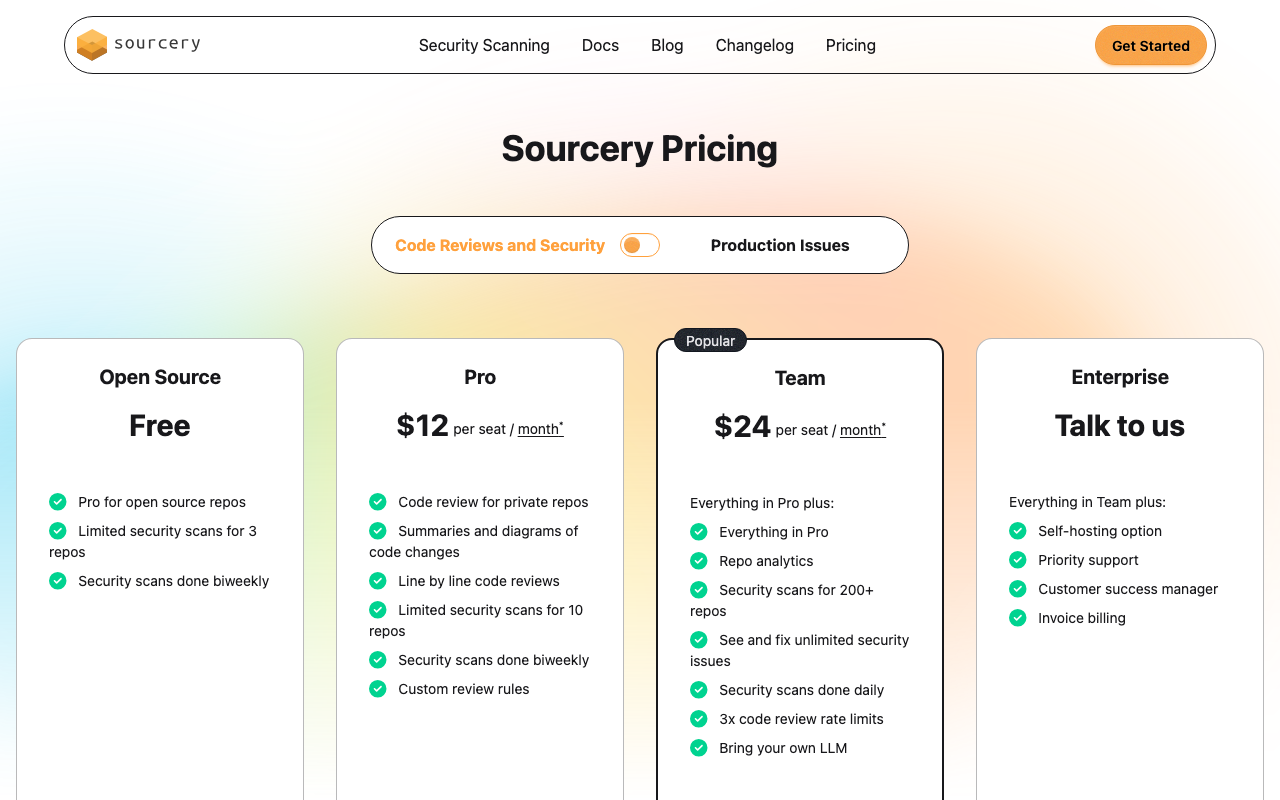
| Plan | Price | Key Capabilities |
|---|---|---|
| Free | $0 | Open-source repos only, AI code reviews, basic refactoring suggestions, GitHub integration |
| Pro | $10/user/month | Private repos, advanced AI reviews, custom coding guidelines, GitHub + GitLab (including self-hosted) |
| Team | $24/user/month | Everything in Pro plus repository analytics, security scanning (200+ repos), daily scans, 3x rate limits, bring-your-own-LLM |
| Enterprise | Custom | SSO/SAML, custom AI model tuning, self-hosted deployment, dedicated support, compliance features |
Annual billing reduces prices by approximately 20% across paid plans.
Cost at Scale
| Team Size | Black Cost (Annual) | Sourcery Pro (Annual) | Sourcery Team (Annual) |
|---|---|---|---|
| 1 developer | $0 | $120 | $288 |
| 5 developers | $0 | $600 | $1,440 |
| 10 developers | $0 | $1,200 | $2,880 |
| 20 developers | $0 | $2,400 | $5,760 |
| 50 developers | $0 | $6,000 | $14,400 |
Sourcery’s open-source free tier is genuinely useful. Open-source Python projects get full AI code reviews and refactoring suggestions at no cost on public repositories. The only restriction is private repos - as soon as private repo support is needed, the Pro plan at $10/user/month applies.
Comparing Sourcery against alternative AI code review tools: CodeRabbit’s Pro plan costs $24/user/month - matching Sourcery’s Team plan price, and more than double Sourcery’s Pro plan. At $10/user/month, Sourcery Pro undercuts most AI code review competitors significantly while providing deeper Python-specific refactoring. DeepSource at $24/user/month and CodeAnt AI at $24-40/user/month both provide broader platform features (quality dashboards, SAST, multi-language analytics) that Sourcery does not include at the Pro level.
Use Cases - When to Choose Each
When You Need Black (Always)
There is no scenario where a Python project should skip a code formatter. Black (or ruff format, which produces equivalent output) belongs in every Python project from the first commit. The argument is simple: formatting debates in code review waste time, inconsistent formatting makes diffs harder to read, and manual formatting enforcement is unreliable. Black solves all three problems completely and at no cost.
New projects: Start with Black configured in pyproject.toml from day one. Every developer working on the project will produce consistently formatted code without thinking about it.
Existing projects: Apply Black to the entire codebase in a single “formatting commit” that is isolated from functional changes. After the initial application, formatting is enforced automatically going forward. The one-time large diff is worth the ongoing benefit.
Open-source projects receiving contributions: Black is especially valuable when contributors have varying style backgrounds. A consistent formatting standard that is automatically enforced means contributors focus on the code logic in their PRs, not on style compliance.
When Sourcery Adds Meaningful Value
Python teams where code quality goes beyond style. If your team’s engineering values include not just “does it work and does it pass the linter” but “is this good Python” - if you invest in idiomatic, readable, well-structured code - Sourcery’s refactoring suggestions align directly with that priority. Sourcery catches the opportunities that Black and even a comprehensive linter like Ruff cannot: overly complex logic, loops that should be comprehensions, functions that are doing too much.
Teams with high PR volume where review time is a constraint. At five or more developers opening multiple PRs per day, the combined time spent on manual code review adds up quickly. Sourcery reduces reviewer burden by catching structural quality issues before human reviewers see the code - reviewers can focus on design decisions, correctness, and intent rather than pointing out refactoring opportunities they have mentioned in previous reviews.
Growing teams where Pythonic consistency is drifting. As teams grow, individual developers write Python with increasingly different patterns. Sourcery’s refactoring suggestions and custom guidelines provide a consistent quality floor that keeps codebases readable and maintainable across a larger group of contributors.
Open-source maintainers reviewing external contributions. Sourcery’s free tier on public repositories is a genuine benefit for maintainers receiving PRs from contributors with varying Python expertise. Sourcery catches refactoring opportunities in contributions before maintainers spend review time on them.
The Combined Stack for Python Teams
For most Python teams in 2026, the right configuration uses Black (or Ruff’s formatter) and Sourcery as complementary layers in a complete quality stack:
- ruff format (or Black) in pre-commit hooks - automatic formatting before every commit, zero developer attention required after initial setup.
- Ruff check in pre-commit hooks - fast linting with 800+ rules, auto-fix for correctable violations, catches style and bug-pattern issues in milliseconds.
- Ruff in CI - enforces the same linting and formatting standards across all branches, clean CI confirms no violations exist in committed code.
- Sourcery on PRs (GitHub or GitLab integration) - AI-powered refactoring suggestions and code quality review at the point where changes are reviewed, catching what formatters and linters cannot.
- Mypy or Pyright in CI - type checking as the fourth dimension of Python code quality, complementing formatting, linting, and structural review.
Each layer catches a different category of issue. Formatting (Black/ruff format) handles visual consistency. Linting (Ruff) handles rule-based patterns and style compliance. Structural review (Sourcery) handles logic and readability improvements. Type checking (Mypy/Pyright) handles type safety. None of these is redundant with the others.
For a broader view of how these tools fit together, see the best code quality tools guide and the best code review tools for Python roundup.
Alternatives to Consider
If you are evaluating options beyond Black and Sourcery for your Python quality stack, several alternatives are worth considering.
Ruff’s formatter (ruff format) is the most practical Black alternative in 2026. It produces output that is intentionally compatible with Black - the formatting is effectively identical in the vast majority of cases. Ruff’s formatter runs 35x faster than Black because Ruff is written in Rust, and using ruff format alongside ruff check means you get linting, import sorting, and formatting from a single binary rather than Black plus Flake8 plus isort as separate tools. For new projects, Ruff is the natural starting point. For existing projects using Black, switching to ruff format is straightforward and the output is functionally identical.
CodeRabbit ($24/user/month Pro) is the most capable AI code review tool for teams needing cross-file context awareness, multi-language coverage, and support for all four major git platforms (GitHub, GitLab, Bitbucket, Azure DevOps). CodeRabbit’s PR summaries and interactive chat on PRs are strong, and it handles polyglot codebases more naturally than Sourcery. The trade-off is that CodeRabbit costs 2.4x more than Sourcery Pro ($24 vs $10/user/month at the comparable tier), and Sourcery’s Python-specific refactoring depth exceeds CodeRabbit’s. See the CodeRabbit vs Sourcery comparison for a detailed breakdown.
DeepSource ($24/user/month Team plan) is a code quality platform with 5,000+ analysis rules across 16 languages, including a strong Python analyzer. DeepSource’s Autofix AI automatically generates ready-to-commit fix code for detected issues rather than just surfacing suggestions. If automated remediation at scale is important, DeepSource’s Autofix is more mature than Sourcery’s suggestion-based model. See the DeepSource vs Codacy comparison for platform-level context.
CodeAnt AI ($24-40/user/month) is a full-platform alternative for teams wanting to consolidate AI code review, SAST, secrets detection, IaC scanning, and DORA metrics into a single tool. At $24/user/month for the Basic plan and $40/user/month for Premium, CodeAnt AI covers all four major git platforms and provides engineering analytics dashboards that neither Black nor Sourcery offer. For Python teams that need security scanning and developer productivity metrics alongside code quality review, CodeAnt AI’s all-in-one approach reduces the number of vendors to manage.
autopep8 and YAPF are alternative Python formatters. autopep8 applies PEP 8 fixes more selectively than Black and is less opinionated - it will not necessarily change code that technically passes PEP 8 but would be formatted differently by Black. YAPF (Yet Another Python Formatter) from Google is more configurable than Black, allowing teams to define formatting preferences in a style file. Both tools have smaller ecosystems than Black in 2026 and are less likely to have pre-configured support in tools that assume Black or Ruff. For most teams, Black or ruff format is the better choice.
Pylint is worth considering as an addition to the stack for teams wanting deeper rule-based linting than Ruff provides. Pylint performs inter-file analysis, detects issues related to inheritance hierarchies, and runs checks that Ruff’s single-file analysis cannot replicate. It is significantly slower than Ruff, which is why most teams use Ruff for the fast daily feedback loop and run Pylint in CI for periodic deeper checks. See Sourcery vs Pylint for a comparison of AI-powered review versus deep rule-based linting.
Final Recommendation
Sourcery vs Black is not a choice. It is two tools solving two different problems, and a complete Python quality setup benefits from having both.
Black (or Ruff’s formatter) belongs in every Python project without exception. Configure it in pyproject.toml, add the pre-commit hook, enable the VS Code extension, and add a CI check that fails on formatting violations. This initial fifteen-minute setup eliminates formatting as a source of code review discussion permanently. Every Python team - from a solo developer to a hundred-person engineering organization - gains from automatic formatting enforcement. There is no cost, no maintenance burden, and no ongoing decision-making required.
Sourcery becomes a compelling addition when your team’s quality goals go beyond style enforcement. If your code reviews regularly include structural feedback - suggestions about comprehension opportunities, function complexity, idiomatic patterns, or refactoring opportunities - Sourcery automates that feedback layer. At $10/user/month for the Pro plan (private repos), Sourcery is one of the more affordable AI code review tools available, and it provides the deepest Python-specific refactoring analysis of any tool in its category.
For solo developers and open-source maintainers: Use Black (or ruff format) for automatic formatting at no cost. Enable Sourcery’s free tier on your public repositories for AI-powered refactoring suggestions, also at no cost.
For small Python teams (3-8 developers): Use ruff format for formatting and Ruff for linting as your quality foundation. Add Sourcery Pro ($10/user/month) for AI-powered PR review. Add Mypy or Pyright for type checking. This stack covers every dimension of Python code quality at minimal cost.
For growing Python teams (10-50 developers): The same Ruff plus Sourcery stack applies. At this scale, consider whether a full code quality platform provides additional organizational value alongside or instead of individual tools. Platforms like Codacy ($15/user/month), DeepSource ($24/user/month), or CodeAnt AI ($24-40/user/month) provide unified dashboards, quality gate enforcement across multiple repositories, and organizational visibility that individual CLI tools cannot offer.
For enterprise Python teams: Black or ruff format plus Ruff as the developer-side local toolchain. Sourcery Team or Enterprise for AI-powered PR review on GitHub or GitLab. Consider adding CodeAnt AI for comprehensive security scanning and DORA metrics, or a dedicated SAST platform for compliance-grade security analysis across a large repository portfolio.
The bottom line is direct. Black is the non-negotiable formatting standard for Python - fast to set up, completely free, and it eliminates an entire category of developer friction. Sourcery is the strongest AI-powered refactoring reviewer for Python teams - it catches what formatters and linters miss, improves code at a structural level, and reduces the load on human reviewers. Use both. They address different problems, complement each other perfectly, and together give Python teams the most complete automated code quality coverage available in 2026.
Frequently Asked Questions
What is the difference between Sourcery and Black?
Sourcery and Black solve completely different problems. Black is a deterministic Python code formatter - it rewrites your code's whitespace, indentation, line lengths, string quotes, and punctuation to enforce a consistent visual style based on PEP 8. It does not change logic, variable names, or structure. Sourcery is an AI-powered code review and refactoring platform - it analyzes code structure and logic, suggests converting loops to comprehensions, simplifying nested conditionals, and removing unnecessary complexity. Black changes how code looks. Sourcery changes how code is structured. Most Python teams use both: Black to enforce formatting standards automatically, Sourcery to catch structural quality issues that no formatter touches.
Does Black replace Sourcery?
No. Black only formats code - it adjusts whitespace, line breaks, string quotes, and punctuation to enforce a consistent style. Black will never suggest replacing a for-loop with a list comprehension, simplifying a nested if/else chain, or converting a class to a dataclass. Those are structural and logical improvements that require semantic understanding, which is what Sourcery provides. Sourcery does not format code at all, so you need both: Black (or Ruff's formatter) for formatting, and Sourcery for deeper code quality analysis.
Is Black free?
Yes. Black is completely free and open source under the MIT license. There is no paid tier, no usage limits, and no commercial restrictions. Black is maintained by the Python Software Foundation and the open-source community. The Black VS Code extension, CLI, and pre-commit hook are all free. You can use Black in any project - personal, commercial, or open source - without any cost.
Does Sourcery format code like Black does?
No. Sourcery is not a code formatter and does not produce Black-compatible or Black-equivalent output. Sourcery focuses on structural code quality - refactoring suggestions, logic simplification, readability improvements - not on whitespace, indentation, or punctuation. If you want consistent formatting, you need Black or Ruff's formatter running separately alongside Sourcery. The standard recommendation for Python teams is to run Black (or ruff format) in pre-commit hooks for automatic formatting, and Sourcery on pull requests for structural code quality review.
Can Black and Sourcery be used together?
Yes, and using them together is the recommended approach for most Python teams. Black handles formatting automatically in pre-commit hooks and on file save in the editor - developers never need to manually fix indentation, line length, or string quote style. Sourcery handles structural review on pull requests and in the IDE, flagging refactoring opportunities, complexity issues, and Pythonic improvements. The two tools operate at different layers and do not conflict. Black formats the code; Sourcery reviews what that code actually does and whether it could be cleaner.
What is Black's opinionated approach and why does it matter?
Black is deliberately opinionated - it makes most formatting decisions for you and offers very few configuration options. The line length (88 characters by default, configurable) and a flag to skip magic trailing commas are the main settings. Everything else - string quote normalization, trailing comma placement, parenthesis wrapping, blank line rules - is decided by Black and not negotiable. This is intentional: Black's value comes from eliminating style debates entirely. Instead of teams arguing about whether to use single or double quotes, Black decides and enforces it automatically. The result is that formatting is fully automated and never a source of code review discussion, which is exactly the kind of mechanical decision that should not require human review time.
How does Sourcery handle Python-specific refactoring?
Sourcery has the deepest Python-specific refactoring analysis of any AI code review tool. It understands Python idioms at a semantic level: it recognizes when a for-loop accumulating results into a list should be a list comprehension, when nested conditions can be flattened using early returns, when a function does not reference self and should be a staticmethod, when explicit comparison to True or False is unnecessary, when enumerate() should replace range(len()), and when dictionary get() with a default avoids a redundant key-existence check. Sourcery's rules-based Python layer covers approximately 300 refactoring patterns, supplemented by an LLM layer that reasons about context and intent. This combination catches improvements that no formatter and no deterministic linter identifies.
Should I use Black or Ruff's formatter in 2026?
For most new projects in 2026, Ruff's formatter (ruff format) is a better choice than standalone Black. Ruff's formatter produces output that is intentionally compatible with Black - the formatting is effectively identical in the vast majority of cases. The advantages of ruff format over Black are significant: Ruff is 35x faster than Black (because Ruff is written in Rust), and switching to ruff format means you can replace both Black and your linter (Flake8, isort, etc.) with a single tool. If you are already using Black and it is working well, there is no urgent reason to switch - but for teams starting fresh or consolidating their toolchain, ruff format is the natural choice.
What git platforms does Sourcery support?
Sourcery integrates natively with GitHub and GitLab, including self-hosted instances of both platforms. It does not support Bitbucket or Azure DevOps. When you install the Sourcery GitHub App or connect Sourcery to your GitLab instance, it automatically reviews every pull request and posts inline comments. For teams on Bitbucket or Azure DevOps that want AI-powered PR review, alternatives like CodeRabbit ($24/user/month) or CodeAnt AI ($24-40/user/month) support all four major git platforms.
What is Sourcery's pricing?
Sourcery offers four pricing tiers. The Free plan covers all public (open-source) repositories with AI code reviews, basic refactoring suggestions, and GitHub integration. The Pro plan is $10/user/month and adds private repository support, advanced AI reviews, custom coding guidelines, and GitHub plus GitLab integration including self-hosted. The Team plan at $24/user/month adds repository analytics, security scanning for 200+ repositories, daily security scans, 3x code review rate limits, and bring-your-own-LLM support. The Enterprise plan has custom pricing and includes SSO/SAML, custom AI model tuning, self-hosted deployment, and dedicated support. Annual billing reduces all paid plan prices by approximately 20%.
What are the best alternatives to Black for Python formatting?
The main alternatives to Black for Python code formatting are: Ruff's formatter (ruff format), which produces Black-compatible output 35x faster and is the most common replacement; autopep8, which applies PEP 8 fixes but is less opinionated and slower than Black; YAPF (Yet Another Python Formatter) from Google, which is more configurable than Black but also more complex to set up consistently; and isort, which handles only import sorting rather than full formatting (commonly used alongside Black). For most teams in 2026, ruff format is the natural Black replacement. For a broader view of Python quality tooling, see our guide on the best code quality tools.
How does Sourcery compare to other AI code review tools?
Sourcery has the strongest Python-specific refactoring analysis among AI code review tools in 2026. It outperforms CodeRabbit and similar tools specifically on Python idiom detection and structural refactoring depth. However, Sourcery does not support Bitbucket or Azure DevOps (CodeRabbit does), and its multi-language support outside Python is less deep than tools built for polyglot teams. CodeRabbit at $24/user/month provides stronger cross-file context awareness and broader platform support. DeepSource at $24/user/month offers automated fix generation alongside analysis. CodeAnt AI at $24-40/user/month adds SAST, secrets detection, IaC scanning, and DORA metrics in a single platform. For teams whose primary language is Python, Sourcery's depth at $10/user/month Pro is difficult to beat.
Explore More
Tool Reviews
 Sourcery Review
Related Articles
- Best Python Code Quality Tools: Sourcery vs Black vs Flake8 vs Ruff
- Qodo vs Sourcery: AI Code Review Approaches Compared (2026)
- Sourcery vs Codacy: AI Code Review Tools Compared (2026)
- Sourcery vs DeepSource: AI Code Review Tools Compared (2026)
- Sourcery vs Flake8: Python Code Quality Compared (2026)
Free Newsletter
Stay ahead with AI dev tools
Weekly insights on AI code review, static analysis, and developer productivity. No spam, unsubscribe anytime.
Join developers getting weekly AI tool insights.
Related Articles
Checkmarx vs Veracode: Enterprise SAST Platforms Compared in 2026
Checkmarx vs Veracode - enterprise SAST, DAST, SCA, Gartner positioning, pricing ($40K-250K+), compliance, and when to choose each AppSec platform.
March 13, 2026
comparisonCodacy Free vs Pro: Which Plan Do You Need in 2026?
Codacy Free vs Pro compared - features, limits, pricing, and when to upgrade. Find the right Codacy plan for your team size and workflow.
March 13, 2026
comparisonCodacy vs Checkmarx: Developer Code Quality vs Enterprise AppSec in 2026
Codacy vs Checkmarx - developer code quality vs enterprise AppSec, pricing ($15/user vs $40K+), SAST, DAST, SCA, compliance, and when to choose each.
March 13, 2026