SonarQube Review 2026: Pros, Cons, and Real User Feedback
Honest SonarQube review covering features, pricing, pros, cons, and real user feedback. Find out if SonarQube is worth it in 2026.
Published:
Quick Verdict
SonarQube remains the most widely deployed static code analysis platform in 2026, trusted by over 7 million developers across 400,000+ organizations. Its 6,500+ deterministic rules, quality gate enforcement, and compliance reporting make it the gold standard for teams that need comprehensive, auditable code quality and security analysis. If your organization has strict quality standards, regulatory requirements, or a large multi-language codebase, SonarQube is still the right choice - and nothing else matches its depth.
That said, SonarQube is not the right tool for every team. Self-hosted deployment requires real DevOps investment. The free Community Build lacks branch analysis and PR decoration, making it impractical for teams that use pull request workflows. Enterprise pricing starts at $20,000+/year and can climb unpredictably with LOC-based billing. And while SonarQube has added AI features like AI CodeFix and AI Code Assurance, its AI capabilities lag meaningfully behind AI-native tools like CodeRabbit and CodeAnt AI.
The bottom line: SonarQube is worth it for enterprise teams that need the deepest rule-based static analysis, quality gate enforcement, and compliance reporting available. For smaller teams or those prioritizing AI-driven review and cloud-native simplicity, alternatives like Codacy, DeepSource, or CodeAnt AI ($24-40/user/month) deliver comparable value with significantly less operational overhead.

What Is SonarQube?
SonarQube is a static code analysis platform built and maintained by SonarSource, a company headquartered in Geneva, Switzerland. Originally launched in 2007 as “Sonar,” it has evolved over nearly two decades into the most comprehensive rule-based code quality and security tool in the industry. The platform scans source code for bugs, vulnerabilities, code smells, security hotspots, and technical debt, then surfaces findings through a web dashboard and inline pull request comments.
SonarQube is available in two deployment models. SonarQube Server is the self-hosted option, available in Community Build (free and open source), Developer, Enterprise, and Data Center editions. SonarQube Cloud (formerly SonarCloud) is the fully managed SaaS offering with Free, Team, and Enterprise tiers. Both share the same core analysis engine and rule set, but differ in feature availability, pricing, and operational overhead.
What makes SonarQube distinct from newer code analysis tools is its deterministic, rule-based approach. Every finding is traceable to a specific rule with documentation explaining the issue, why it matters, and how to fix it. This auditability is critical for regulated industries and compliance-conscious organizations. When SonarQube flags an issue, you can explain exactly why it was flagged - something probabilistic AI tools cannot guarantee.
In 2025, SonarSource reported that 42% of all committed code is now AI-generated or AI-assisted and responded by launching AI Code Assurance for verifying AI-generated code quality, and SonarQube Advanced Security with SCA, SBOM generation, and malicious package detection. These moves signal SonarSource’s strategy to evolve from a pure code quality tool into a broader application security platform.
Key Features
6,500+ Static Analysis Rules
The foundation of SonarQube is its deterministic rule engine. With 6,500+ rules spanning 35+ languages, it is the deepest rule database available in any static analysis tool. Rules are categorized by type - bugs, vulnerabilities, code smells, and security hotspots - and by severity from info to blocker. Each rule includes detailed documentation with compliant and non-compliant code examples, making the platform educational as well as analytical.
Teams can customize Quality Profiles to select which rules apply to their projects, adjust severity levels, and create custom rules using the built-in rules engine. This depth of deterministic analysis is what sets SonarQube apart from AI-native tools. When a SonarQube rule flags an issue, you can trace exactly which rule triggered it and understand the fix with certainty.
Quality Gates
Quality gates are arguably SonarQube’s most valuable feature and the primary reason enterprises adopt the platform. A quality gate is a set of conditions that code must meet before it can be merged or deployed. Typical conditions include minimum code coverage, maximum number of new bugs, limits on code duplication, and technical debt ratio thresholds.
When a pull request fails the quality gate, SonarQube blocks the merge through PR decoration in GitHub, GitLab, Bitbucket, or Azure DevOps. You can configure branch protection rules to require the SonarQube quality gate to pass before PRs can merge, creating an automated enforcement mechanism. Multiple G2 reviewers specifically cite quality gates as the feature that fundamentally changed how their teams write code. For more details on setting up quality gates, see our SonarQube setup guide.
Multi-Language Support (35+ Languages)
SonarQube’s commercial editions cover 35+ programming languages, including modern languages like Java, JavaScript, TypeScript, Python, Go, Rust, and Kotlin, alongside enterprise languages like COBOL, ABAP, PL/SQL, RPG, and VB6. This breadth is unmatched by any competitor. For organizations maintaining legacy codebases alongside modern services, SonarQube may be the only tool that covers everything under a single platform.
The free Community Build supports 20+ languages but excludes several enterprise and systems languages like C, C++, Objective-C, COBOL, and ABAP. Infrastructure-as-Code languages like Terraform, CloudFormation, and Kubernetes manifests are analyzed across all editions.
Security Analysis and Advanced Security
SonarQube’s security analysis covers the OWASP Top 10, CWE Top 25, and SANS Top 25 vulnerability categories. The Developer Edition and above include enhanced SAST with taint analysis, which traces data flow through the application to identify injection vulnerabilities that span multiple methods or classes. The secrets detection engine covers 400+ secret patterns to catch accidentally committed API keys, passwords, and tokens.
SonarQube Advanced Security, launched in 2025, extends coverage with Software Composition Analysis (SCA) for third-party dependency vulnerabilities, malicious package detection, license compliance checking, and SBOM generation in CycloneDX and SPDX formats. This add-on is available for Enterprise Edition and Enterprise Cloud. For teams evaluating SonarQube’s security capabilities against dedicated SAST tools, see our comparisons of SonarQube vs Checkmarx and SonarQube vs Coverity.
CI/CD Integration
SonarQube integrates with every major CI/CD platform including Jenkins, GitHub Actions, GitLab CI, Azure Pipelines, Bitbucket Pipelines, CircleCI, and TeamCity. The SonarScanner runs as a step in your pipeline, analyzes the code, and reports results back to the SonarQube server. For GitHub Actions, SonarSource provides official composite actions - sonarsource/sonarqube-scan-action and sonarsource/sonarqube-quality-gate-action - that handle scanning and quality gate enforcement as PR checks.
Build tool integration is equally broad, with native support for Maven, Gradle, .NET (MSBuild), and a standalone CLI scanner for other ecosystems. The scanner sends analysis results to the SonarQube server for processing, and the results are available in the web dashboard and as PR decorations within minutes.
SonarLint IDE Integration
SonarLint (now called SonarQube for IDE) is a free IDE plugin that brings SonarQube’s analysis directly into the developer’s editor. Available for JetBrains IDEs, VS Code, Visual Studio, and Eclipse, it runs analysis rules in real-time as developers write code and highlights issues before they are committed. When connected to a SonarQube Server or Cloud instance in “connected mode,” SonarLint synchronizes the team’s Quality Profile so that what developers see in their IDE matches exactly what the CI pipeline enforces.
This creates a genuine shift-left experience that eliminates the frustrating cycle of pushing code, waiting for CI, finding issues, and pushing fixes. Many teams cite SonarLint as a key reason for choosing SonarQube over competitors.
SonarQube Editions at a Glance
| Edition | Price | Branch Analysis | PR Decoration | Taint Analysis | Languages | Portfolio Mgmt |
|---|---|---|---|---|---|---|
| Community Build | Free | No | No | No | 20+ | No |
| Cloud Free | Free (50K LOC) | Yes | Yes | No | 30 | No |
| Developer | ~$2,500/yr | Yes | Yes | Yes | 35+ | No |
| Enterprise | ~$20,000/yr | Yes | Yes | Yes | 35+ (incl. COBOL) | Yes |
| Data Center | Custom | Yes | Yes | Yes | 35+ (incl. COBOL) | Yes |
AI Code Assurance and AI CodeFix
Launched in 2025, AI Code Assurance automatically detects code generated by AI coding assistants and applies enhanced verification rules. SonarSource’s research shows that SonarQube users are 24% more likely to report lower vulnerability rates and 20% more likely to report lower defect rates from AI-generated code when using this feature.
AI CodeFix generates suggested fixes for identified issues. While functional for straightforward problems, this feature is less mature than the auto-fix capabilities of AI-native tools like CodeRabbit or CodeAnt AI. The suggestions tend to be template-like rather than deeply contextual. AI CodeFix is best understood as a convenience layer on top of SonarQube’s core deterministic analysis, not as a primary feature.
Pros and Cons
After extensive analysis of G2 reviews (4.4/5 rating, 135+ reviews, 70% five-star), Gartner Peer Insights, developer community feedback, and hands-on testing, here is an honest breakdown of SonarQube’s strengths and weaknesses.
| Category | Details |
|---|---|
| Pros | |
| Deepest rule database | 6,500+ rules across 35+ languages - the most comprehensive deterministic analysis available |
| Quality gate enforcement | Automated merge blocking prevents code quality degradation and changes developer behavior |
| SonarLint IDE integration | Real-time feedback in the editor, synchronized with CI pipeline rules via connected mode |
| Industry trust | Used by 7M+ developers across 400K+ organizations including BMW, Cisco, and Samsung |
| Security coverage | OWASP, CWE, SANS mapping plus taint analysis, secrets detection, and SCA (Advanced Security) |
| Data sovereignty | Self-hosted deployment gives full control over code and analysis data |
| Technical debt tracking | Quantified remediation time with trend tracking and portfolio-level dashboards |
| Free entry points | Community Build and Cloud Free provide genuine value for evaluation and small projects |
| Cons | |
| Self-hosting overhead | PostgreSQL, JVM tuning, Elasticsearch, upgrades, and backups require ongoing DevOps effort |
| Limited Community Build | No branch analysis, no PR decoration, no taint analysis in the free self-hosted edition |
| Steep Enterprise pricing | $20,000+/year for Enterprise, with reported aggressive pricing increases at renewal |
| LOC-based pricing surprises | Costs scale with codebase size, not team size, creating unpredictable billing |
| False positives | Initial tuning effort required, especially for security hotspots and generated code |
| AI features lag behind | AI CodeFix produces template-like suggestions that lack depth of AI-native tools |
| Dated UI | Web interface has not kept pace with design standards set by modern developer tools |
Pricing
SonarQube’s pricing model is one of the more complex in the code quality space, with different models for cloud and self-hosted deployment. For a comprehensive breakdown with comparison tables and hidden cost analysis, see our complete SonarQube pricing guide.
Community Build - Free
The open-source, self-hosted edition. Supports 20+ languages, basic quality gates, and CI/CD integration. The critical limitation is no branch analysis and no PR decoration, which makes it unsuitable for teams using pull request workflows. Best for personal projects, evaluation, and learning.
SonarQube Cloud Free - Free (50K LOC)
Cloud-hosted analysis for up to 50,000 lines of code across 30 languages. Unlike the Community Build, Cloud Free includes branch analysis and PR decoration, making it substantially more useful for real development workflows. Supports GitHub, GitLab, Bitbucket, and Azure DevOps.
SonarQube Cloud Team - From EUR 30/month
Scales based on LOC tiers up to 1.9 million lines. Adds quality gates on PRs and SonarLint connected mode. Payment is monthly via credit card. This is the most accessible paid tier for small-to-medium teams.
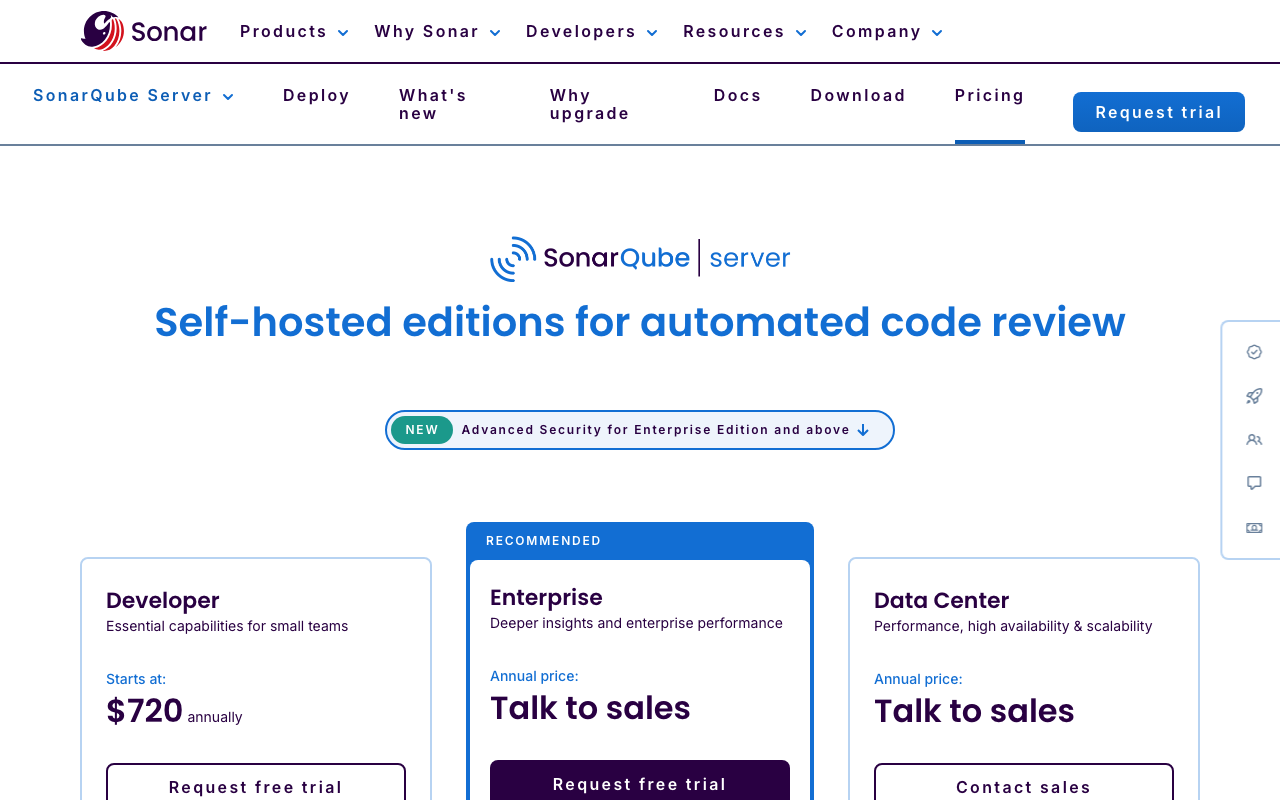
Developer Edition (Server) - From ~$2,500/year
The practical minimum for self-hosted teams that use PR workflows. Unlocks branch analysis, PR decoration, taint analysis, secrets detection, SonarLint connected mode, and 35+ language support. Pricing scales with lines of code - approximately $6,500/year at 250K LOC and $13,000/year at 500K LOC.
Enterprise Edition (Server) - From ~$20,000/year
Adds portfolio management, regulatory compliance reporting (OWASP, CWE, PCI DSS), executive dashboards, additional enterprise languages (COBOL, ABAP, PL/I, RPG), and premium support. Multi-year contracts can unlock discounts of 39% to 78%. The jump from Developer to Enterprise is significant and requires careful justification.
Data Center Edition (Server) - Custom Pricing
Designed for mission-critical deployments requiring high availability, horizontal scaling, and component redundancy. Contact SonarSource sales for pricing.
Hidden Costs of Self-Hosting
Beyond the license fee, self-hosted SonarQube carries significant hidden costs. Infrastructure for a production server ranges from $100-$500/month for small instances to $1,000-$5,000/month for enterprise deployments. Admin time for upgrades, configuration, and troubleshooting typically requires 5-15 hours per month of a DevOps engineer’s time. Database maintenance, backup systems, and monitoring add further costs. One G2 reviewer estimated their team spent 15-20 hours per quarter on SonarQube maintenance alone. Total hidden costs can equal or exceed the license fee itself.
Real-World Usage and User Feedback
What Users Praise
The most consistent positive feedback centers on three areas. First, quality gates fundamentally change developer behavior. Teams report that developers write cleaner code proactively because they know the gate will catch problems. This behavioral shift is difficult to achieve with advisory-only tools.
Second, SonarLint creates a genuine shift-left experience. Users consistently praise the IDE integration as one of the best aspects of the SonarQube ecosystem. Connected mode synchronization ensures consistency between what developers see locally and what the CI pipeline enforces.
Third, the rule depth is unmatched. For teams that need deterministic, auditable analysis across a broad language stack, no competitor provides the same rule coverage. Users in regulated industries particularly value the ability to trace every finding to a specific, documented rule.
What Users Criticize
Self-hosted setup complexity is a recurring pain point. G2 reviewers note “complex configuration processes and integration issues, particularly in connecting to GitLab.” The initial deployment typically takes a full day for an experienced DevOps engineer, and ongoing maintenance is a real burden for teams without dedicated platform engineering resources.
The Community Build’s limitations frustrate teams evaluating SonarQube. The lack of branch analysis and PR decoration in the free edition means teams cannot properly evaluate SonarQube in their actual PR workflow without paying for the Developer Edition. This gap between the free and first paid tier is a common complaint.
Pricing increases at renewal have drawn criticism. Multiple G2 reviewers flag “aggressive pricing increases” and describe billing practices as unclear. The LOC-based pricing model means that as codebases grow, costs can jump unexpectedly at renewal.
False positives require tuning effort. Out of the box, SonarQube generates a meaningful number of false positives, especially in the security hotspot category. Teams should expect to spend several hours in the first week configuring rule exclusions for test files, generated code, and context-specific patterns. The initial noise can lead to “alert fatigue” if not addressed quickly.
The UI feels dated. Multiple reviewers note that SonarQube’s web interface has not kept pace with the design standards of modern developer tools. While functional, the dashboard can feel cluttered and overwhelming, particularly for teams used to the cleaner interfaces of newer tools.
Who Gets the Most Value
Based on user feedback patterns, the teams that get the most value from SonarQube share common characteristics:
- They have 20+ developers and established DevOps practices
- They operate in regulated industries (finance, healthcare, government)
- They maintain large, multi-language codebases including legacy code
- They have dedicated platform engineering or DevOps resources
- They need audit-ready compliance reporting
Teams that consistently report frustration tend to be smaller organizations (under 10 developers) without dedicated DevOps resources, or teams that primarily wanted AI-powered conversational review rather than rule-based static analysis.
Who Should Use SonarQube?
Enterprise Engineering Teams
SonarQube is purpose-built for enterprise organizations with strict quality standards. The depth of rule coverage (6,500+ rules), quality gate enforcement, portfolio management, and compliance reporting are designed for organizations managing multiple projects across business units. If you have hundreds of contributors and need to enforce minimum quality standards consistently, SonarQube’s enforcement mechanism is proven at scale.
Regulated Industries
Finance, healthcare, government, and defense organizations that need security analysis aligned to OWASP, CWE, and SANS standards benefit from SonarQube’s compliance reporting. The Enterprise Edition’s security reports and the Advanced Security module with SCA and SBOM generation address regulatory requirements that many competitors cannot match. The self-hosted deployment option provides the data sovereignty that many regulated organizations require.
Large Multi-Language Codebases
With 35+ languages in commercial editions - including legacy languages like COBOL, ABAP, PL/I, and RPG alongside modern Java, TypeScript, and Go - SonarQube supports codebases that span multiple decades and technology generations. If your organization maintains legacy code alongside modern services, SonarQube may be the only tool that covers everything.
Teams Adopting AI Coding Assistants at Scale
The AI Code Assurance feature provides specific verification of AI-generated code quality. With 42% of committed code now AI-generated according to SonarSource’s data, this capability is increasingly important for organizations that want guardrails around AI-assisted development.
Who Should Look Elsewhere
Small teams without DevOps resources will find the self-hosted operational burden disproportionate. Cloud-native alternatives like Codacy ($15/user/month) or DeepSource ($30/user/month) install in under 10 minutes and require zero infrastructure management.
Teams prioritizing AI-powered PR review should consider CodeRabbit ($24/user/month) or CodeAnt AI ($24-40/user/month). SonarQube’s AI features are supplementary rather than primary, and AI-native tools provide deeper, more contextual review feedback.
Budget-conscious teams with moderate codebases may find SonarQube’s LOC-based pricing less economical than per-seat alternatives. A 50-person team with 500K LOC pays approximately $13,000/year for the Developer Edition, while Codacy costs $9,000/year for the same team with predictable per-seat pricing.
SonarQube Alternatives Worth Considering
Understanding where SonarQube stands relative to competitors helps determine whether it is the right tool or whether an alternative better fits your needs. For a comprehensive comparison, see our SonarQube alternatives guide.
Semgrep
Semgrep is the strongest SonarQube alternative for security-focused teams. It offers 20,000+ security rules, cross-file taint analysis, reachability-based SCA, and AI-powered triage. Semgrep is free for up to 10 contributors and its custom rule syntax makes it highly extensible. The trade-off is that Semgrep focuses primarily on security rather than code quality metrics and technical debt tracking. Read our detailed Semgrep vs SonarQube comparison.
DeepSource
DeepSource provides AI-powered code analysis with the lowest false positive rate among SonarQube competitors. At $30/user/month, it offers automated fixes, security analysis, and performance insights with a clean, modern interface. DeepSource eliminates self-hosting overhead entirely but has shallower rule coverage per language compared to SonarQube. See our SonarQube vs DeepSource breakdown.
Codacy
Codacy is the most direct SonarQube replacement for teams that want to eliminate self-hosting. It covers code quality, SAST, SCA, DAST, secrets detection, and AI review across 49 languages at $15/user/month with predictable per-seat pricing. Codacy’s rule depth per language is shallower than SonarQube’s, and its quality gate enforcement is less granular, but it is significantly easier to set up and maintain. See our SonarQube vs Codacy analysis.
CodeAnt AI ($24-40/user/month)
CodeAnt AI bundles AI-powered code review with SAST, secret detection, IaC security, and DORA metrics in a single platform. The Basic plan at $24/user/month provides AI review and static analysis, while the Premium plan at $40/user/month adds the full security and metrics suite. CodeAnt AI supports GitHub, GitLab, Bitbucket, and Azure DevOps. It does not match SonarQube’s 6,500+ rule depth or quality gate sophistication, but delivers broader functionality per dollar for teams that want AI review and security scanning without managing SonarQube infrastructure. For teams currently running SonarQube primarily for its code quality and security scanning without leveraging the full enterprise feature set, CodeAnt AI offers a compelling cloud-native alternative at a predictable price point.
Other Alternatives
For enterprise security testing, Checkmarx and Coverity provide deeper SAST capabilities at significantly higher price points. For code quality metrics with a simpler interface, Code Climate targets small-to-mid-size teams. For a comprehensive look at all options, see our guides on SonarQube vs CodeClimate, SonarQube vs Coverity, and the best SAST tools in 2026.
Final Verdict
SonarQube has earned its position as the industry standard for static code analysis over nearly two decades. Its 6,500+ deterministic rules, quality gate enforcement, multi-language coverage, compliance reporting, and SonarLint IDE integration create a comprehensive platform that no single competitor fully replaces. For enterprise teams with strict quality standards, regulatory requirements, and dedicated DevOps resources, SonarQube is still the right choice in 2026.
But the landscape has shifted. Cloud-native alternatives have eliminated the self-hosting tax. AI-native tools provide deeper, more contextual review feedback. Per-seat pricing models offer more predictable costs. And the gap between SonarQube’s free Community Build and its first paid tier remains a significant barrier for teams evaluating the platform.
Choose SonarQube if: You need the deepest deterministic static analysis available, quality gate enforcement, compliance reporting for regulated industries, self-hosted deployment for data sovereignty, or support for legacy languages like COBOL and ABAP.
Look elsewhere if: You are a small team without DevOps resources (consider Codacy at $15/user/month), you want AI-powered contextual PR review (consider CodeRabbit at $24/user/month), or you want an all-in-one platform covering AI review plus SAST, secrets detection, and DORA metrics without infrastructure overhead (consider CodeAnt AI at $24-40/user/month).
The practical recommendation: Many teams in 2026 are running SonarQube alongside an AI review tool rather than choosing one or the other. SonarQube handles deterministic analysis, quality gates, and compliance while an AI tool handles contextual PR review. This combination covers both the auditable, rule-based analysis that compliance teams need and the semantic, context-aware review that developers value. If budget allows only one tool, your decision should come down to whether your primary need is enforcement and compliance (SonarQube) or developer productivity and AI-driven feedback (CodeRabbit or CodeAnt AI).
For more SonarQube content, explore our guides on SonarQube pricing, SonarQube alternatives, and how to set up SonarQube.
Frequently Asked Questions
Is SonarQube worth it in 2026?
For enterprise teams with strict code quality standards, regulatory requirements, or large multi-language codebases, SonarQube remains worth it. Its 6,500+ deterministic rules, quality gate enforcement, and compliance reporting are unmatched. However, for small-to-mid-size teams that want cloud-native simplicity or AI-powered review, alternatives like Codacy, DeepSource, or CodeAnt AI ($24-40/user/month) deliver comparable value with less operational overhead.
Is SonarQube free?
SonarQube offers two free options. The Community Build is a fully open-source self-hosted edition supporting 20+ languages with basic quality gates but no branch analysis or PR decoration. SonarQube Cloud Free provides cloud-hosted analysis for up to 50,000 lines of code with branch analysis and PR decoration included. Both are suitable for evaluation and small projects but have limitations that push most professional teams toward paid editions.
What are the main pros and cons of SonarQube?
Pros include the deepest rule database in the industry (6,500+ rules across 35+ languages), quality gate enforcement that changes developer behavior, excellent SonarLint IDE integration, strong security coverage mapped to OWASP and CWE, and self-hosted deployment for data sovereignty. Cons include significant self-hosting overhead, a limited Community Build that lacks branch analysis, steep Enterprise pricing ($20,000+/year), false positives that require tuning, AI capabilities that lag behind AI-native tools, and a dated user interface.
How much does SonarQube cost?
SonarQube Community Build is free. The Developer Edition starts at approximately $2,500/year for up to 100K lines of code. Enterprise Edition starts at approximately $20,000/year for larger codebases. Data Center Edition has custom pricing. SonarQube Cloud offers a free tier (50K LOC), Team plan starting at EUR 30/month, and Enterprise Cloud with custom pricing. All commercial self-hosted editions use per-lines-of-code pricing. For a detailed breakdown, see our SonarQube pricing guide.
How does SonarQube compare to newer AI code review tools?
SonarQube excels at deterministic, rule-based analysis with 6,500+ rules, quality gate enforcement, and compliance reporting. Newer AI tools like CodeRabbit and CodeAnt AI excel at contextual, conversational PR review that catches semantic and logic issues that rule-based tools miss. Many teams run both - SonarQube for quality gates and deterministic analysis, and an AI tool for contextual PR review. SonarQube has added AI CodeFix but its AI capabilities are less mature than dedicated AI-native tools.
What languages does SonarQube support?
SonarQube supports 35+ programming languages in its commercial editions, including Java, JavaScript, TypeScript, Python, C#, C, C++, Go, PHP, Ruby, Kotlin, Scala, Swift, Objective-C, Dart, Rust, HTML, CSS, T-SQL, PL/SQL, COBOL, and ABAP. The free Community Build supports 20+ languages but excludes some enterprise languages like C, C++, Objective-C, COBOL, and ABAP. SonarQube also analyzes Infrastructure-as-Code languages like Terraform, CloudFormation, and Kubernetes manifests.
Is SonarQube hard to set up?
SonarQube Cloud is straightforward to set up - connect your Git platform, select repositories, and configure the SonarScanner in your CI pipeline. Self-hosted SonarQube Server is significantly more involved, requiring a PostgreSQL database, JVM configuration with at least 8 GB heap for production, Elasticsearch setup, TLS certificates, and CI/CD scanner integration. Self-hosted deployment typically takes a full day for a DevOps engineer. Cloud-native alternatives like Codacy and DeepSource install in under 10 minutes.
What is SonarQube's quality gate feature?
Quality gates are configurable sets of conditions that code must meet before it can be merged. Typical conditions include minimum code coverage, maximum number of new bugs or vulnerabilities, and technical debt ratio thresholds. When a pull request fails the quality gate, SonarQube blocks the merge through PR decoration in GitHub, GitLab, Bitbucket, or Azure DevOps. This enforcement mechanism is consistently cited by users as SonarQube's most valuable feature because it prevents code quality from degrading over time.
Can SonarQube replace a SAST tool like Checkmarx or Veracode?
For many teams, yes. SonarQube Developer Edition and above include taint analysis, secrets detection, and security rules mapped to OWASP Top 10 and CWE Top 25. The newer Advanced Security add-on adds SCA, SBOM generation, and malicious package detection. However, dedicated SAST platforms like Checkmarx and Veracode provide deeper security analysis, DAST capabilities, and binary analysis that SonarQube does not offer. For security-first organizations in highly regulated industries, SonarQube is better as a complement to rather than a replacement for dedicated application security testing tools.
What do real users say about SonarQube?
SonarQube holds a 4.4/5 rating on G2 with 70% five-star ratings. Users consistently praise the depth of its rule engine, quality gate enforcement, and SonarLint IDE integration. Common criticisms include complex self-hosted setup, a dated UI, aggressive pricing increases at renewal, false positives requiring tuning effort, and AI features that trail behind dedicated AI tools. Enterprise users value the compliance reporting, while smaller teams often find the operational overhead disproportionate to their needs.
Should I use SonarQube Cloud or self-hosted?
Choose SonarQube Cloud if you want zero infrastructure management, automatic updates, and your codebase is under 1 million lines of code. Choose self-hosted if you need complete data control, have regulatory requirements for on-premises deployment, or want to avoid per-LOC recurring costs for very large codebases. For most small-to-mid-size teams, Cloud is simpler and cheaper when you factor in the true cost of self-hosting including database, JVM management, upgrades, and admin time.
What are the best alternatives to SonarQube?
The best SonarQube alternatives in 2026 include Semgrep (best for security rules, free for up to 10 contributors), DeepSource (lowest false positive rate at $30/user/month), Codacy (most direct replacement at $15/user/month), and CodeAnt AI ($24-40/user/month for AI review plus SAST, secrets detection, and DORA metrics). For enterprise security, Checkmarx and Coverity offer deeper analysis. For AI-powered PR review as a complement to SonarQube, CodeRabbit at $24/user/month is the most popular choice.
Explore More
Tool Reviews
 SonarQube Review
 CodeAnt AI Review
Related Articles
- AI Code Review Tool - CodeAnt AI Replaced Me And I Like It
- I Reviewed 32 SAST Tools - Here Are the Ones Actually Worth Using (2026)
- Free SonarQube Alternatives: Best Open Source Code Quality Tools in 2026
- Is SonarQube Free? Understanding the Community Edition in 2026
- Snyk vs CodeQL: Free SAST Tools Compared (2026)
Free Newsletter
Stay ahead with AI dev tools
Weekly insights on AI code review, static analysis, and developer productivity. No spam, unsubscribe anytime.
Join developers getting weekly AI tool insights.
Related Articles
Checkmarx Pricing in 2026: Plans, Per-Developer Costs, and Enterprise Quotes
Checkmarx pricing decoded - per-developer costs ($40-70+/dev/year), SAST/DAST/SCA bundle pricing, total cost of ownership, and enterprise negotiation tips.
March 13, 2026
reviewCodacy Pricing in 2026: Free, Team, and Business Plans Compared
Codacy pricing in 2026 - free Developer plan, Team at $18/dev/month, Business custom pricing, ROI calculation, and competitor comparisons.
March 13, 2026
reviewCodacy Review 2026: Is It Worth It for Your Team?
In-depth Codacy review covering features, pricing, pros and cons, and real-world performance. Find out if Codacy is worth it for your team.
March 13, 2026