Sourcery vs GitHub Copilot: Code Review vs Code Generation (2026)
Sourcery vs GitHub Copilot - dedicated code review and refactoring vs all-in-one AI coding platform. Pricing, review depth, and which fits your team.
Published:
Last Updated:
Quick Verdict
Sourcery and GitHub Copilot are not really competing for the same buyer. Sourcery is a specialist - a dedicated AI code review and refactoring platform that focuses entirely on making pull requests better. GitHub Copilot is a generalist AI coding platform that bundles code completion, chat, code review, and an autonomous coding agent into one subscription deeply embedded in GitHub. The overlap is real but narrower than it first appears.
Choose Sourcery if: your team is Python-heavy and wants the deepest, most idiomatic refactoring feedback available; you use GitLab or self-hosted GitHub; you want affordable dedicated code review at $10/user/month; or you need custom coding guidelines that adapt to your team’s preferences over time.
Choose GitHub Copilot if: you want a single AI tool for your entire development workflow - code completion, chat, review, and autonomous task execution; your team is already invested in the GitHub ecosystem; or you are an individual developer who wants code generation assistance alongside review at $10/month.
The core distinction in practice: Sourcery reviews code you have already written - its entire product is built to make that review sharper, more Pythonic, and more aligned with your team’s standards. Copilot helps you write the code in the first place, then reviews it as one part of a broader platform. Different problems, different tools.
Why This Comparison Matters
Both tools appear on shortlists when teams evaluate AI code review options for GitHub repositories. They both post inline PR comments, both have free tiers, and both charge around $10-19/user/month for paid access. The surface similarities lead to real confusion about which is the better investment.
The confusion is compounded by the fact that GitHub Copilot has evolved significantly. What started as an autocomplete tool is now a multi-capability AI platform - and its code review feature, particularly after the March 2026 agentic architecture overhaul, is genuinely capable. Meanwhile, Sourcery has expanded from a Python refactoring engine into a multi-language AI code reviewer with security scanning and analytics at the Team tier.
Understanding how these tools actually differ - in architecture, focus, strengths, and pricing model - determines which one deserves your team’s budget. For Python-centric teams evaluating code review specifically, this comparison directly answers that question. See also our related comparisons: Sourcery vs Pylint, Sourcery vs Ruff, and CodeRabbit vs GitHub Copilot.
At-a-Glance Comparison
| Dimension | Sourcery | GitHub Copilot |
|---|---|---|
| Primary focus | AI code review and refactoring (specialist) | AI coding platform - completion, chat, review, agent (generalist) |
| Review architecture | Rules-based static analysis + LLM layer | Agentic tool-calling (March 2026) |
| Python refactoring depth | Best-in-class - purpose-built rules engine | General LLM-based analysis |
| Free tier | Unlimited open-source repos, full features | 2,000 completions + 50 premium requests/month |
| Paid entry price | $10/user/month (Pro, private repos) | $10/month (Pro individual) |
| Team pricing | $24/user/month (Team) | $19/user/month (Business) |
| Enterprise pricing | Custom | $39/user/month |
| Git platforms | GitHub, GitLab (incl. self-hosted) | GitHub only |
| IDE support | VS Code, PyCharm | VS Code, JetBrains, Neovim, Xcode |
| Custom review instructions | .sourcery.yaml (no char limit, adaptive learning) | copilot-instructions.md (4,000 char limit, no learning) |
| Adaptive learning | Yes - reduces noise from team feedback over time | No |
| Interactive PR commands | Yes - @sourcery-ai summary, guide, resolve, dismiss | No equivalent commands |
| Security scanning | Team plan - daily scans, 200+ repos | Bundled in agentic workflow analysis |
| Repository analytics | Team plan | No |
| Code completion (IDE) | No | Yes - core feature |
| Chat assistant | IDE only (VS Code, PyCharm) | IDE + GitHub.com, multi-model |
| Autonomous coding agent | No | Yes - creates branches, writes code, opens PRs |
| Multi-model support | No (own LLM option on Team plan) | GPT-5.4, Claude Opus 4, Gemini 3 Pro |
| Self-hosted option | Enterprise plan | No |
| Bring your own LLM | Team plan and above | No |
| Open-source free tier | Yes, full features | Limited (50 premium requests) |
What Is Sourcery?
Sourcery is an AI-powered code review and refactoring platform that began as a Python-first refactoring engine and has since expanded to support over 30 programming languages. Its core identity remains clear: it is built to make pull requests better through smart, actionable, idiomatic feedback - and it is particularly good at Python.
When a developer opens a pull request on a connected GitHub or GitLab repository, Sourcery automatically reviews the diff. It applies two layers of analysis: a rules-based static engine that enforces deterministic checks, and an LLM-powered layer that understands the broader context of a change. For Python, this combination recognizes opportunities that generic tools miss - suggesting list comprehensions, context managers, f-strings, dataclasses, and early-return patterns that transform verbose code into idiomatic Python.
Sourcery’s pricing starts at $10/user/month for private repositories (Pro) and $24/user/month for teams that need security scanning and analytics (Team). Its free tier covers all public repositories without feature restrictions, making it one of the most competitive options in the AI code review market for open-source maintainers. Read the full Sourcery tool review for a complete breakdown.
What Makes Sourcery Different
Adaptive learning. When your team consistently dismisses a certain type of suggestion as noise - perhaps Sourcery keeps suggesting list comprehensions that your team considers less readable - it adapts. Future reviews deprioritize that pattern for your repository. Over weeks of use, Sourcery’s suggestions become more aligned with what your team actually values. No other AI code review tool at this price point replicates this behavior.
Interactive PR commands. Sourcery supports a set of at-mention commands that give teams fine-grained control: @sourcery-ai summary generates a PR summary, @sourcery-ai guide creates a review guide for human reviewers, @sourcery-ai resolve clears all pending Sourcery comments, and @sourcery-ai dismiss removes the current review. These commands reduce friction and make Sourcery feel like a team member rather than a passive bot.
Custom coding guidelines. The .sourcery.yaml configuration file lives in the repository root and is version-controlled alongside the code. Teams define naming conventions, architectural requirements, forbidden patterns, and complexity thresholds in YAML. These guidelines travel with the repository and are enforced automatically.
Python depth that generalist tools lack. Sourcery’s Python refactoring rules are built on a purpose-specific static analysis engine, not just LLM reasoning about what “good Python” looks like. It understands the difference between a list comprehension that genuinely improves readability and one that creates cognitive overhead. This distinction matters - and Sourcery has been tuning these rules for years.
What Is GitHub Copilot?
GitHub Copilot is GitHub’s AI coding platform, holding approximately 42% of the AI coding tools market with over 60 million code reviews processed. It is the default AI coding tool for GitHub’s 100 million developers - built into the platform they already use, available without additional installation, and continuously expanding its capabilities.
Copilot is not primarily a code review tool. It began as inline code completion, grew into a multi-model chat assistant, and now includes a fully agentic coding agent that can implement features, fix bugs, and open pull requests autonomously. Code review was added as a natural extension of this AI assistance vision. As of March 5, 2026, Copilot Code Review runs on a fully agentic architecture that uses tool-calling to read relevant files, trace cross-file references, and build broader context before generating feedback - a meaningful upgrade over the earlier diff-only approach.
The strategic pitch is consolidation: instead of paying separately for code completion (Copilot), code review (Sourcery, CodeRabbit), and a coding agent (Claude Code, Codex), Copilot bundles all of these under one subscription from $10/month to $39/user/month. For teams already using Copilot for code generation, its code review feature is essentially free - included in the subscription they already pay for. For a detailed Copilot pricing walkthrough, see our GitHub Copilot pricing guide. For alternatives to consider alongside or instead of Copilot, see our GitHub Copilot alternatives guide.
What Makes Copilot Different
Zero-setup GitHub integration. Because Copilot is built by GitHub, enabling code review requires no app installation, no webhook configuration, no separate account creation. For teams already on GitHub with a Copilot subscription, assigning Copilot as a reviewer on a PR just works. This frictionless experience is a genuine competitive advantage.
Multi-model flexibility. Copilot lets users choose the AI model powering their interactions: GPT-5.4 for general coding, Claude Opus 4 for detailed reasoning, Gemini 3 Pro for different analytical styles. No other review tool at this price point gives developers model selection. Different models genuinely perform differently on different codebases and problem types.
Autonomous coding agent. Copilot’s agent can implement features from GitHub Issues, fix bugs identified during review, run tests, and open PRs without manual intervention. The agent self-reviews its own changes using Copilot Code Review before opening a PR, iterating on feedback to improve the patch. This closes the loop between code generation and review in a way Sourcery does not offer.
Native platform data. Being built by GitHub gives Copilot access to repository context, issue history, organizational patterns, and code relationship graphs that no external tool can fully replicate. While the agentic architecture adds tool-calling to approximate this for external tools, the native depth remains an advantage.
Feature-by-Feature Deep Dive
Code Review Quality and Depth
This is the most critical dimension for teams evaluating these tools as PR reviewers.
Sourcery’s review quality is built on two engines working in tandem. The rules-based static analysis engine handles deterministic checks - it knows specific Python (and other language) patterns that should be transformed, and it catches them consistently regardless of how an LLM interprets the code. The LLM layer adds contextual understanding: it can identify logic issues, architectural concerns, and code smells that require understanding the intent of a change, not just its syntax.
The combination means Sourcery catches two categories of issues. First, specific refactoring opportunities that its static rules identify with certainty - no hallucination, no false positives on these. Second, contextual issues that require reasoning about the PR as a whole. The adaptive learning layer then ensures that, over time, Sourcery filters out the types of suggestions your team consistently dismisses.
Independent benchmarks have identified limitations in Sourcery’s approach. Evaluations have found that approximately 50% of Sourcery’s comments can be noise, with an additional 25% categorized as bikeshedding - technically valid but not worth addressing. The file-by-file analysis approach means Sourcery can miss cross-file dependencies and architectural issues that span multiple modules. These are real weaknesses relative to tools with full-repository analysis.
GitHub Copilot’s March 2026 agentic architecture is a genuine improvement. The tool-calling system reads relevant files beyond the diff, examines directory structure, and traces function references before generating review feedback. This means Copilot can now identify when a change in one file breaks assumptions made in another - a category of issue that earlier Copilot versions missed entirely.
However, Copilot’s review is one feature within a broader platform, and its quality reflects that position. Reviews tend to catch obvious issues well - type errors, missing null checks, common antipatterns - but can be less thorough on complex, multi-file changes. Users report that context window limitations mean very large PRs may not receive analysis on every section. The customization gap is also meaningful: Copilot’s copilot-instructions.md instructions top out at 4,000 characters per file and have no learning mechanism.
The practical verdict on review depth: For routine pull requests - features, bug fixes, refactors under a few hundred lines - both tools provide useful, actionable feedback. The gap becomes significant in three scenarios: Python-specific refactoring (Sourcery wins decisively), cross-file architectural analysis on large PRs (Copilot’s agentic approach handles this somewhat better), and custom standard enforcement over time (Sourcery’s adaptive learning wins).
Python-Specific Capabilities
This deserves a separate section because it is Sourcery’s most meaningful differentiator against Copilot.
Sourcery was built as a Python refactoring engine. Its rules for Python are not derived from LLM training data about what “Pythonic code” looks like - they come from a purpose-built static analysis engine with explicit rules for specific transformations. Sourcery recognizes:
- For-loops that should be list comprehensions, generator expressions, or dict comprehensions
- Manual file handling that should use context managers (
with open(...)) - Verbose
__init__methods that should use dataclasses - Nested
ifchains that should use early returns - String concatenation that should use f-strings
if/elifchains that should use dictionary dispatch- Manual
try/finallyblocks that should use context managers - Inefficient iterable patterns that should use
zip,enumerate, oritertools
Each suggestion includes a before/after diff and an explanation of why the idiomatic version is better - not just that it is different. This educational dimension matters for teams trying to improve their Python skills, not just their codebase.
GitHub Copilot understands Python and can suggest Pythonic patterns through its chat interface when prompted. Its code generation is excellent at producing idiomatic Python. But its code review does not apply the same systematic, rule-based analysis to identify these transformation opportunities in existing code. Copilot’s review comments on Python PRs tend to focus on logic correctness and general code quality rather than idiomatic style improvement.
For teams where “we want our Python to be more Pythonic” is a real objective, Sourcery is the only AI code review tool with purpose-built capabilities to systematically address it. See our Sourcery vs Ruff comparison for how Sourcery fits alongside linting and formatting tools in a modern Python toolchain.
Platform and IDE Support
Git platform support is a binary constraint, not a preference. Sourcery supports GitHub and GitLab (including self-hosted). GitHub Copilot Code Review supports only GitHub.
| Git platform | Sourcery | GitHub Copilot |
|---|---|---|
| GitHub (cloud) | Yes | Yes |
| GitHub (self-hosted) | Yes (Pro+) | No |
| GitLab (cloud) | Yes (Pro+) | No |
| GitLab (self-hosted) | Yes (Pro+) | No |
| Bitbucket | No | No |
| Azure DevOps | No | No |
If your team uses GitLab - whether cloud or self-hosted - Sourcery is one of the few affordable AI code review tools that covers it. Copilot Code Review simply cannot help you. The alternatives at GitLab are CodeRabbit at $24/user/month, Qodo at $30/user/month, or running Sourcery alongside your GitLab workflows at $10/user/month.
IDE support tells a different story. GitHub Copilot’s extension is available for VS Code, JetBrains IDEs, Neovim, and Xcode - and it provides inline code completion, multi-model chat, and agent mode in all of them. Sourcery supports VS Code and PyCharm with real-time refactoring suggestions and an IDE chat interface. Sourcery does not provide inline code completion as you type.
For teams that want AI assistance while writing code in their IDE - ghost-text completions, chat-based explanations, agent-mode task execution - Copilot’s IDE integration is far richer. Sourcery’s IDE plugin is genuinely useful for Python developers in VS Code and PyCharm, but it is a quality tool for reviewing and refactoring code you have already written, not an assistant for generating new code.
Customization and Control
Sourcery’s customization system is more powerful and adaptive. Teams configure review behavior through .sourcery.yaml at the repository root - a version-controlled file that specifies which rules to enable or disable, coding guidelines to enforce, Python version targets, and custom patterns to flag. This configuration is unlimited in scope: you can define as many custom guidelines as your team needs.
More importantly, Sourcery learns from feedback. When reviewers consistently dismiss specific types of suggestions, those suggestion types are deprioritized for future reviews on that repository. This means Sourcery’s effective customization improves through use, not just through configuration. A team that spends two weeks interacting with Sourcery’s suggestions will receive more relevant reviews in week three than in week one.
GitHub Copilot’s customization is powerful but constrained. The copilot-instructions.md file in the .github directory accepts up to 4,000 characters of review instructions per file. Teams can create language-specific instruction files using *.instructions.md with applyTo frontmatter. Best practices emphasize short imperative directives, bullet points, and clear headings - the 4,000-character limit makes verbose descriptions impractical.
Copilot has no learning mechanism that adapts to feedback patterns. Every review starts fresh from the configured instructions. If your team’s specific conventions require more than 4,000 characters to describe accurately, you must prioritize ruthlessly. Sourcery’s YAML configuration has no equivalent character limit.
Pricing: Detailed Breakdown
Understanding the pricing requires separating what each tool provides for the money.
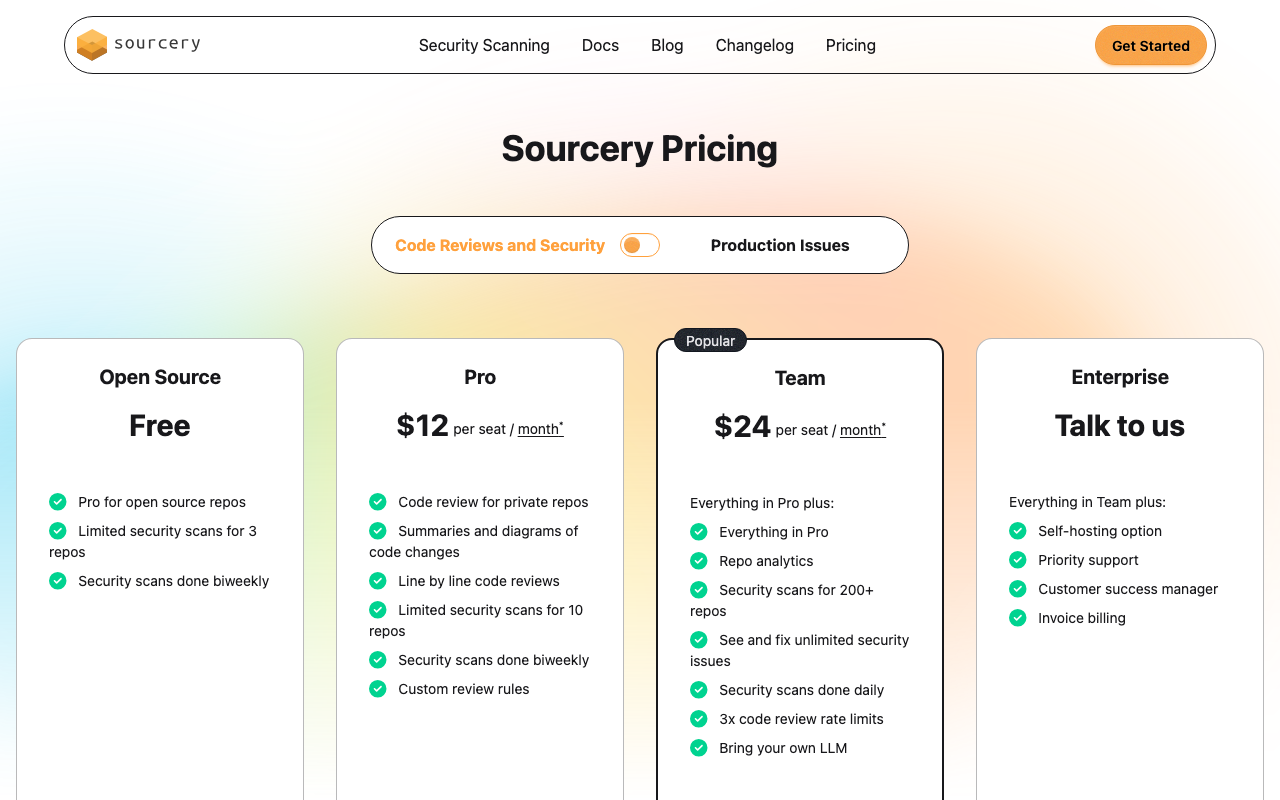
Sourcery pricing:
| Plan | Price | Key features |
|---|---|---|
| Free | $0 | All public repos, AI code reviews, refactoring suggestions, GitHub integration, VS Code and PyCharm extensions |
| Pro | $10/user/month | Private repos, advanced AI reviews, custom coding guidelines, GitHub + GitLab + self-hosted, IDE chat assistant |
| Team | $24/user/month | Everything in Pro plus analytics dashboard, security scanning 200+ repos, unlimited security fixes, daily scans, 3x rate limits, bring your own LLM |
| Enterprise | Custom | SSO/SAML, custom AI model tuning, self-hosted deployment, dedicated account manager, compliance features, SLA |
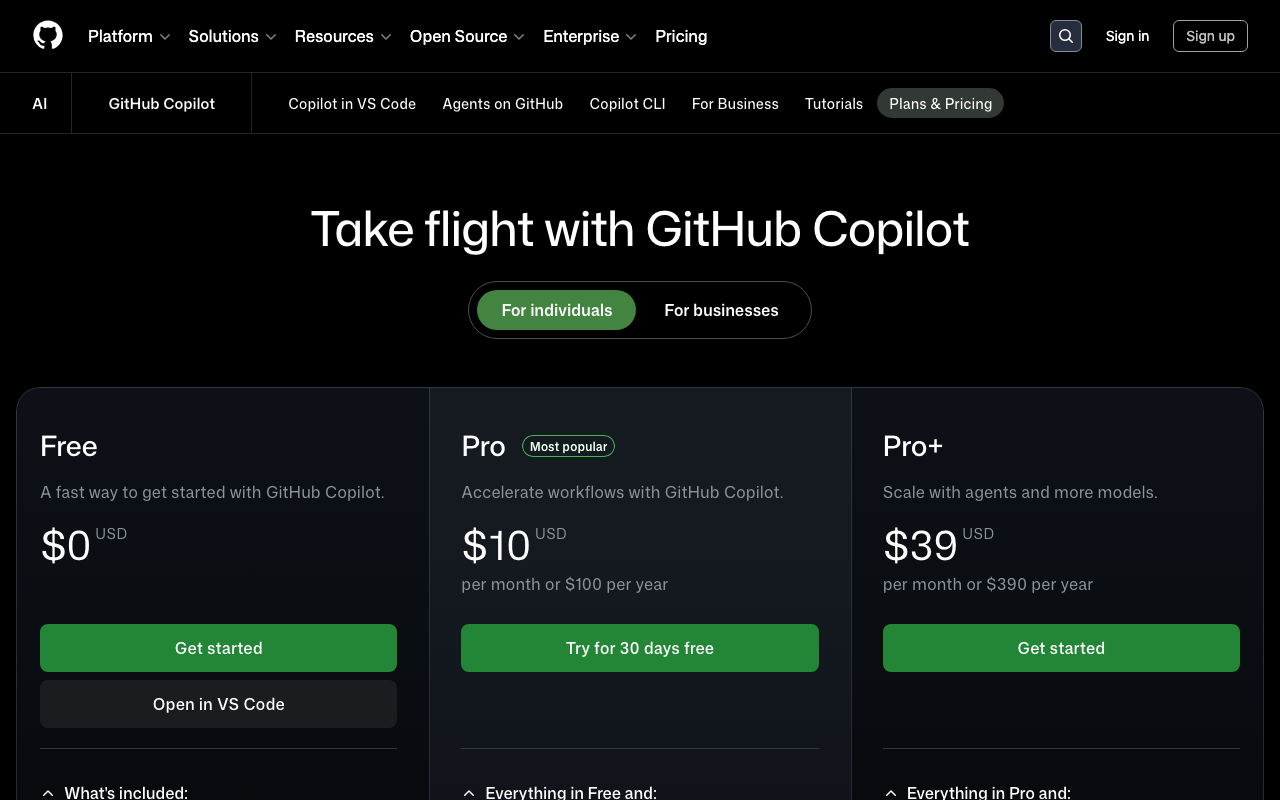
GitHub Copilot pricing:
| Plan | Price | Key features |
|---|---|---|
| Copilot Free | $0 | 2,000 code completions + 50 premium requests/month. Premium requests cover chat, review, agent, model selection |
| Copilot Pro | $10/month | Unlimited completions, 300 premium requests/month, code review, coding agent, multi-model selection |
| Copilot Pro+ | $39/month | 1,500 premium requests/month, access to all models including Claude Opus 4 and o3 |
| Copilot Business | $19/user/month | Organization policies, audit logs, IP indemnity, file exclusion, admin controls |
| Copilot Enterprise | $39/user/month | Codebase-aware knowledge bases, custom models, 1,000 premium requests/user |
Cost comparison at scale:
| Team size | Sourcery Pro (annual) | Copilot Business (annual) | Sourcery + Copilot Business |
|---|---|---|---|
| 1 developer | $120/year | $228/year | $348/year |
| 5 developers | $600/year | $1,140/year | $1,740/year |
| 10 developers | $1,200/year | $2,280/year | $3,480/year |
| 25 developers | $3,000/year | $5,700/year | $8,700/year |
| 50 developers | $6,000/year | $11,400/year | $17,400/year |
The pricing comparison makes the tradeoff explicit. Sourcery Pro costs dramatically less than Copilot Business per seat. But Copilot Business includes code completion and a coding agent alongside review - tools Sourcery does not provide. If your team needs code generation assistance, Sourcery is not a replacement for Copilot. If your team only needs code review, Sourcery at $10/user/month delivers comparable or better review quality for roughly half the price.
The premium request concern with Copilot. GitHub Copilot Business includes code review in its feature set, but code reviews consume premium requests from a monthly allocation. At $19/user/month, the Business plan does not have a hard cap on premium requests for code review specifically, but organizations tracking usage carefully should note that heavy agent mode and chat usage on the same subscription competes with review for premium request allocation. For complete pricing details, see our GitHub Copilot pricing guide.
Security Scanning
Security scanning capabilities differ significantly by tier for both tools.
Sourcery’s security scanning is a Team plan feature. The Team plan at $24/user/month includes daily security scans across up to 200+ repositories, unlimited security issue fixes, and security vulnerability detection for common patterns. This is not as comprehensive as dedicated SAST tools like Snyk Code or Semgrep, but it provides a meaningful baseline for teams that do not have separate security tooling. The Pro plan does not include dedicated security scanning.
GitHub Copilot integrates security awareness into its agentic review workflow. The agentic architecture uses tool-calling that can identify security issues as part of its contextual analysis. Copilot’s coding agent also runs code scanning, secret detection, and dependency vulnerability checks as part of its autonomous workflow. However, Copilot does not provide a standalone security scanning dashboard or maintain a library of security-specific review rules in the same way dedicated tools do.
For teams with serious security requirements, neither tool is a substitute for dedicated SAST. Pairing either with Snyk Code, Semgrep, or Checkmarx gives a more complete security posture. The security capabilities in both Sourcery and Copilot are best understood as a first-line awareness layer, not an enterprise security program.
When to Choose Sourcery
Your team writes significant Python code. No other AI code review tool at any price point matches Sourcery’s Python-specific refactoring engine. If code quality means “more Pythonic, more idiomatic, more readable” as much as it means “fewer bugs,” Sourcery’s rules-based Python analysis is purpose-built for that goal. Teams working primarily in Python will extract materially more value from Sourcery than from Copilot’s review feature.
You use GitLab or self-hosted GitHub. If your code lives on GitLab - cloud or self-hosted - Copilot Code Review is simply not available to you. Sourcery at $10/user/month with full GitLab support is one of the most affordable quality AI code review options for GitLab teams. The alternative is CodeRabbit at $24/user/month, which provides broader multi-file analysis but costs 2.4x more.
Code review quality is your primary investment, not code generation. If your team already writes code well and the gap you want to close is review thoroughness - catching more issues, enforcing standards more consistently, reducing review cycle time - Sourcery’s $10/user/month Pro plan delivers dedicated code review capability for less than half the cost of Copilot Business.
You want review quality to improve over time without ongoing configuration effort. Sourcery’s adaptive learning means that the more your team interacts with its suggestions, the more relevant future suggestions become. This is a structural advantage over tools that require manual configuration updates to tune review behavior.
Budget is a constraint and open-source is your primary use case. Sourcery’s free tier for public repositories is genuinely unrestricted - no rate limits, no feature gates, no trial period. For open-source maintainers or teams with public repositories, this is the most generous free code review tier among AI tools.
When to Choose GitHub Copilot
Your entire workflow is on GitHub and you want one AI tool. The zero-setup integration, native PR comment experience, and bundled features make Copilot the path of least resistance for GitHub-native teams. If you value workflow simplicity and vendor consolidation, Copilot eliminates the need to manage a separate review tool.
You already pay for Copilot and want code review included. Teams on Copilot Business or Enterprise already have access to code review at no additional cost. Adding Sourcery means paying $10/user/month on top of the existing subscription for review quality improvements. The question is whether Sourcery’s Python refactoring depth and adaptive learning justify that incremental spend for your team.
You need code generation, not just code review. Sourcery does not write code. It reviews and suggests improvements to code you have written. If your team wants AI to assist during the coding process - ghost-text completions, multi-model chat, agent-mode task execution - Copilot provides all of this while Sourcery provides none of it. See our GitHub Copilot vs Cursor comparison for evaluating the code generation side in more detail.
You want multi-model flexibility. Copilot’s ability to switch between GPT-5.4, Claude Opus 4, and Gemini 3 Pro is genuinely useful for teams that want model diversity. Different models perform differently on different codebases and problem types. Sourcery does not offer user-facing model selection (the Team plan’s “bring your own LLM” option adds flexibility at the infrastructure level, not the developer level).
You need an autonomous coding agent. Copilot’s agent can implement GitHub Issues, write tests, refactor code, and open PRs autonomously. This extends the tool beyond review into active development work. Sourcery is purely a review tool - it identifies improvements but does not implement them.
Can You Use Both?
Yes - and for Python-heavy teams this is a natural combination. The tools operate at different stages of the development workflow without conflict:
- Copilot assists while you write code: inline completions, chat-based explanations, agent-mode task execution in the IDE
- Sourcery reviews after you open a pull request: Python refactoring suggestions, custom guidelines enforcement, adaptive learning from team feedback
Both tools can comment on the same PR, and their feedback tends to complement each other. Copilot’s review covers broader context awareness through its agentic tool-calling. Sourcery’s review covers Python-specific idiomatic improvements and custom team standards through its rules engine. Using both means no important category of feedback goes uncovered.
The combined cost for a 10-person team would be $10/user/month for Sourcery Pro plus $19/user/month for Copilot Business, totaling $29/user/month or $3,480/year. That is $1,200/year more than Copilot alone but $1,800/year less than replacing both with CodeRabbit Pro. For Python-focused teams that want both code generation assistance and deep refactoring review, this combination offers strong value.
Alternatives to Consider
If neither tool is the right fit, several alternatives are worth evaluating.
CodeRabbit is the most widely deployed dedicated AI code review tool with over 13 million PRs reviewed across 2 million repositories. It provides deeper multi-file context analysis than Sourcery, supports GitHub, GitLab, Bitbucket, and Azure DevOps, and includes 40+ built-in linters. At $24/user/month, it costs more than Sourcery Pro but less than Sourcery Team. It does not match Sourcery’s Python-specific refactoring depth. See our CodeRabbit vs GitHub Copilot comparison for a detailed breakdown of how CodeRabbit stacks up against Copilot specifically.
Qodo (formerly CodiumAI) combines deep AI code review with automated test generation - two capabilities this comparison does not cover. Qodo’s multi-agent architecture achieved the highest F1 score (60.1%) in comparative benchmarks. At $30/user/month it is more expensive than either Sourcery or Copilot, but for teams that need both review depth and proactive test generation, it is the purpose-built option. See our Qodo vs GitHub Copilot comparison for details.
Greptile indexes your entire codebase upfront and uses that full context for every review, achieving high bug catch rates in independent evaluations. It is the strongest choice for large, complex codebases where cross-file context awareness is critical and teams can justify the higher cost.
For a broader view of the market, see our roundup of GitHub Copilot alternatives and our best AI code review tools guide.
Verdict
Sourcery is the better dedicated code review tool for Python teams. Its Python-specific refactoring engine, adaptive learning, custom coding guidelines without character limits, and GitLab support combine to produce review feedback that Copilot’s general-purpose analysis does not replicate. At $10/user/month, it delivers this capability at a price that makes it accessible to small teams and individual developers without requiring a full AI platform subscription.
GitHub Copilot is the better all-in-one AI coding platform. It is the market leader with 42% share for a reason: it covers the full development lifecycle at a competitive price, integrates natively with GitHub, offers multi-model flexibility, and includes an autonomous coding agent that Sourcery simply does not have. For teams that want to consolidate AI tooling under one subscription without managing multiple vendor relationships, Copilot is the logical choice.
The practical recommendation by team type:
-
Python-focused teams on GitHub or GitLab - Start with Sourcery Pro at $10/user/month as a dedicated code review tool. Add Copilot if the team also wants code generation assistance. The combination at $29/user/month (Sourcery Pro + Copilot Business) gives you best-in-class Python review alongside best-in-class code generation.
-
Teams fully committed to GitHub who already use Copilot - Evaluate Sourcery’s free tier for open-source or trial it on a private repo. If you find Copilot’s review quality sufficient for your team’s Python needs, save the additional $10/user/month. If Sourcery’s Python refactoring and adaptive learning provide meaningfully better review quality, the incremental cost is low.
-
Teams on GitLab - Sourcery Pro at $10/user/month is one of the most cost-effective AI code review options for GitLab. Copilot Code Review is not available. Complement Sourcery with a dedicated Python linting setup using Ruff or Pylint - see our Sourcery vs Pylint guide for how these tools work together.
-
Teams that need code generation, not just review - GitHub Copilot is the clear choice. Sourcery does not write code. If your primary pain point is code generation productivity rather than review quality, invest in Copilot and evaluate whether its included review is sufficient for your needs.
The tools are not really alternatives - they solve adjacent but distinct problems. The comparison is most useful as a budget allocation question: if you can only invest in one AI tool, does your team need code generation assistance (Copilot) or deep code review specialization (Sourcery) more?
Frequently Asked Questions
Is Sourcery better than GitHub Copilot for code review?
For dedicated pull request review and refactoring quality, Sourcery outperforms GitHub Copilot in several ways. Sourcery's custom coding guidelines, Python-specific refactoring engine, and adaptive learning that reduces noise over time produce more targeted, actionable review comments than Copilot's general-purpose analysis. However, GitHub Copilot has processed over 60 million reviews and - as of March 2026 - runs on an agentic architecture that reads broader repository context. For teams whose primary need is deep, customizable PR review (especially for Python), Sourcery wins. For teams that want code completion, chat, a coding agent, and review bundled under one subscription, Copilot wins.
Does Sourcery support GitHub Copilot code generation?
No, Sourcery and GitHub Copilot are separate products that do not interact directly. Sourcery is an AI code review and refactoring platform - it reviews pull requests and suggests improvements to code you have already written. GitHub Copilot is an AI code generation assistant that helps you write new code through inline completions, chat, and an autonomous coding agent. They serve different parts of the development workflow and can be used together without conflict: Copilot assists as you write code, Sourcery reviews when you open a PR.
Can I use Sourcery and GitHub Copilot together?
Yes, and for Python-heavy teams this combination makes practical sense. GitHub Copilot handles real-time code completion, multi-model chat, and agentic task execution while you write code in your IDE. Sourcery reviews the result when you open a pull request, applying its Python refactoring expertise, custom coding guidelines, and adaptive learning. The tools operate at different workflow stages and do not conflict. The combined cost is $10/user/month for Sourcery Pro plus $19/user/month for Copilot Business, totaling $29/user/month - less expensive than CodeRabbit Pro alone at $24/user/month.
How much does Sourcery cost compared to GitHub Copilot?
Sourcery's Pro plan costs $10/user/month for private repositories, and its Team plan costs $24/user/month. It offers a free tier for open-source projects with no feature restrictions. GitHub Copilot ranges from $10/month for an individual Pro plan to $19/user/month for Business and $39/user/month for Enterprise. At the entry level, both tools cost the same ($10/month), but Sourcery's $10 is for code review only while Copilot's $10 covers code completion, chat, review, and a coding agent. Sourcery's Team plan at $24/user/month competes more closely with Copilot Business at $19/user/month.
Does GitHub Copilot review code like Sourcery?
GitHub Copilot includes code review as one feature within its broader AI coding platform. As of March 2026, Copilot Code Review uses an agentic architecture that reads relevant files, traces cross-file references, and generates inline PR comments - a significant improvement over its earlier diff-only analysis. However, Copilot's review is one capability among many, not the product's core focus. Sourcery's entire platform is built around review quality: custom coding guidelines, Python-specific refactoring rules, adaptive learning from team feedback, and interactive PR commands. For teams where review quality is the primary goal, Sourcery's specialization delivers more targeted results.
Does Sourcery work with GitHub and GitLab?
Yes. Sourcery supports GitHub, GitLab, and self-hosted versions of both platforms on its Pro plan and above. It does not support Bitbucket or Azure DevOps. GitHub Copilot Code Review works exclusively on GitHub - it has no GitLab, Bitbucket, or Azure DevOps support for its PR review feature (though its IDE features work regardless of hosting platform). If your team uses GitLab, Sourcery is one of the few AI code review tools that covers it alongside GitHub, and it is significantly cheaper than alternatives like CodeRabbit at $24/user/month.
Is Sourcery good for Python teams?
Sourcery is arguably the best AI code review tool specifically for Python teams. Its heritage as a Python-first refactoring engine gives it capabilities that general-purpose tools lack: recognizing opportunities to use list comprehensions, context managers, dataclasses, f-strings, and generator expressions; understanding idiomatic Python patterns; and applying rules that align with PEP standards. Sourcery's Python analysis runs at two layers - a rules-based static engine for deterministic checks and an LLM layer for contextual review. GitHub Copilot supports Python well for code generation, but its review capabilities do not include the same depth of Python-specific refactoring intelligence.
Does GitHub Copilot or Sourcery have a better free tier?
They serve different use cases in their free tiers. Sourcery's free tier covers all public (open-source) repositories with full AI code reviews, refactoring suggestions, and GitHub integration - no feature limitations for open-source work. GitHub Copilot's free tier covers any repository and includes 2,000 code completions and 50 premium requests per month across code completion, chat, review, and agent mode combined. For pure open-source code review, Sourcery's free tier is more generous. For a broader set of AI coding features on any project type, Copilot's free tier covers more surface area.
What platforms does Sourcery support?
Sourcery supports GitHub and GitLab, including self-hosted instances of both. It also offers VS Code and PyCharm IDE extensions with real-time refactoring suggestions and an integrated chat interface. Sourcery does not support Bitbucket or Azure DevOps. If your team is on either of those platforms, alternatives to consider include CodeRabbit (supports all four major Git platforms at $24/user/month) or CodeAnt AI ($24-40/user/month, also four platforms). GitHub Copilot's IDE extensions work with VS Code, JetBrains, Neovim, and Xcode - significantly broader IDE coverage than Sourcery's two-editor support.
Can Sourcery enforce custom coding standards?
Yes. Sourcery supports custom coding guidelines through a .sourcery.yaml configuration file that lives in the repository root. Teams define their own naming conventions, architectural patterns, forbidden anti-patterns, complexity thresholds, and project-specific practices. These are version-controlled alongside the code and enforced automatically during PR reviews. GitHub Copilot similarly supports custom review instructions via copilot-instructions.md files in the .github directory, but imposes a 4,000 character limit per file. Sourcery's YAML-based configuration has no such character limit and additionally adapts over time based on which suggestions your team accepts or dismisses.
Which tool has better IDE integration - Sourcery or GitHub Copilot?
GitHub Copilot has broader and more mature IDE integration. It supports VS Code, JetBrains IDEs (IntelliJ, WebStorm, PyCharm, etc.), Neovim, and Xcode with full inline code completion, multi-model chat, and agent mode. Sourcery's IDE integration covers VS Code and PyCharm with real-time refactoring suggestions and a chat interface, but it does not provide inline code completion as you type. For teams that want AI assistance during the coding phase - not just at PR review time - Copilot's IDE presence is significantly richer. Sourcery's IDE plugin is best thought of as a shift-left review tool rather than a code generation assistant.
What is the best alternative to Sourcery for Python code review?
The best alternative depends on your budget and platform requirements. CodeRabbit ($24/user/month) provides stronger multi-platform support (GitHub, GitLab, Bitbucket, Azure DevOps) and deeper multi-file context analysis, though it lacks Sourcery's Python-specific refactoring depth. GitHub Copilot ($19/user/month Business) bundles code review into a broader AI coding platform and has improved its review quality significantly with the March 2026 agentic architecture. For free Python-specific tooling, Ruff handles linting and formatting while Pylint provides rule-based analysis - see our [Sourcery vs Pylint comparison](/blog/sourcery-vs-pylint) for details. For AI-powered review with security scanning, Snyk Code and Semgrep add security-specific analysis that Sourcery's Team plan only partially covers.
Explore More
Tool Reviews
 Sourcery Review
 GitHub Copilot Code Review Review
Related Articles
- Best AI Code Review Tools for Pull Requests in 2026
- CodeRabbit Pricing in 2026: Free Tier, Pro Plans, and Enterprise Costs
- Will AI Replace Code Reviewers? What the Data Actually Shows
- Best AI Tools for Developers in 2026 - Code Review, Generation, and Testing
- 12 Best Free Code Review Tools in 2026 - Open Source and Free Tiers
Free Newsletter
Stay ahead with AI dev tools
Weekly insights on AI code review, static analysis, and developer productivity. No spam, unsubscribe anytime.
Join developers getting weekly AI tool insights.
Related Articles
Checkmarx vs Veracode: Enterprise SAST Platforms Compared in 2026
Checkmarx vs Veracode - enterprise SAST, DAST, SCA, Gartner positioning, pricing ($40K-250K+), compliance, and when to choose each AppSec platform.
March 13, 2026
comparisonCodacy Free vs Pro: Which Plan Do You Need in 2026?
Codacy Free vs Pro compared - features, limits, pricing, and when to upgrade. Find the right Codacy plan for your team size and workflow.
March 13, 2026
comparisonCodacy vs Checkmarx: Developer Code Quality vs Enterprise AppSec in 2026
Codacy vs Checkmarx - developer code quality vs enterprise AppSec, pricing ($15/user vs $40K+), SAST, DAST, SCA, compliance, and when to choose each.
March 13, 2026